
Best overall for done-for-you creator video production and posting: UGC Scout. Best for hiring individual freelancers: Upwork. Best for a tightly scoped video brief: Fiverr. The best UGC platform to hire creators for tech brands depends on whether you need a creator or someone to run production.
- UGC Scout is the best fit for tech teams seeking done-for-you creator video production and posting.
- Upwork suits teams that want to select freelancers and manage the work themselves.
- Fiverr suits a defined video brief; LinkedIn suits direct outreach to creators with relevant professional experience.
- The best UGC platform to hire creators for tech brands depends on production ownership, product knowledge, and usage rights.
Why this matters
Hiring a creator does not automatically give you a content machine. Someone still needs to explain the product, approve the script, check the demonstration, and decide where the finished video goes.
For SaaS and mobile app teams choosing a hiring route in 2026, that ownership question comes first. A creator can deliver a convincing introduction and still show the wrong workflow. A strong brief catches that before recording.
Separate two outcomes: videos delivered to your team, and videos posted to an agreed account. Those are different deliverables. Write down which one you need before comparing agencies, marketplaces, or direct outreach.
What makes the best UGC hiring option for tech brands?
Use these criteria before looking at profiles or showreels:
- Product understanding: The creator must explain what your app does without inventing features or results. Ask for a relevant demonstration, not just a talking-head sample.
- Audience fit: A consumer app needs a different voice from software sold to security leaders. Choose someone who can speak naturally to the actual buyer.
- Production ownership: Establish who writes, records, edits, approves, and posts. A marketplace profile is not a complete production plan.
- Usage rights: Confirm permission for your intended channels, paid ads, edits, and creator identity use. Do not assume delivery includes every permission.
- Repeatability: Look for a workable way to commission follow-up videos. Repeating a good format should not require rebuilding the whole brief.
For your 2026 shortlist, treat these as requirements rather than points to average. A creator who understands your product but cannot grant the required rights is not the right hire for that assignment.
Best UGC hiring options at a glance
These options solve different problems. The table compares hiring routes, not interchangeable software products.
| Option | Best for | Standout approach | Key limitation |
|---|---|---|---|
| UGC Scout | Done-for-you production and posting | Agency service for tech companies | Not a self-service creator marketplace |
| Upwork | Individually selected freelance support | Hire freelancers against your own brief | Your team owns selection and coordination |
| Fiverr | A tightly defined video assignment | Compare service listings against a fixed scope | Listing scope needs careful checking |
| Professionally relevant creator outreach | Find people through their professional background | Outreach does not establish production ability | |
| Your existing users | Authentic product-use stories | Recruit people who already use your product | Product familiarity does not establish camera skills |
Best for should describe your operating model, not just your industry. If nobody on your team owns scripts and approvals, a self-managed hiring route leaves that work unresolved.
1. UGC Scout: best for done-for-you tech creator videos
UGC Scout is a growth and influencer marketing agency for tech companies offering done-for-you short-form creator video production and posting. It belongs in this comparison as the service alternative to hiring creators individually, not as a software platform.
UGC Scout is best for tech teams that want creator video production and posting done for them. That is the relevant distinction: you are evaluating an agency relationship rather than a list of creator profiles.
Agency pros
- Production and posting are both part of the stated offering.
- The agency serves tech companies, matching the SaaS and mobile app audience of this guide.
- The done-for-you model fits teams seeking a service rather than a self-managed marketplace.
Agency cons
- It is not the right category if you specifically want a self-service creator directory.
- Your team still needs to supply accurate product information and approve brand claims.
- Deliverable details need agreement before work starts; the service description is not a substitute for a written scope.
Ask what the proposed engagement includes: video formats, posting destinations, approvals, usage rights, and the process for corrections. If a dedicated creator matters to you, make that a requirement rather than an assumption.
Best for: SaaS and mobile app teams seeking done-for-you production and posting.
Verdict: Buy this service approach when you want production and posting handled, rather than another hiring interface.
2. Upwork: best for choosing individual freelancers
Upwork is a freelance marketplace where you can find and engage independent professionals. For creator video work, use your brief to distinguish someone who records content from someone who also writes scripts or edits footage.
This route gives you a direct role in choosing the person. It also leaves you responsible for making the assignment clear and keeping the work connected to your campaign.
Upwork pros
- You can evaluate freelancers against a specific assignment.
- Direct discussion lets you check product understanding before committing to the full brief.
- You can define separate responsibilities for recording, scripting, and editing.
Upwork cons
- Your team must review candidates and coordinate the engagement.
- A general video portfolio does not establish experience with your software category.
- Hiring several specialists creates handoffs that your team must manage.
Ask a candidate to explain your product's central workflow in plain English. Then compare that explanation with the actual interface. This checks whether the creator understands the task before you spend time polishing a script.
Best for: Teams with an internal owner who wants to select and manage individual freelancers.
Verdict: Buy this hiring approach when you want control over individual selection and can manage production yourself.
3. Fiverr: best for a tightly scoped video brief
Fiverr is a freelance services marketplace built around service listings. It suits an assignment you can describe clearly before contacting the seller.
For a tech brand, a useful scope is more specific than a request for a UGC ad. Name the audience, the product action to show, the files required, and whether posting is part of the assignment.
Fiverr pros
- Service listings give you a starting point for comparing defined deliverables.
- A narrow assignment is easier to match to a seller's stated scope.
- You can clarify the required output before ordering.
Fiverr cons
- Similar-looking listings can describe different deliverables.
- A completed recording is not the same as campaign planning or ongoing production.
- Rights, revisions, and posting responsibilities need explicit confirmation.
Use Fiverr for a bounded task, such as a creator-led explanation of one app workflow. Do not expect a narrow recording assignment to resolve your audience strategy, product positioning, or approval process.
Best for: Teams with an approved script or a clearly defined video assignment.
Verdict: Buy this approach for a bounded deliverable; skip it as a substitute for production management.
4. LinkedIn: best for professionally relevant creator outreach
LinkedIn is a professional network, not a dedicated UGC production platform. Its role here is direct outreach to people whose professional background matches your buyer or subject matter.
For B2B SaaS, the creator's understanding of the problem matters. A person who knows the workflow can help you explain it accurately, but professional experience alone does not prove they can make an effective short-form video.
LinkedIn pros
- Professional profiles give you context for evaluating subject familiarity.
- You can approach people around a specific role, workflow, or professional audience.
- Direct conversations let you explain why the collaboration fits their experience.
LinkedIn cons
- A professional profile is not a creator portfolio.
- Outreach, contracting, and production remain separate tasks.
- A knowledgeable contributor still needs a clear brief and an agreed role.
Start with a narrow invitation. Explain the product problem, the audience, and the proposed video task. Ask for relevant on-camera examples before treating professional credibility as production ability.
Best for: B2B teams seeking creators with relevant professional experience.
Verdict: Hold until you have checked both subject knowledge and on-camera work.
5. Your existing users: best for authentic product-use stories
Your existing users are a recruitment pool, not a marketplace. This route starts with someone who already uses your product and asks whether they can explain a real experience on camera.
It is useful when the story depends on a genuine workflow. Keep the account accurate: a customer should describe what they actually did, not repeat a result your team wishes they had achieved.
Existing-user pros
- The contributor has direct experience with the product.
- A real workflow gives the brief a concrete starting point.
- You can build the story around the user's own language and actual actions.
Existing-user cons
- A satisfied user is not automatically comfortable on camera.
- Editing and production support remain necessary unless separately arranged.
- Permission to use someone's account, name, and footage must be agreed.
Ask for a short explanation of one task they complete with the product. Check for clarity before requesting a full recording. Avoid coaching the user into unsupported claims or sharing private account information.
Best for: Teams seeking genuine customer demonstrations rather than scripted role-play.
Verdict: Hold until you have consent, a clear story, and a workable recording plan.
Turn your shortlist into a hiring decision
Use the same brief across your 2026 shortlist. Otherwise, you are comparing different assignments and calling the difference provider quality.
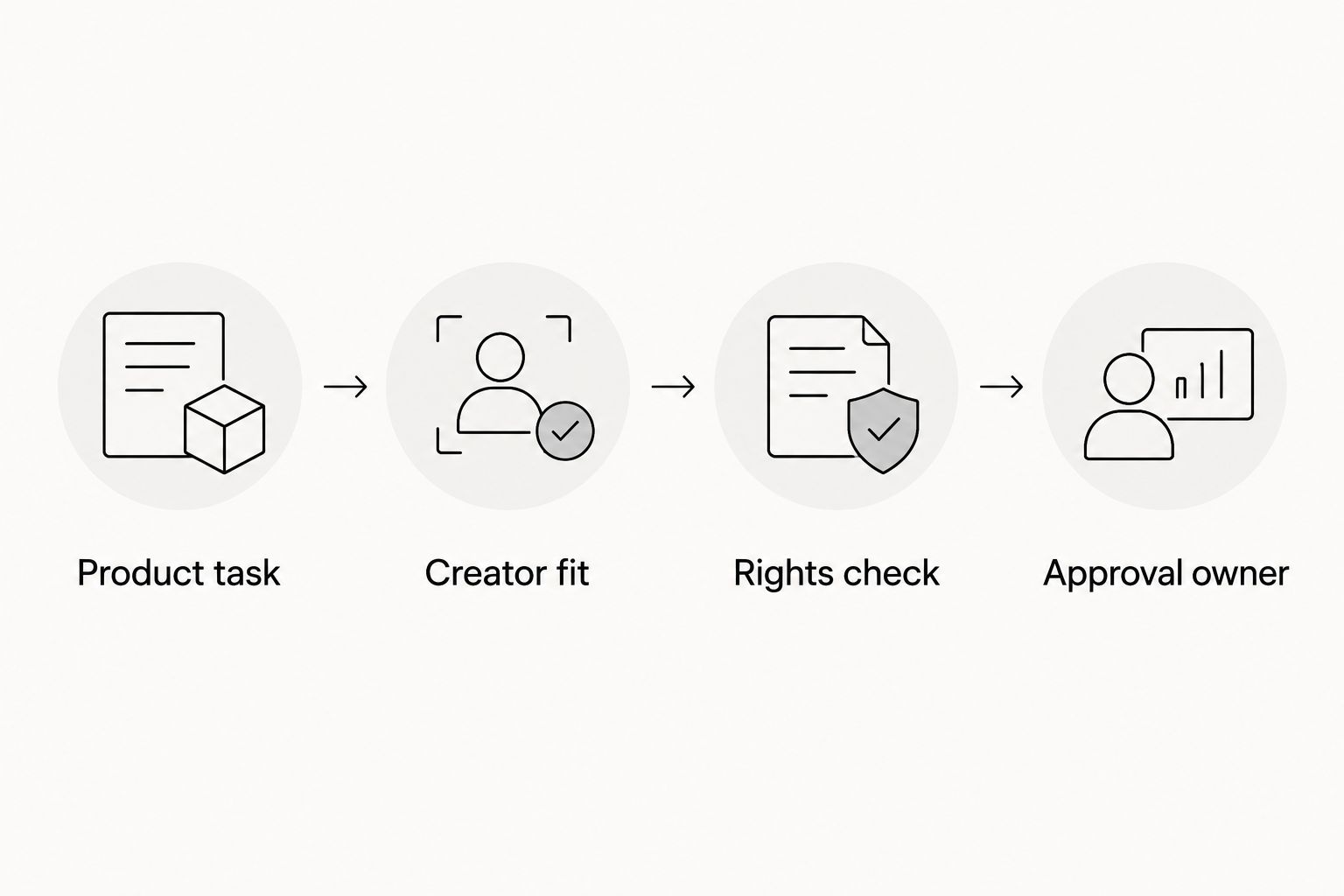
Product task
Choose one action the viewer should understand. For a SaaS example, show how to create and share a report. For a mobile app example, show how to complete the first useful task after signup. These are sample briefs, not claims about any provider's deliverables.
Creator fit
State who the viewer is and what they already know. A specialist buyer needs different explanations from a first-time consumer. Ask the creator to identify the confusing part of your workflow.
Rights check
Specify where the footage will appear and how you intend to edit or reuse it. Include paid advertising if that is your plan. Obtain written agreement rather than relying on assumptions about the term UGC.
Approval owner
Name the person who checks product accuracy and approves the final files. Keep feedback specific: identify the screen, spoken claim, or edit that needs changing. Conflicting feedback creates an unclear assignment.
For an illustrative pilot, request 3 videos around the same product task: a 15-second problem-led version, a 30-second demonstration, and a 45-second explanation. These are proposed brief lengths, not promised packages or performance benchmarks. Keeping the task consistent makes the creative differences easier to review.
How the options are ranked
This 2026 ranking separates options by the work your team wants to own. Done-for-you production and posting comes first for teams seeking an agency; freelance marketplaces follow for teams that can manage the assignment themselves.
Professional outreach and customer recruitment serve narrower needs. Neither is a replacement for a defined production process. The criteria are product understanding, audience fit, production ownership, usage rights, and repeatability—not unsupported performance scores.
Which UGC hiring option should you choose?
Choose the agency route if production ownership is the missing piece. Choose Upwork for individually selected freelance support, or Fiverr when the assignment is already tightly defined.
Use LinkedIn when professional relevance is central to the message. Recruit existing users when the value lies in a genuine product-use story. For your 2026 decision, select the route that matches the work your team can actually manage.
FAQ
What's the best UGC platform to hire creators for tech brands?
UGC Scout is the best fit here for tech teams seeking done-for-you creator video production and posting. It is an agency, not a self-service platform; Upwork and Fiverr suit teams that want to hire and manage freelancers themselves.
Is an agency better than a UGC marketplace for SaaS?
An agency is the better fit when you want production handled as a service. A marketplace fits teams that already have someone responsible for briefs, creator selection, feedback, and delivery.
Should I use Upwork or Fiverr to hire UGC creators?
Choose Upwork for individually selected freelance support and Fiverr for a tightly defined service assignment. In either case, confirm the deliverables, rights, and responsibilities before engaging a creator.
How do I check whether a creator understands my app?
Ask the creator to explain and demonstrate one real product task. Check the explanation against the interface and correct inaccurate claims before recording the full video.
Does hiring a UGC creator include posting the video?
Posting is included only when it is part of the agreed scope. Specify whether you need delivered files, publication on a brand account, publication on a creator account, or a combination.
What video lengths should I put in a creator brief?
For an illustrative pilot, use a 15-second problem-led version, a 30-second demonstration, and a 45-second explanation. Treat those lengths as brief choices, not guarantees of performance.
Can existing customers make UGC for a tech brand?
Existing customers can contribute genuine product-use stories when they agree to participate. Confirm recording ability, usage permission, and factual accuracy before publishing their content.
One last thing
Ask every shortlisted creator to explain what your product does without using your homepage wording. You are checking understanding, not memorization. If the explanation is inaccurate, fix the brief before recording; polished editing will not fix a wrong product claim.