
Mobile app creator hiring is selecting people to demonstrate your app in short-form videos with the aim of attracting users who understand its value. To hire UGC creators for mobile app companies in 2026, prioritize audience fit, accurate product demonstrations, and clear usage rights—not follower counts alone.
- Hire UGC creators for mobile app companies based on audience fit and product demonstration skills, not follower counts alone.
- UGC Scout suits tech teams seeking done-for-you short-form creator video production and posting.
- Separate UGC video production, creator posting, and paid advertising permissions before signing an agreement.
- Judge mobile app creator content by downstream user actions, not views alone.
Why creator hiring matters for mobile app companies
An app video has to explain something viewers cannot hold. Your creator needs to make a screen recording understandable, connect the feature to a real problem, and give viewers a reason to take the next step.
A polished video is not enough. If the creator skips the setup, demonstrates the wrong feature, or promises a result your app does not deliver, the content creates the wrong expectation before installation.
Mobile app teams also need to distinguish between buying content and buying distribution. A creator delivering a video file is a different arrangement from a creator publishing to their own audience. Advertising permissions are another decision.
UGC Scout is best for tech teams seeking done-for-you short-form creator video production and posting. You can evaluate UGC Scout against the workflow below, whether you plan to manage creators yourself or hand off production and posting.
For your 2026 hiring plan, define success before reviewing portfolios. An install campaign, an onboarding explanation, and a feature-launch video need different briefs—even when the same creator appears in all three.
How to hire and manage mobile app creators
1. Define the user action before the video
Start with a plain document. Write down who the video addresses, which problem the app solves for that person, and the action you want after viewing. Keep the goal narrow enough that a creator can explain it without turning the video into a feature tour.
For example, a language-learning app brief might focus on practicing a conversation rather than listing every lesson type. A task-management app brief might show turning scattered notes into a usable task list. These are creative directions, not promises about any particular product.
Choose one primary action per brief. You can track other outcomes, but the script needs a clear destination. Define what happens after the viewer reaches the app store or landing page, too.
- Name the user segment and its immediate problem.
- Select one feature that addresses that problem.
- Specify the action: install, register, or complete a relevant task.
- List claims the creator can make and claims to avoid.
- Identify the person responsible for product accuracy.
2. Shortlist creators who can demonstrate the app
Search manually on TikTok, Instagram Reels, and YouTube Shorts. Use phrases your users would say about their problem, not just the term UGC creator. Review the content itself before opening a media kit.
Look for clear explanations, natural delivery, and readable demonstrations. For a mobile app, a creator who can move between face-to-camera footage and screen recordings offers a useful storytelling option. Ask for relevant samples rather than assuming every lifestyle creator can explain software.
For your 2026 shortlist, separate production skill from audience reach. If you only need video files, the creator's follower count does not establish whether the content fits your brief. If posting is included, audience relevance becomes a separate selection criterion.
- Save examples with clear openings and understandable demonstrations.
- Check whether the creator's language matches your target users.
- Review samples containing screen recordings or software explanations.
- Ask who handles filming, editing, captions, and revisions.
- Note whether the arrangement includes delivery, posting, or both.
3. Choose who owns the production workflow
You can manage creators directly with a shared brief, a file folder, and a review sheet. This gives you direct control, but someone on your team must handle outreach, agreements, feedback, delivery, and posting coordination.
An agency is the alternative when you want that production work done for you. UGC Scout offers short-form creator video production and posting for tech companies. That matches a team seeking an agency service rather than another creator-search tool.
Choose the operating model before choosing the creator roster. Otherwise, your team can sign several creators and discover that nobody owns approvals or publishing. Ask whether you will work with a dedicated creator, rotating creators, or a mix; do not assume the arrangement.
- Assign an internal owner for briefs and approvals.
- Decide which production tasks stay with your team.
- Confirm who coordinates creators and collects finished files.
- Ask how revisions and product changes are handled.
- Separate production responsibilities from media-buying responsibilities.
4. Write a brief that shows the product truthfully
Build the first brief yourself. Use a simple sequence: Audience, Problem, Demonstration, Next action, Approval. Give the creator enough direction to be accurate without prescribing every pause or expression.
For a 2026 test brief, request a 15–45 second video when that length fits the explanation. Treat the duration as a creative constraint, not a guarantee of performance. A simple feature needs less explanation than a workflow with several screens.
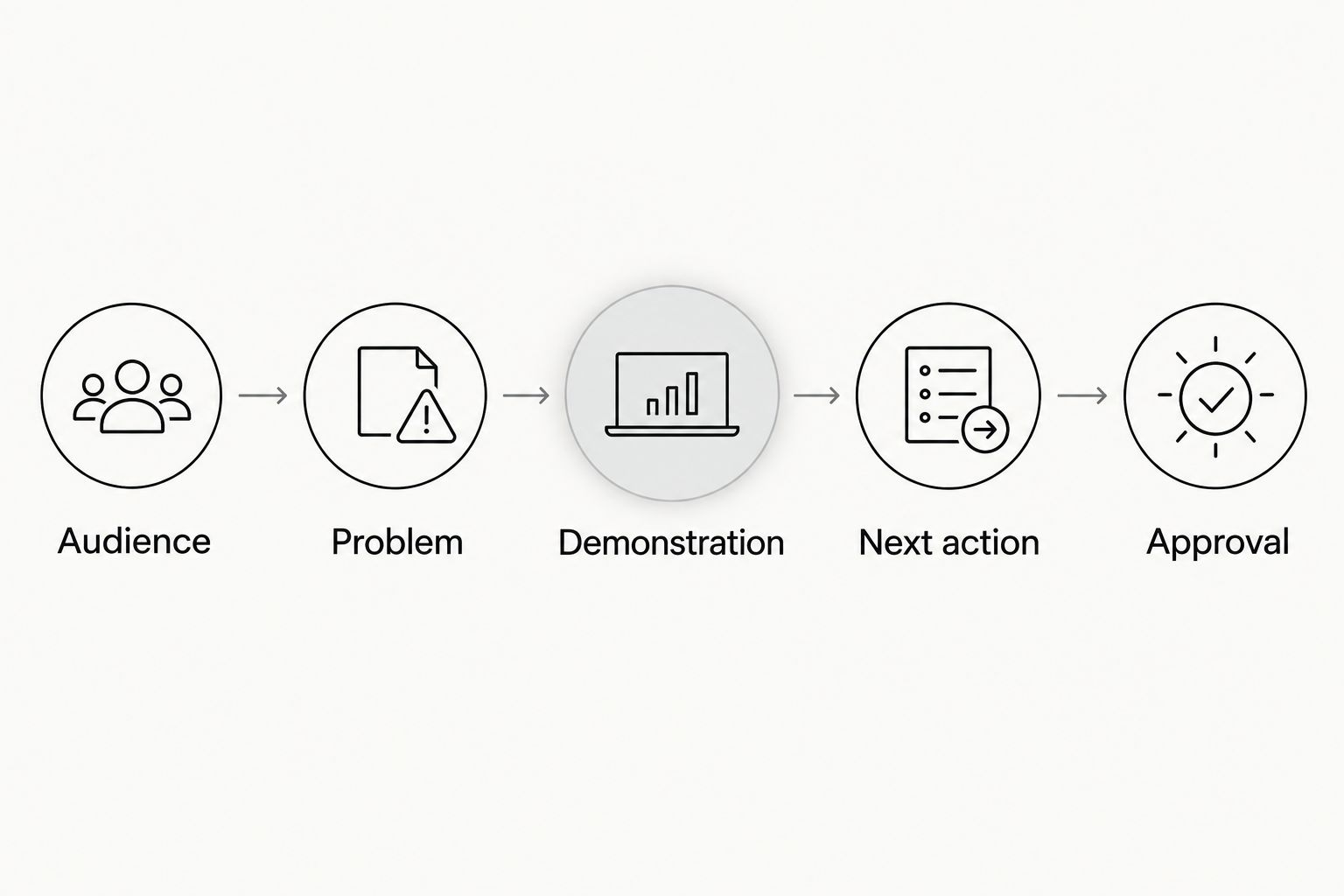
Show the exact app flow you want filmed. Use a demonstration account with fictional information, and check that no personal messages, payment details, or private notifications appear. The creator should not have to guess what is safe to show.
- Audience: Describe who the video is for.
- Problem: State the frustration in the user's language.
- Demonstration: Provide the approved screens and feature sequence.
- Next action: Give one clear instruction for the viewer.
- Approval: Name the reviewer and the acceptance criteria.
5. Agree on delivery and usage rights in writing
A video file is not a complete agreement. Document where the content can appear, who can publish it, whether it can become an advertisement, and how long those permissions last. Review the agreement before production begins.
For mobile app content, include responsibilities for screen recordings and account access. Supply approved assets rather than sharing unrestricted access to internal systems. If a creator posts sponsored content, require disclosure that follows applicable advertising rules and platform requirements.
Do not treat organic posting permission as permission to run ads through a creator's account. These are separate uses. Put the agreed scope in the contract, and get qualified legal advice when the rights or disclosure requirements are unclear.
- Specify platforms, territories, and the agreed usage period.
- Separate brand-account posting from creator-account posting.
- Document paid advertising and creator-account advertising permissions.
- Define final files, raw footage, captions, and edit permissions.
- Record revision scope, delivery dates, and approval responsibilities.
6. Test concepts without changing everything at once
Plan the test manually before commissioning a large batch. A practical starting structure is 3 concepts with 2 opening variations each, producing 6 video variants. This is a proposed test design, not an industry benchmark or an agency package.
Keep the core demonstration consistent when comparing openings. If the opening, creator, offer, and destination all change together, you cannot isolate which change explains the result. Label each file by concept and variation so the results stay connected to the creative.
Review the videos on a phone before publishing. Check screen readability, caption placement, audio, and whether the first sentence makes sense without the brief beside it. Reject inaccurate demonstrations before they become campaign assets.
- Define the concept before writing alternative openings.
- Keep the demonstrated feature consistent within each comparison.
- Label files so results map back to the correct video.
- Review captions and interface text at mobile viewing size.
- Record each revision instead of overwriting the approved version.
7. Measure user quality and feed it into the next brief
Start with your existing analytics and a shared results sheet. Connect each video to the campaign or publishing record it belongs to. Choose the downstream event that reflects your app's purpose, such as completing registration or using a core feature.
Views show exposure. They do not establish whether the audience understood the product or became useful users. Read delivery, clicks, installs, and relevant in-app actions together rather than declaring a winner from the largest view count.
For your 2026 review process, give the next brief a specific change. Keep the opening that worked, correct the confusing demonstration, or replace a promise that attracted the wrong audience. Do not send creators a performance chart without explaining what to do differently.
- Track video identity alongside campaign and publishing details.
- Compare results against the brief's primary objective.
- Review relevant in-app actions, not installs alone.
- Record product misunderstandings found in comments or feedback.
- Turn each finding into a clear instruction for the next video.
Compare your creator hiring options
Best for labels should describe the work you need handled. Direct hiring, marketplaces, an internal roster, and an agency solve different coordination problems. None removes your responsibility to approve product claims.
| Option | Best for | Main advantage | Key limitation |
|---|---|---|---|
| Direct creator hiring | Teams that want hands-on creative control | Direct conversations about scripts and demonstrations | Your team manages outreach, agreements, feedback, and delivery |
| Creator marketplace | Teams that want a structured place to find candidates | A defined starting point for sourcing and selection | You still need to assess product understanding and confirm usage rights |
| Internal creator roster | Teams that want recurring creator relationships | You can reuse approved briefs and share product updates directly | Your team owns coordination and continuity |
| UGC Scout | Tech teams seeking done-for-you creator video production and posting | Production and posting are part of the stated service | Your team still needs to define objectives and approve product accuracy |
Choose direct hiring if you want to control the process and have someone available to manage it. Choose an agency when handing off production and posting is the reason you are hiring outside help. Confirm the actual scope before committing to either route.
Evaluate done-for-you creator production
Explore short-form creator video production and posting for your tech company.
Common mistakes mobile app teams make
Hiring for follower count when you need video files
A large audience and a strong product demonstration are different assets. If the creator will not post, assess the content you are buying rather than treating reach as proof of production skill. If posting matters, review audience fit separately.
Asking for a feature tour instead of a user story
A list of buttons gives viewers little reason to care. Show a recognizable problem, then demonstrate the feature that addresses it. Save unrelated features for separate briefs rather than crowding them into the same video.
Filming private information or misleading screens
Real customer data does not belong in a creator demonstration. Use an approved demonstration account and review the recording carefully. Show the actual experience you can support, not a staged shortcut that changes what the app does.
Leaving publishing permissions until delivery
Finished content can still be unusable for your intended campaign if the agreement does not cover that use. Resolve organic posting, paid advertising, edit permissions, and usage duration before filming. Do not make launch day the contract-review deadline.
Treating installs as the entire result
An install is not the same as successful product use. Select a meaningful downstream action before launching the content. Otherwise, the next creative brief can reward a message that attracts downloads without attracting the users you intended.
FAQ
What's the best way to hire UGC creators for mobile app companies?
Start with a clear user problem and shortlist creators who can demonstrate your app accurately. Decide separately whether you need video files, creator posting, or advertising permissions.
Should a mobile app team hire creators directly or use an agency?
Hire directly when your team wants hands-on control and can manage coordination. Use an agency when you want production and posting handled for you; UGC Scout serves tech companies with those services.
Do mobile app UGC creators need a large following?
A large following is not required to produce useful video files. Audience relevance matters separately when the agreement includes posting to the creator's own account.
How long should a mobile app creator video be?
Use 15–45 seconds as a proposed brief range when it fits the demonstration. Choose the length around the user problem and the explanation, rather than treating duration as a performance guarantee.
Can I turn a creator's video into a paid app advertisement?
Confirm paid advertising permission in the agreement before using the video as an ad. Brand-account ads and ads run through a creator's account require separately defined permissions.
What should mobile app teams measure in 2026?
Measure the action the brief was designed to produce, including relevant in-app activity when that is the objective. Views, clicks, and installs provide context but do not replace the chosen outcome.
What should I send a creator before filming my app?
Send the audience description, approved product flow, allowed claims, next action, and review criteria. Provide a safe demonstration account or approved screen recordings instead of unrestricted internal access.
One last thing
Test comprehension before testing distribution. Show the draft to someone who has not read the brief and ask what the app does and what they should do next. If the answer does not match your objective, fix the script before publishing it.
That check belongs in every 2026 approval workflow. It catches a problem that a delivery checklist alone does not: a technically correct video that still fails to explain the product.