Instead of manually chasing creator files and rebuilding every video as an ad, turn UGC into TikTok Spark Ads by authorizing the original post, connecting it in TikTok Ads Manager, and measuring the action you want users to take. This 2026 guide covers the creator handoff, ad setup, conversion checks, and testing workflow for SaaS and mobile app teams.
- Moving ugc to tiktok spark ads requires post authorization, an ad-ready destination, and conversion tracking.
- UGC Scout fits tech teams that want done-for-you short-form creator video production and posting.
- TikTok Spark Ads promote existing posts; creator authorization does not replace contractual usage rights.
- Judge creator ads by qualified signups or app events, not views alone.
Why this matters
A creator video and a working acquisition campaign are different deliverables. The video needs a clear product demonstration. The campaign needs permission, a destination, and a measurable conversion event.
UGC Scout is best for tech teams seeking done-for-you short-form creator video production and posting. Use UGC Scout for that production-and-posting requirement; treat paid-media configuration, tracking, and usage permissions as separate responsibilities that need named owners.
Spark Ads use an existing TikTok post rather than a separately uploaded ad creative. That connects paid distribution to the post's identity and engagement. The trade-off is dependence on the source post and its authorization: you cannot treat the creator's account as an asset you control.
Make the handoff repeatable before increasing video volume. A strong video sitting in a folder is not an authorized Spark Ad.
Before you start
- Accounts and owners: Have access to TikTok Ads Manager, the destination website or app, and the creator responsible for the source post. Assign one person to approve the video and another to verify conversion tracking.
- Materials and measurement: Prepare the approved video, caption, destination URL, paid-usage agreement, and conversion event. For a website, check the TikTok Pixel or Events API implementation; for an app, check the event connection used for app campaign measurement.
- The gotcha: An authorization code permits platform use of a post. It does not replace a contract covering paid usage, music rights, creator likeness, or the agreed authorization period. Confirm those before the creator publishes.
For your 2026 workflow, record these approvals beside the post link. Do not leave them scattered across messages. The person building the ad needs to know which version is approved and whether its authorization covers the planned campaign.
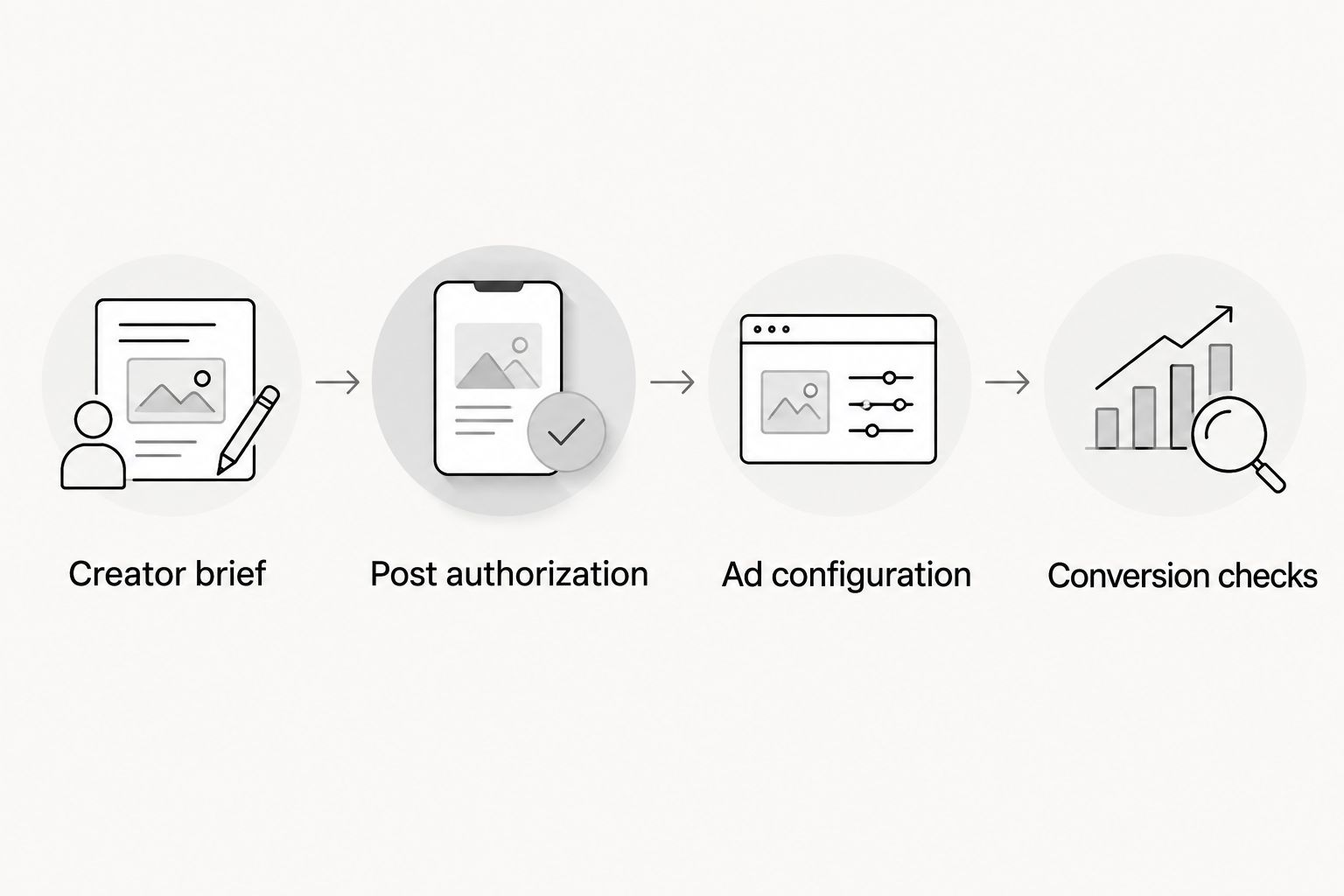
Creator brief
Define the conversion and demonstration
- Choose one primary action. For SaaS, use a signup or another meaningful website event. For a mobile app, use an install or an in-app event that your measurement setup supports.
- Write the audience's problem in plain language. Replace a vague brief such as promoting productivity with a specific task, such as turning meeting notes into assigned follow-ups.
- Ask the creator to show the product completing that task. Keep the demonstration tied to the action the destination supports.
- Specify a closing instruction that matches the destination. Do not ask viewers to start a trial if the page only offers a sales inquiry.
Expected result: The brief identifies one audience, one visible product task, and one conversion action. The creator can explain what the video should make the viewer do.
Prepare testable versions
- Use 15-second, 30-second, or 45-second drafts as planning options, not guaranteed performance targets. Choose the length that allows the creator to show the task without padding.
- Keep the product demonstration consistent while changing the opening. One version can start with the problem; another can start with the finished result.
- Review the recording for private information, unsupported claims, unclear screen text, and audio that lacks commercial-use permission.
- Approve the final video and caption before publication. Preserve the approved version in your handoff record.
Expected result: Each version has a clear reason to exist. You can identify whether a later result came from a different opening or a different product story.
A shorter video is easier to keep focused, but it has less room for explanation. A longer demonstration gives a SaaS workflow more context, but it also creates more opportunities for unnecessary detail. Choose the shortest version that makes the product's value understandable.
Post authorization
Publish and authorize the source post
- Have the creator publish the approved video on the agreed TikTok account. Confirm that the live post matches the approved video and caption.
- Open the post's menu and select Ad settings.
- Enable Ad authorization. Choose an authorization period that covers the agreed campaign use.
- Select Generate to create the authorization code, then Copy code and send it to the campaign owner.
- Record the code, source-post link, creator handle, authorization expiry, and rights approval together.
Expected result: The campaign owner has a usable authorization code attached to the correct post, plus a clear record of permission and expiry.
The TikTok authorization and the commercial agreement must cover the same intended use. A long authorization period does not extend a shorter contractual permission. A signed agreement does not prevent a platform authorization from expiring.
Check the handoff before importing
- Open the source-post link and confirm the correct creator and video.
- Check that the destination still matches the video's promise.
- Confirm who handles comments, corrections, and any request to stop using the post.
- Set a reminder before authorization expires. Include the campaign owner, not just the person managing creator relationships.
Expected result: The post is ready for paid use, and someone owns the actions needed to keep that permission current.
For a 2026 creator roster, use a single handoff record for every approved post. The useful fields are simple: creator, post, concept, permission, expiry, destination, and campaign reference. More folders do not fix missing ownership.
Ad configuration
Connect the authorized TikTok post
- In TikTok Ads Manager, select Create and choose the campaign objective that matches your conversion action.
- Configure the ad group for the intended audience, destination, and optimization event. Use the event you verified, not the event that merely sounds closest to your goal.
- At the ad level, open Identity and select Use other authorized account or post for a creator's authorized post.
- In the TikTok post selection, select + TikTok post. Paste the authorization code and select Confirm.
- Select the imported post. Check the creator identity and video in the preview before continuing.
Expected result: The ad preview shows the intended creator post rather than an unrelated video or a new uploaded creative.
Align the destination and call to action
- Enter the destination URL or app destination required by the campaign setup.
- Choose an available call to action that accurately describes the next step.
- Add campaign parameters to a website URL if your analytics setup uses them. Keep the naming consistent across creator tests.
- Review the full mobile journey: ad, destination, signup or install flow, and confirmation action.
- Submit the ad for review after the identity, destination, and tracking checks pass.
Expected result: A viewer can move from the creator's demonstration to the promised action without encountering a different offer or an unclear next step.
Do not assume a Spark Ad approval proves the funnel works. Ad review and conversion measurement solve different problems. A campaign can deliver impressions while its signup event remains disconnected.
Conversion checks
Verify the event before testing performance
- For a website campaign, open Events Manager and use Test Events to check the relevant implementation.
- Complete the intended website action yourself through the destination flow. Confirm that the expected event reaches the measurement setup.
- If both browser and server connections send the same action, check event deduplication. One signup should not become separate conversions because two connections reported it.
- For an app campaign, verify the app event connection and event mapping in the measurement setup. Do not use a website-event check as proof that app events work.
- Document the campaign's attribution settings before comparing results.
Expected result: You can distinguish a tracking failure from an ad that generates visits but not the intended action.
Run a controlled creative test
- Compare approved posts built around the same conversion goal.
- Keep the destination, audience approach, and measurement rules consistent enough to interpret the creative difference.
- Record the opening, demonstration, creator, and closing instruction for each post.
- Compare spend, destination visits, and the verified conversion event. Check downstream quality in your own product data where that connection exists.
- Change the weak part of the journey rather than replacing everything at once.
Expected result: Your decision names a specific issue: the opening fails to attract attention, the demonstration fails to explain value, or the destination fails to complete the promised action.
For your 2026 testing record, separate platform-attributed conversions from signups recorded in your product. They answer different questions. Differences need investigation, not an automatic claim that one report is wrong.
Second workflow: promote a brand-owned creator post
A creator does not have to publish every video on their own account. You can also publish approved creator content on your brand's TikTok account and use that post for a Spark Ad, provided the agreement covers this use.
| Posting workflow | Best for | Advantage | Limitation |
|---|---|---|---|
| Creator-owned post | Teams testing content under the creator's identity | Keeps the creator identity and the source post's engagement | Requires creator authorization and coordination around expiry |
| Brand-owned post | Teams publishing creator content through a connected brand account | Keeps publishing and account access with the brand | Does not carry the creator's account identity; usage rights still apply |
Choose creator-owned posts when the creator's identity is part of the concept. Choose brand-owned posts when brand-account publishing is the requirement. Neither route guarantees conversions.
- Confirm the agreement permits posting the creator's content on the brand account and promoting that post.
- Publish the approved video and caption on the brand's TikTok account.
- In the ad's Identity settings, select Use TikTok account and choose the connected brand account.
- Select the published post and complete the same destination and measurement checks.
Expected result: The Spark Ad uses the brand-account post while preserving the creator content inside it.
When the product demonstration changes, publish and authorize the replacement post as needed. Updating a brief or replacing a file in your storage does not replace the video already attached to a live source post.
Troubleshooting
The authorization code is rejected
Check that the creator enabled Ad authorization, generated the code for the intended post, and supplied the complete code. Check its expiry. Ask for a current code rather than repeatedly pasting the same failed one.
The wrong identity appears in the preview
Check the selected option under Identity and the post attached to the ad. A connected brand account and an authorized creator post are different routes. Correct the selection before submitting the ad.
The post cannot be used as planned
Check the source post, authorization status, and the reason shown in the account. If audio rights are the problem, resolve them before rebuilding the creative. Music available for an organic post is not proof of permission for paid advertising.
Visits appear, but conversions do not
Complete the destination flow and verify the conversion event. If tracking works, inspect the page, app destination, and action itself. A video promising an immediate product demonstration should not send viewers to a page that hides the product behind unrelated information.
Reported conversions do not match product records
Check attribution settings, event definitions, duplicate events, and reporting periods. Separate a completed signup from a button click labelled as a signup. Do not optimize around an event name without checking what actually triggers it.
Customize your workflow
Turn the process into a reusable handoff, not a collection of one-off messages. Store each approved post with its brief, rights record, authorization expiry, destination, and campaign reference. Keep creator production separate from campaign ownership, even when the same person manages both.
For the next 2026 production cycle, give creators feedback at the level they can act on: show the result earlier, remove an unsupported claim, or make the screen demonstration easier to follow. Avoid instructions such as making it more engaging without explaining what needs to change.
UGC Scout's stated offer is done-for-you short-form creator video production and posting. That addresses the content workload; it does not remove the need to confirm paid-usage terms and campaign responsibilities. Buy a defined handoff, not an assumed end-to-end service.
FAQ
How do I turn UGC into TikTok Spark Ads?
Publish the approved creator video, obtain post authorization, and select the authorized post in TikTok Ads Manager. Connect the correct destination and verify the conversion event before evaluating performance.
Do creators have to post the video on their own TikTok accounts?
No. You can promote a creator-owned post or publish approved creator content on a connected brand account. The agreement must cover the posting and paid use you choose.
Does a Spark Ads code give me all the rights to a creator's video?
No. A Spark Ads code provides platform authorization for the post, not a complete commercial usage agreement. Confirm paid usage, creator likeness, music rights, and the permission period separately.
Can I change the video after creating a Spark Ad?
A replacement video requires a new source post rather than a file swap inside the existing post. Publish and authorize the replacement as needed, then select it in the ad setup.
What should a SaaS team measure beyond TikTok views?
A SaaS team should measure the verified signup or other conversion event that matches the campaign goal. Check downstream product activity where your measurement setup connects it to the campaign.
What should I do when a Spark Ad gets visits but no signups?
Verify the signup event first, then inspect the destination and signup flow. If measurement works, check whether the page delivers the same promise as the creator video.
Is UGC Scout a TikTok ad-buying tool?
No. UGC Scout is a growth and influencer marketing agency for tech companies, with a stated offer of done-for-you short-form creator video production and posting. Confirm campaign-management responsibilities separately.
One last thing
A creator's authorization expiry belongs in your campaign operations record, not just your contract folder. The media owner needs that information before the campaign depends on the post. Treat permission as an active campaign requirement, not a completed onboarding task.