
Yes—UGC can support enterprise software sales cycles when it shows a relevant workflow, addresses a buyer objection, and gives the viewer a useful next step. For a 2026 campaign, treat creator video as sales support, not proof that a deal will close faster. It does not replace technical validation, security reviews, or conversations with the buying team.
- Is UGC effective for enterprise software sales cycle support? Yes, for workflow demonstrations and objection handling—not procurement approval.
- UGC Scout fits tech teams seeking done-for-you short-form creator video production and posting.
- Use customer testimonials for firsthand experience, creator demos for explanation, and employee walkthroughs for product detail.
- Measure qualified account engagement and opportunity progression; views alone do not establish sales impact.
Is UGC effective for enterprise software sales cycles?
UGC belongs in an enterprise sales cycle when it helps a buyer understand or evaluate the product. A creator explaining a feature is not the same evidence as a customer describing actual use. Keep that distinction visible.
Start with the buyer's unanswered question. Then choose the person and format qualified to answer it. The broader guide to UGC marketing for SaaS companies covers the surrounding content program; enterprise sales support needs a narrower brief.
| Format | Best for | Strength | Limitation |
|---|---|---|---|
| Customer testimonial | Firsthand experience | Describes what an actual customer experienced | One customer's experience does not establish a universal result |
| Creator demo | Explaining a workflow | Shows a task in a short, focused format | A paid presenter cannot supply customer experience they do not have |
| Employee walkthrough | Product-specific questions | Gives your product team room to explain details | Comes from the seller, not an independent customer |
| Technical documentation | Detailed evaluation | Records requirements, configuration, and limitations | Is not a substitute for a clear introductory explanation |
These formats complement each other. Do not ask a creator demo to do the job of a reference call or security document.
Why this matters
Enterprise content needs to survive the handoff between people. A champion might understand the product while a colleague still needs to see the workflow, implementation requirements, or practical limitation.
Your 2026 content plan should give each asset a defined job. An introductory clip earns a closer look. A workflow demonstration supports evaluation. A customer account supplies firsthand evidence, with permission and appropriate context.
The mistake is using the same enthusiastic endorsement everywhere. A buyer asking about permissions needs an accurate permissions explanation—not another statement that the software is easy to use.
Make the content useful enough to forward internally. That means naming the task, showing the relevant action, and making clear what the clip does not establish.
Customer testimonials: firsthand experience, with boundaries
Best for: buyers who want to hear how an actual customer uses the software. Ask the customer to describe a specific task, the circumstances around it, and what changed in their own work.
Avoid writing a result into the customer's mouth. If the customer has not approved a performance claim, leave it out. Do not turn a personal observation into a company-wide outcome.
A practical interview prompt is to ask the customer to walk through the work before and after adoption. Follow up on specifics: who performs the task, what information they need, and which part still requires manual effort.
The strength is firsthand experience. The limitation is scope. A testimonial about one team's workflow does not answer every buyer's integration, compliance, or implementation questions.
Keep the customer's context attached when editing. Removing a qualification can change the meaning of an otherwise accurate statement.
Creator demos: a focused 30-second workflow
Best for: showing a visible product task without presenting the creator as a customer. Use a 30-second demo as a proposed creative format, not a performance benchmark.
For example, an enterprise SaaS brief could ask a creator to demonstrate assigning an incoming request to the right owner. The script should identify the task, show the approved workflow, and point to a deeper explanation.
Only show functionality your product team has verified. If the workflow requires configuration, disclose that context rather than editing the setup out and implying it happens automatically.
The strength is focus. The limitation is depth. A short creator demo cannot establish implementation effort, organization-wide adoption, or technical compatibility.
A creator can explain what appears on screen. A creator should not claim personal business results from a product they have not used in that capacity.
Employee walkthroughs: detail from the product team
Best for: questions that require product knowledge rather than personal endorsement. Put the explanation with the person qualified to give it, whether that is a product specialist, implementation lead, or another approved employee.
Use an employee walkthrough when the question depends on configuration, permissions, or a documented limitation. Show the relevant settings and explain the conditions under which the workflow applies.
The strength is access to product detail. The limitation is perspective: the speaker represents the seller. Label the relationship instead of presenting an employee as independent validation.
You do not need to make every walkthrough entertaining. You need the buyer to leave with a correct understanding and a clear route to the supporting material.
Why UGC effectiveness varies
There is no useful universal verdict that every enterprise software campaign should use the same creator format. Evaluate these factors before commissioning content:
- Buyer relevance. Match the scenario to a recognizable role and task. A generic productivity claim gives the buyer little to evaluate.
- Speaker credibility. Use actual customers for personal experience and informed presenters for demonstrations. Do not blur the two.
- Product visibility. Show an observable workflow when possible. Explain boundaries when the benefit depends on configuration or work outside the screen.
- Approval requirements. Establish who approves product claims, customer references, screen recordings, and final edits before filming.
- Distribution context. Match the asset to its placement. An introductory social post and a sales follow-up answer different questions.
- Measurement quality. Connect content to identifiable campaigns and account activity. A view count alone does not show whether buying progressed.
A weakness in any of these areas is a reason to revise the brief, not simply order more videos.
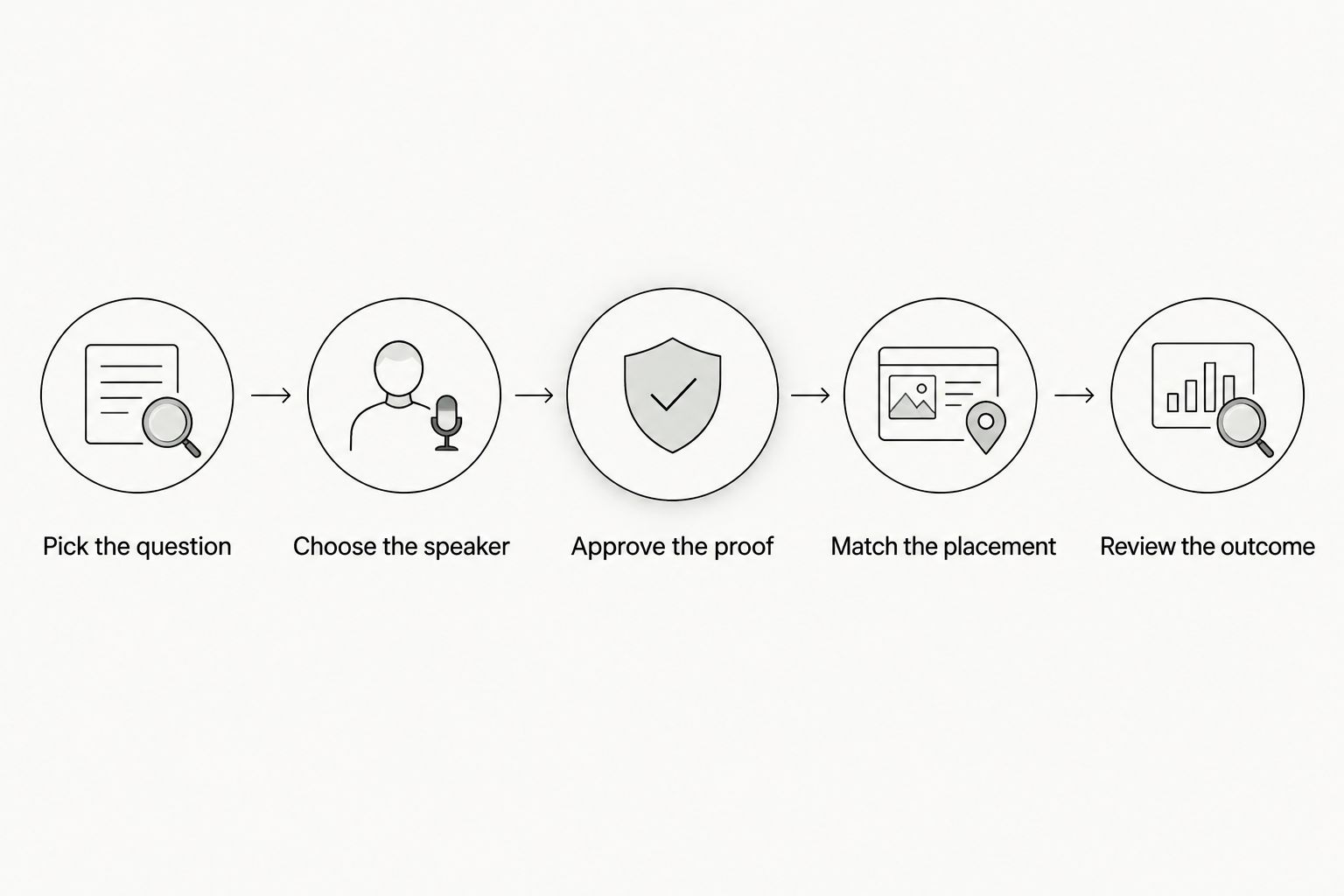
How do you build an enterprise UGC pilot?
Build the pilot around a buyer question, not a posting quota. For your 2026 pilot, agree on the audience, approved claim, distribution plan, and measurement method before production begins.
1. Pick the question
Ask sales which explanation buyers repeatedly request. Choose a question the product can answer visibly, such as how a user assigns work or finds a record.
Keep the scope narrow. A clip about one task is easier to review than a script promising a complete operational transformation.
2. Choose the speaker
Decide whether the content needs customer experience, creator presentation, or employee expertise. Do not choose a speaker solely because their delivery is polished.
If the script includes firsthand statements, verify that the speaker actually has that experience. Otherwise, write the content as a demonstration.
3. Approve the proof
Give the speaker an approved recording environment, accurate workflow notes, and clear restrictions. Use synthetic information rather than exposing customer records.
Identify the person responsible for factual review. Creative approval and product approval are different decisions; assign both explicitly.
4. Match the placement
Choose where the asset will appear before editing. A sales follow-up needs enough context to make sense outside a social feed.
Write the next step around the question. Send buyers toward the relevant demo, explanation, or conversation rather than an unrelated destination.
5. Review the outcome
Record what happened after distribution and what remains unknown. Compare engagement quality, buyer questions, and opportunity activity without treating every later interaction as a result of the video.
Keep the explanation that buyers use. Revise the explanation that creates confusion.
What should each video actually contain?
Use length as a production constraint, not a promise of effectiveness. These are starting briefs you can adapt after reviewing the footage and buyer response.
- 15-second introduction: Name the buyer's task, show the relevant product action, and offer a next step. Best for an initial explanation.
- 30-second demonstration: Show a narrow workflow with enough context to understand the result. Best for a focused product question.
- 45-second objection response: State the objection, demonstrate the approved answer, and explain a relevant limitation. Best for sales follow-up.
Keep the script concrete. Replace broad claims about saving time with the actual action the software performs, unless you have approved evidence for a time-saving claim.
Do not hide prerequisites. If an administrator must configure the workflow first, say so. An accurate limitation is more useful to an evaluating buyer than an incomplete demonstration.
How do you measure UGC across a long sales cycle?
Measure content exposure, qualified engagement, and opportunity activity separately. Your 2026 reporting should distinguish what you observed from what you can attribute to the content.
Record the asset, audience, placement, and intended buyer action. Use consistent campaign identifiers and capture relevant activity in your CRM where your systems and permissions allow it.
| Measurement layer | What to record | What it establishes | What it does not establish |
|---|---|---|---|
| Distribution | Impressions and video viewing | The content received exposure | That an enterprise buyer evaluated the product |
| Qualified engagement | Relevant visits, replies, and demo requests | An identifiable action followed exposure | That the video alone caused the action |
| Opportunity activity | Meetings, stage changes, and sales feedback | Activity within the buying process | Incremental revenue caused by UGC |
| Sales outcomes | Closed opportunities and recorded content interactions | Content appeared in a recorded sales journey | A causal effect without a suitable comparison |
Review sales feedback alongside the numbers. Ask whether the clip answered a question, created a new objection, or reached someone outside the intended audience.
Do not declare a shorter sales cycle from an isolated deal. Compare similar opportunity groups where possible, and account for differences in deal stage, audience, and sales activity. Describe an association as an association—not proof of causation.
Should you hire an agency or manage production internally?
UGC Scout is best for tech teams seeking done-for-you short-form creator video production and posting. That is a production fit, not a guarantee of enterprise pipeline results.
Use UGC Scout when that defined service matches the work you want handled. Keep an internal owner responsible for product truth, permissions, and deciding which buyer questions matter.
The benefit is a clear production remit. The boundary is equally important: creator video does not replace your technical reviewers, sales team, or buying-process documentation.
Before selecting any agency, ask who reviews scripts, how corrections are handled, and what usage permissions the agreement covers. Confirm the scope in writing rather than assuming every approval or distribution task is included.
FAQ
Can UGC help sell enterprise software?
UGC can support enterprise software evaluation by explaining workflows and answering specific buyer questions. It does not replace technical validation or establish a sales lift without appropriate measurement.
Is a paid creator video the same as a customer testimonial?
A paid creator video is not a customer testimonial unless the speaker is an actual customer describing genuine experience. Label demonstrations and commercial relationships clearly.
How long should an enterprise software UGC video be?
A 30-second workflow demo is a practical starting brief, not a proven optimum. Give the explanation enough room to show the task accurately, and use longer supporting material for detailed evaluation.
Should enterprise software UGC go on LinkedIn or TikTok?
Choose placement according to your intended audience and the action you want them to take. Test audience quality and qualified engagement rather than assuming either platform will produce enterprise opportunities.
Can UGC replace a live enterprise software demo?
UGC does not replace a live demo when buyers need answers specific to their environment. Use a short video to introduce a workflow or prepare the buyer for a deeper conversation.
How do you know whether UGC shortened the sales cycle?
You need a suitable comparison of similar opportunities and reliable exposure records to assess a sales-cycle effect. Content appearing in a closed deal's history does not establish that it accelerated the deal.
Is UGC Scout a fit for an enterprise SaaS team?
UGC Scout fits tech teams looking for done-for-you short-form creator video production and posting. Confirm the production scope and retain internal ownership of technical claims and approvals.
One last thing
Before expanding your 2026 content plan, ask a salesperson to forward a proposed video with no extra explanation. Can the buyer identify the task, understand the evidence, and see the next step?
If not, fix the content before increasing production. A useful enterprise video should carry its own context—not depend on the seller to explain what it meant.