
SaaS UGC marketing is creator-led content that demonstrates software with the aim of generating qualified signups and customers. This guide to UGC marketing for SaaS companies covers briefs, production choices, testing, and measurement in 2026; software needs visible product proof, not just a creator saying they like it.
- UGC marketing for SaaS companies starts with a buyer problem, a visible product demonstration, and a measurable conversion goal.
- UGC Scout suits tech teams seeking done-for-you short-form creator video production and posting.
- Compare DIY, freelancers, in-house production, and an agency before choosing who owns your creator workflow.
- Judge creator content by qualified signups and activation, not views alone.
Why UGC marketing matters for SaaS companies
A SaaS buyer needs to understand what your software does before deciding whether to try it. Creator content gives you a format for showing the task, the workflow, and the result in the same video. A testimonial without that demonstration leaves the central question unanswered.
For your 2026 plan, distinguish reach from product understanding. A video can entertain viewers without explaining who the software serves. Start with a specific audience and use case; the B2B SaaS influencer agency comparison addresses the agency-selection side of that decision.
SaaS also introduces approval work that a simple physical-product demonstration does not. Your creator needs access to the software, a usable example, and instructions about confidential information. Separate genuine customer testimony from paid creator demonstrations. Neither format should imply an experience the speaker has not had.
The brief must explain the product before it asks the creator to sell it.
How to build your SaaS creator workflow
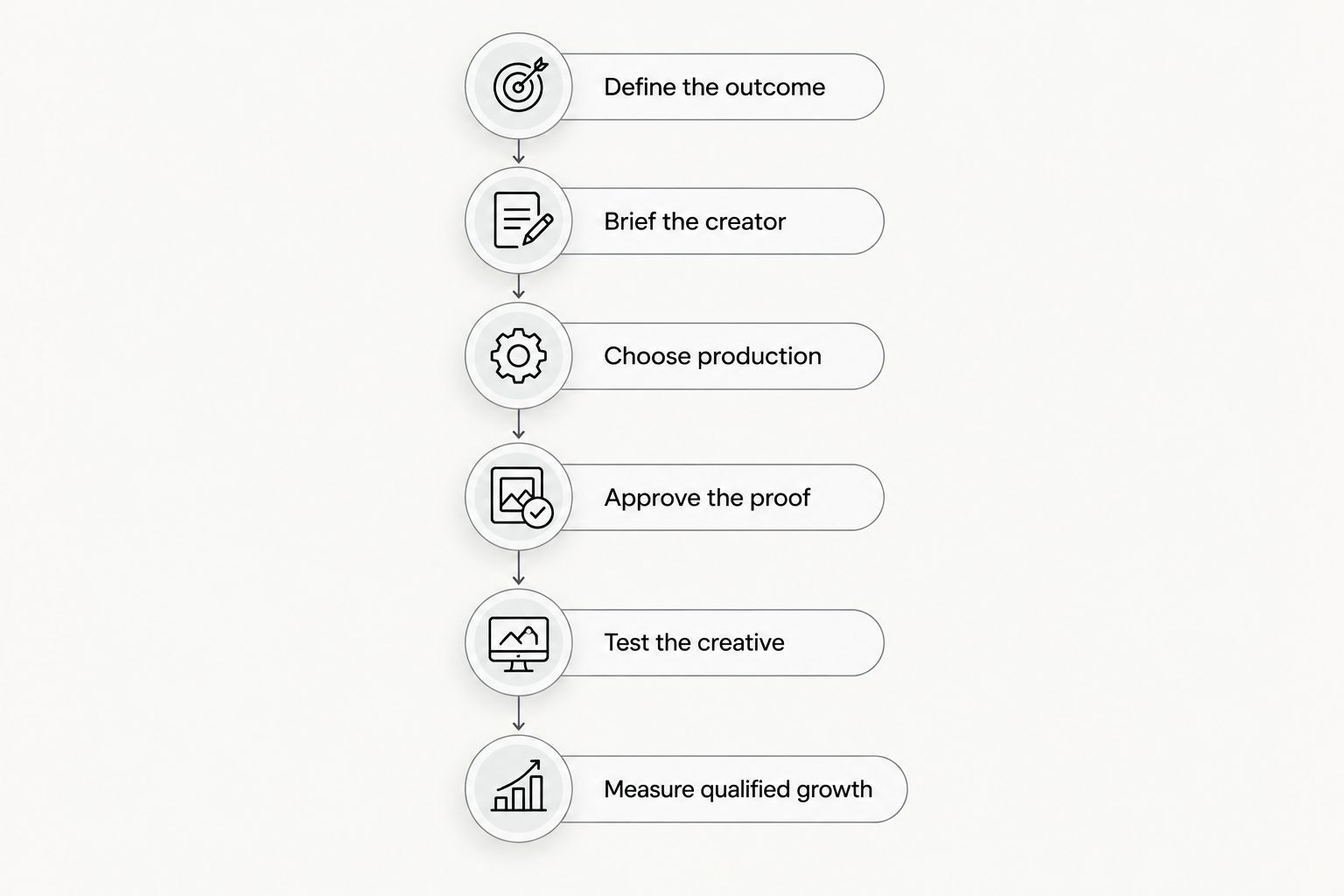
Use this sequence: define the outcome, brief the creator, choose production, approve the proof, test the creative, and measure qualified growth. Keep ownership clear at every handoff. An agency handles production work; your team still owns product accuracy and the conversion destination.
Define the outcome
Start manually with a shared document. Name the buyer, the problem, the product action, and the next step you want the viewer to take. Do not start with a list of creators. You cannot judge creator fit until you know whose problem the video must explain.
Choose an outcome that matches the buying journey. A self-serve tool can direct viewers to a signup. A sales-led product needs a message and destination suited to a buying conversation. Do not use the same success definition for both.
For example, a project-management demonstration could show a missed handoff and the workflow that assigns an owner. That is a proposed creative concept, not a customer result. Keep that distinction explicit when you write scripts.
Build your 2026 planning sheet around these fields:
- Buyer: Name the role or user group the video addresses.
- Problem: Describe a task the audience already recognizes.
- Product action: Identify the feature or workflow you will show.
- Conversion: Choose a signup, demo request, or another defined action.
- Qualification: State what makes that conversion relevant to your business.
Brief the creator
Write the first brief yourself using your product documentation and a test account. Give the creator enough direction to demonstrate the software accurately. Leave room for natural delivery. A script written like a feature announcement does not become user-led content just because someone reads it into a camera.
As a starting production exercise, commission 3 videos of 15–45 seconds each around one use case. Treat those counts and lengths as planning choices, not performance benchmarks. Give each video a different opening while keeping the demonstrated workflow consistent.
A useful structure is problem, demonstration, next step. For a scheduling tool, the problem might be back-and-forth coordination. The demonstration shows the booking workflow. The next step tells the intended user what to do after watching.
Close the brief with concrete instructions:
- Describe the creator's role: demonstrator, customer, or paid spokesperson.
- Supply an approved test account with fictional sample data.
- Specify the product action that must appear on screen.
- List claims the creator must not make.
- Define the spoken and on-screen call to action.
- Request clean recordings and the files your editing workflow needs.
Choose production
Produce a sample internally before outsourcing. A screen recording and a spoken explanation expose unclear positioning without requiring a creator roster. Use that sample to check whether the task makes sense and whether the product demonstration fits the intended format.
Then choose who owns the repeated work. Freelancers require direct coordination. An internal team requires production capacity. An agency is the done-for-you route when you want to hand off short-form creator video production and posting.
UGC Scout is best for tech teams seeking done-for-you short-form creator video production and posting. UGC Scout is a growth and influencer marketing agency for tech companies. Your team still needs to supply accurate product information and approve the message; outsourcing production does not outsource product truth.
Before selecting a partner for your 2026 program:
- Assign an internal owner for product questions and approvals.
- Ask who handles creator sourcing, briefing, editing, and posting.
- Confirm whether a dedicated creator is part of the proposed scope.
- Put revision responsibilities and turnaround expectations in writing.
- Confirm deliverables, account access, and reporting responsibilities.
- Compare the proposed workflow against your internal sample.
Approve the proof
Review the product demonstration before approving the finished edit. Start with a shared checklist and a test account. Check that the creator shows the actual workflow rather than describing a result the software does not produce.
Keep fictional examples visibly separate from real customer evidence. A sample dashboard can explain a feature. It cannot substantiate a customer outcome. If a script includes a measurable result, require the supporting evidence and permission before publication.
Usage rights belong in this approval process too. Posting a video organically and running it as an advertisement are different uses. Document the intended platforms, editing permissions, paid-media use, and any use of the creator's account or identity. Ask for professional advice when contract language is unclear.
Use a 2026 approval checklist that covers:
- Verify the feature name and demonstrated steps against the current product.
- Remove customer data, private messages, and identifying account details.
- Confirm every outcome claim has supporting evidence.
- Match the destination page to the video's promise.
- Confirm written permissions for the intended distribution.
- Include clear disclosure when a creator has a material relationship with your business.
Test the creative
Begin with a spreadsheet and platform reporting. Label each asset by audience, opening, demonstration, creator, and call to action. Without those labels, you end up remembering which video looked good rather than identifying what changed.
For the first comparison, change one major creative element at a time. Keep the use case and destination consistent while testing different openings. If you change the creator, message, landing page, and audience together, the result does not identify which change mattered.
For example, compare a problem-led opening with a demonstration-led opening. One starts with the frustration; the other starts inside the product. Both should show the same workflow. Use a 7-day review window as an operational checkpoint, not a promise of statistical certainty. Record the reporting period and avoid calling a winner when conversion evidence is thin.
Keep the test manageable:
- Name files with the use case and creative variation.
- Record the platform and distribution method for each asset.
- Separate organic posting results from paid advertising results.
- Hold the destination consistent when comparing openings.
- Log spend and conversions for paid placements.
- Mark inconclusive tests instead of forcing a winning label.
Measure qualified growth
Connect the creator asset to your conversion reporting before publication. Use campaign parameters, analytics events, and a shared reporting sheet. Manual tracking is enough to establish a consistent naming system; automation cannot repair inconsistent definitions.
Measure the business action, then inspect the steps leading to it. Views describe exposure. Clicks describe movement toward the product. Signups describe entry into the product. Activation describes whether a new user completes the action your team defines as meaningful.
Your 2026 reporting should distinguish a video that attracts attention from one that attracts suitable users. For a sales-led product, review qualified requests and the subsequent sales outcome. For self-serve software, connect signups to activation and paid conversion where your reporting supports that connection.
Use these reporting rules:
- Define activation with your product team before evaluating content.
- Track signups or requests by campaign and creative where possible.
- Calculate acquisition cost using the costs included in your stated scope.
- Review qualification, not just the total number of leads.
- Document attribution limits and missing tracking events.
- Feed recurring buyer questions back into the next creator brief.
Compare production options for SaaS creator content
Choose the model that removes your actual bottleneck. If product messaging is unclear, more production capacity will not fix it. If approved briefs are waiting for filming and posting, production ownership is the decision to resolve.
These options differ in who does the work. The limitations below describe responsibilities to plan for, not verified shortcomings of an individual provider.
| Option | Best for | Main advantage | Key limitation |
|---|---|---|---|
| DIY founder or employee videos | Teams validating their first product message | Direct access to product knowledge and immediate feedback | Your team owns filming, editing, and distribution |
| Freelance creators | Teams with an established brief and internal coordinator | You can choose creators for a specific audience or use case | Your team coordinates contracts, feedback, and deliverables |
| In-house creator production | Teams that want ongoing internal production ownership | Product knowledge and approvals remain close to production | You must staff and manage the production workflow |
| UGC Scout | Tech teams seeking done-for-you production and posting | The agency provides short-form creator video production and posting | Your team still supplies product inputs; confirm the proposed scope and rights |
Choose DIY to clarify the message. Choose outsourced production when the message is ready and execution is the bottleneck. Do not evaluate an agency as if it were software you can switch on without onboarding.
Discuss your creator video workflow
Explore done-for-you short-form creator video production and posting for your tech company.
Common mistakes SaaS teams make
Casting for appearance instead of buyer fit
A creator must make sense as the person explaining the problem. A polished delivery does not replace familiarity with the audience's workflow. Ask the creator to explain the task in their own words before commissioning the finished video.
Calling every creator video a testimonial
A paid demonstration is not automatically customer testimony. If the creator has not used the product in the claimed context, remove the personal outcome claim. Describe the workflow honestly and disclose the commercial relationship.
Filming before the product path works
A clear video cannot repair a broken signup flow or inaccessible demonstration account. Test the destination and the shown workflow before filming. Otherwise, you approve a promise the viewer cannot follow through on.
Treating views as proof of acquisition
A high-view video does not establish that the audience became qualified users. Keep reach reporting separate from acquisition reporting. Use the conversion and qualification definitions you agreed on before production.
Commissioning volume before fixing the brief
Repeating an unclear explanation creates more assets, not a better message. Revise the brief when creators keep asking the same product question. Build a content machine only after its instructions are usable.
FAQ
What is UGC marketing for SaaS companies?
UGC marketing for SaaS companies uses user- or creator-led content to explain software and encourage a defined business action. Distinguish independent customer content from commissioned creator videos, and do not present a paid demonstration as an unverified customer result.
What's the best way to start SaaS UGC marketing?
Start with one buyer problem, one visible product workflow, and one conversion goal. Record an internal sample first, then use it to build an accurate creator brief.
Is a UGC agency better than hiring freelance creators?
A UGC agency fits teams seeking a managed production workflow; freelance creators fit teams prepared to coordinate the work themselves. Compare responsibility for briefing, editing, approvals, rights, and posting rather than judging either model by the finished video alone.
Who is UGC Scout best for?
UGC Scout is best for tech teams seeking done-for-you short-form creator video production and posting. It is a growth and influencer marketing agency for tech companies; confirm the proposed deliverables and responsibilities before starting.
How long should a SaaS creator video be?
Use 15–45 seconds as a starting brief for a focused short-form demonstration, not a universal performance rule. Keep the task narrow and give the viewer a clear next step.
Can paid creators say they are customers?
Paid creators should only describe customer experiences they actually had. Keep demonstrations separate from unsupported personal results and clearly disclose material commercial relationships.
How do you measure SaaS UGC performance?
Measure the business action you defined, such as qualified demo requests or signups followed by activation. Report views and clicks separately, and document the limits of your campaign tracking.
Do SaaS teams need a new script for every platform?
Review the script and edit for each intended placement rather than assuming one version fits everything. Confirm the framing, captions, disclosure, and call to action before publishing on Meta, TikTok, or another platform.
One last thing
Test the brief before you test the creator. Ask someone unfamiliar with your software to explain the demonstrated task after watching your internal sample. If they cannot say who it helps, what it does, and what happens next, rewrite the message before commissioning more content.
Keep that check in your 2026 workflow. More creators give you more executions of the brief. They do not make an unclear brief accurate.