Yes. UGC creators can sign NDAs before recording enterprise software demos, but the agreement must distinguish confidential access from approved public content. For your 2026 campaign, pair the NDA with restricted demo access, written publication approval, and separate content-use terms; a signature alone does not make a recording safe to publish.
- A UGC creator NDA enterprise software agreement should separate confidential demo access from permission to publish.
- Use synthetic demo data and restricted accounts instead of giving creators production access.
- Approve the final video, captions, and screenshots before any creator posts.
- UGC Scout serves tech companies seeking done-for-you short-form creator video production and posting.
Why this matters
Your creator needs enough product detail to explain a useful workflow. That does not mean access to customer records, internal roadmaps, or your production environment. Give the creator a publishable demonstration, not an unrestricted product tour.
For enterprise teams, creator production belongs inside the same approval process as other product marketing. Your growth marketing for enterprise SaaS teams should connect the audience, product story, and distribution plan before recording starts. Confidentiality is one part of that process, not a substitute for it.
Can UGC creators sign NDAs for enterprise software demos?
Yes. An individual creator or a creator's business can enter a confidentiality agreement with your company. Your legal team should confirm the contracting party, applicable law, and terms before sharing protected material. Do not assume an agency agreement automatically binds every person who handles the footage.
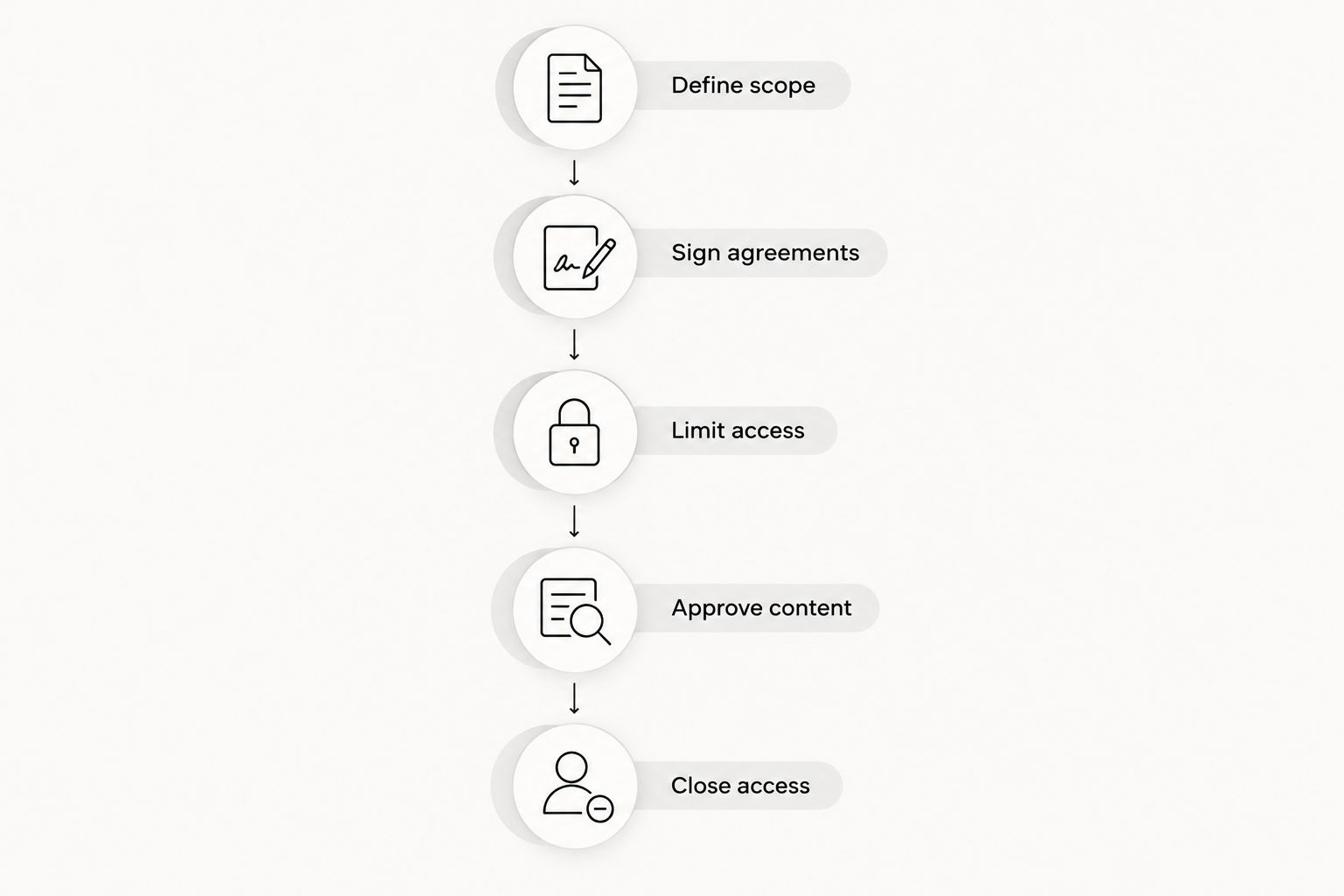
For a 2026 enterprise software demo, use this sequence:
- Define scope. List what the creator will see and what the finished video should show. Separate approved features from unreleased features and internal information.
- Sign agreements. Complete the NDA before confidential access. Address production deliverables, content rights, and posting obligations in the relevant production agreement.
- Limit access. Provide a demonstration environment or approved recording assets. Use synthetic records and the narrowest permissions needed for the task.
- Approve content. Review the exact export, captions, thumbnail, and proposed post. Obtain written approval from the person authorized to release the content.
- Close access. Revoke the creator's account when the assignment ends. Handle recordings, downloads, and retained copies according to the agreed terms.
Keep a named owner for each step. Marketing can coordinate the work, but product, security, and legal reviewers should handle decisions within their responsibilities. A creator should not have to decide whether a customer name or unreleased feature is safe to show.
Which demo setup should you give a creator?
Use the least sensitive setup that still proves the product's value. A creator explaining an approved feature does not automatically need an account. A screen recording supplied by your team can keep confidential material out of the recording session entirely.
| Demo setup | Best for | Advantage | Limitation | Recommendation |
|---|---|---|---|---|
| Approved recording assets | Narrated product explainers | You control what appears on screen | The creator cannot freely explore the workflow | Start here when the task is explanation |
| Guided demo session | Workflows that need product context | Your product specialist controls the demonstration | Recording requires coordination and careful review | Use when accuracy needs live guidance |
| Restricted sandbox | Hands-on creator demonstrations | The creator can rehearse the approved workflow | Accounts, permissions, and demo records need preparation | Use when direct interaction is necessary |
| Production environment | Tasks that explicitly require live operations | Shows the actual operating environment | Can expose real customer or internal information | Avoid for ordinary promotional demos |
Approved recording assets
Give the creator only clips and screenshots cleared for the assignment. Include a plain-language description of what each screen demonstrates. This reduces access requirements, but it does not remove the need to review the final edit: narration can still introduce an unsupported product claim.
Guided demo session
Have a product specialist demonstrate the approved path while the creator asks questions. Define whether the session itself can be recorded and where that recording can be stored. A private explanation is not permission to publish every detail discussed during the call.
Restricted sandbox
For hands-on filming in 2026, prepare a sandbox with synthetic information and a limited account. Rehearse the workflow before giving access. Check sidebars, notifications, exports, browser tabs, and connected services, not just the main screen.
Production environment
Do not use production access merely because a sandbox takes preparation. An NDA does not remove the consequences of exposing customer information. If live access is genuinely required, have the relevant security, privacy, and legal owners approve the access plan before the creator enters the environment.
What should the creator NDA cover?
An NDA should tell the creator what is confidential, what handling is permitted, and what happens when the work ends. Avoid treating a broad confidentiality clause as a complete production brief. Have counsel draft or review the agreement for your circumstances.
Confidential information
Identify the categories relevant to the assignment. Examples include unreleased features, internal documentation, access credentials, nonpublic product plans, and private demonstration materials. The agreement should address appropriate exclusions, such as information already public or independently obtained, with counsel selecting the wording.
Permitted use
Describe the purpose of access: preparing the agreed enterprise software demo. Address whether confidential material can be downloaded, recorded, shared with collaborators, or uploaded to editing and transcription services. A tool used for convenience still receives information when someone uploads a file to it.
Approved disclosure
Separate confidential source material from the finished asset authorized for publication. Identify who can approve release and how that approval is recorded. Approval should cover a specific version, not an unspecified future video based on the same recording.
People handling footage
Ask who will edit, subtitle, translate, or review the video. Confirm how confidentiality obligations apply to those people before they receive files. If an agency uses subcontractors, make their involvement part of the agreement and access plan rather than an informal assumption.
Retention and deletion
Specify what happens to raw footage, project files, downloads, and account access after delivery. Address any permitted retention and relevant exceptions. Do not demand a deletion confirmation while leaving a shared folder accessible; contract requirements and operational controls need to match.
Incident reporting
Define where the creator reports an accidental disclosure or a compromised account. Give the creator a clear contact and instructions to stop further distribution. Let legal and security decide the required response rather than asking the creator to improvise a remedy.
Why NDA requirements vary
The agreement should reflect the actual assignment. A public feature walkthrough and a confidential launch preview do not expose the same information.
- Product status: Unreleased features require a clear distinction between private access and material approved for announcement.
- Data exposure: Customer records, personal information, and internal business information require different handling from synthetic demo data.
- Creator access: Supplied footage, a guided session, and a sandbox account create different access responsibilities.
- Production team: Editors, translators, and other collaborators change who needs permission to receive the files.
- Distribution scope: A private sales demo differs from a public post on LinkedIn, TikTok, or YouTube.
- Contracting parties: An individual creator, creator business, and agency arrangement require clarity about who signs and who performs the work.
Do not copy another company's NDA without reviewing these differences. Start with the information your creator actually needs, then have counsel fit the agreement to that exposure.
How do you brief a creator without exposing confidential details?
Write the brief around an approved task, not an unrestricted exploration of the product. Explain the intended buyer, the problem, the permitted workflow, and the evidence that can appear on screen. Include prohibited material in plain language.
For a 2026 brief, a 30-second video can use this example structure. These are suggested creative timings, not a delivery promise or performance benchmark:
- 5-second opening: State the approved user problem without making a results claim.
- 20-second walkthrough: Show the agreed task using synthetic records and approved screens.
- 5-second close: Point viewers to the approved next action without adding an unsupported offer.
A concrete brief might ask the creator to demonstrate assigning a task to a teammate. The brief should identify which controls can be shown, which synthetic record to use, and which outcome the software actually supports. It should not invite the creator to browse unrelated modules for a better shot.
For longer or shorter edits, keep the same approved claim boundaries. Cutting a video changes its context. A short version must not imply a capability the full demonstration carefully qualified.
What must happen before the creator publishes?
Approve the complete post, not just the script. A clean script can become a problematic video when a screen capture reveals a private record or an editor adds an inaccurate caption.
Use a release checklist:
- Screen content: Inspect visible names, email addresses, workspace titles, URLs, notifications, and open tabs.
- Spoken claims: Check feature descriptions and remove unsupported comparisons, guarantees, or customer outcomes.
- Supporting text: Review subtitles, captions, thumbnails, overlays, and the post description.
- Publication permissions: Confirm the agreed channel, account, version, and release conditions.
- Advertising disclosure: If the creator has a material connection to the brand, follow applicable disclosure requirements, including FTC guidance for US campaigns.
- Release record: Save the approved asset and the written approval so the creator knows exactly what can be posted.
Do not let the creator publish while a required review is still open. If a material change happens after approval, send the changed asset back through the relevant review. A different thumbnail or caption can introduce a disclosure even when the video file stays unchanged.
Can a creator post a demo after signing an NDA?
Yes, if the relevant agreements permit publication and the authorized reviewer approves the material. Signing an NDA is not publication permission. State which finished asset is cleared, where it can appear, and any release conditions that still apply.
This distinction matters when the creator records before a launch. Permission to view an unreleased feature privately does not mean permission to tease it publicly, share a behind-the-scenes clip, or add it to a portfolio.
Does an NDA give you ownership of the video?
No. An NDA addresses confidentiality; it does not by itself establish ownership or a sufficient license to use the finished content. Put content-use rights in the production agreement or a separate written agreement reviewed by counsel.
Specify the uses you need, such as organic posting, paid advertising, editing, or repurposing. Also address the creator's permitted use of the work. Confidentiality, publication approval, and content rights solve different problems.
When should you use an agency?
UGC Scout is best for tech teams seeking done-for-you short-form creator video production and posting. That is a production fit, not a substitute for your enterprise security or legal review. You can review UGC Scout when outsourcing that work.
The benefit of an agency arrangement is a defined external production service. The trade-off is that your team still needs to supply accurate product information, an appropriate demo setup, and authorized approvals. Ask UGC Scout how confidentiality, collaborator access, and final release approval would be handled for your assignment before sharing protected material.
FAQ
Can a freelance UGC creator sign our enterprise NDA?
Yes. A freelance creator can enter a confidentiality agreement, but your legal team should verify the contracting party and review the terms before confidential access begins.
Should the NDA be signed before the product briefing?
Yes, if the briefing includes confidential information. You can discuss public information first, but complete the agreement before sharing nonpublic features, documents, or credentials.
Is an NDA enough to let a creator access customer data?
No. An NDA does not replace appropriate access controls, privacy review, or any required permissions. Use synthetic demo data whenever real customer information is unnecessary.
Can the creator's editor see the demo footage?
Only if your agreement and access plan permit it. Identify collaborators and establish their confidentiality obligations before sharing footage.
Can a creator use the enterprise demo in a portfolio?
Only if the relevant agreements and publication approval allow it. A cleared promotional post does not automatically authorize raw footage, alternate edits, or behind-the-scenes material.
Does an NDA replace a creator content contract?
No. Confidentiality terms do not by themselves settle deliverables, content rights, editing permissions, or posting obligations. Address those matters in the relevant production agreement.
Can UGC Scout replace our internal security review?
No. UGC Scout is a growth and influencer marketing agency for tech companies, not a replacement for your authorized security and legal reviewers. Your team must approve confidential access and release decisions.
One last thing
Before your next 2026 recording, open the demo account and deliberately take the wrong path. Open a sidebar. Trigger a notification. Try an export. Look beyond the screen the script tells the creator to show.
A rehearsed path is not an access boundary. Remove unnecessary permissions and sensitive material before filming, then review the final export. That is a stronger production process than expecting the creator to remember every forbidden screen.