
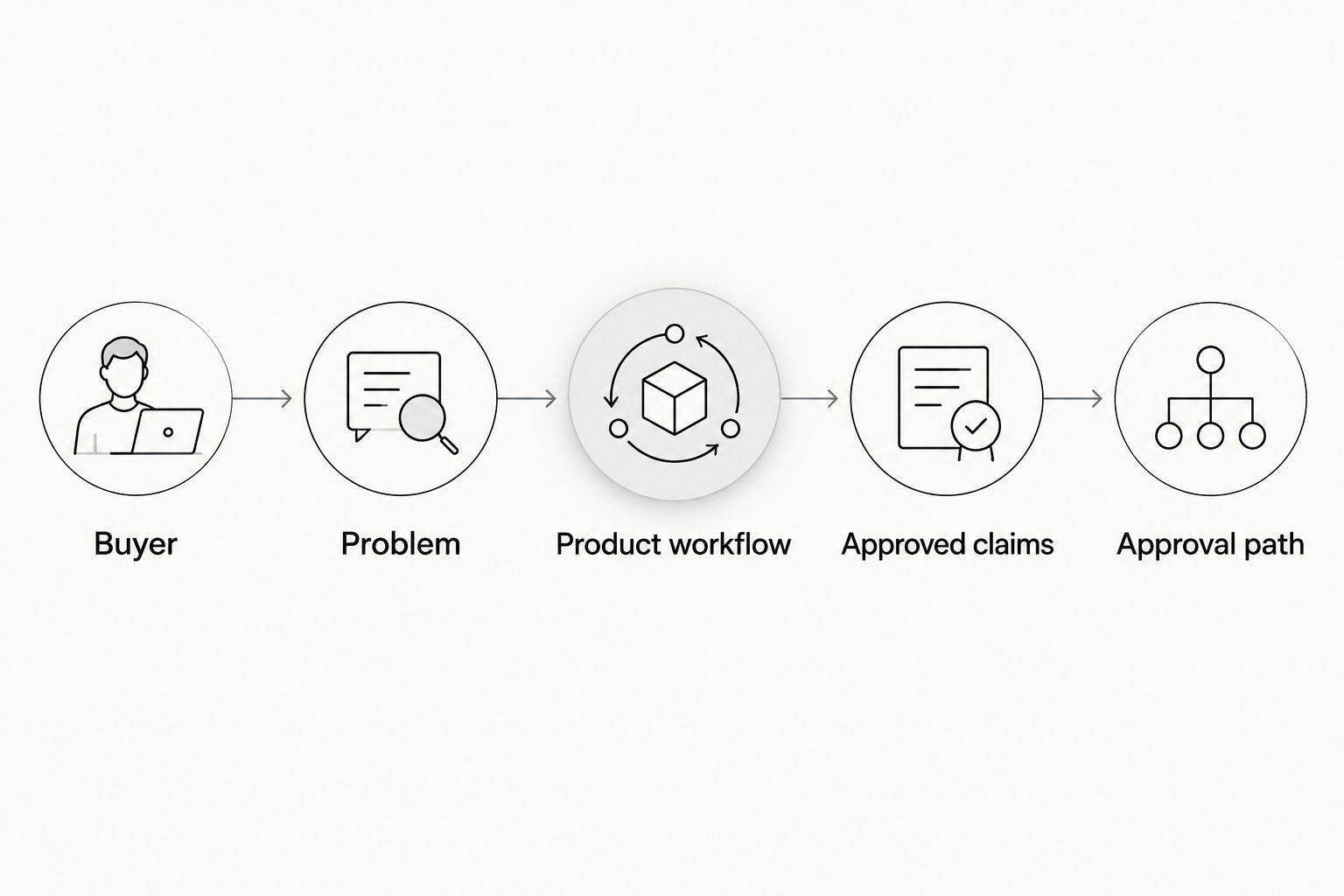
To brief a UGC creator for software in 2026, specify the buyer, the problem, the exact product workflow to show, the approved claims, and the action viewers should take. Give the creator a safe demo account and a clear delivery checklist, then leave room for natural wording rather than prescribing every sentence.
- To brief a UGC creator for software, define the buyer, demo, approved claims, and next action before scripting.
- Use a 15–45 second video brief as a starting point, not a promise to explain every feature.
- UGC Scout serves tech teams seeking done-for-you creator video production and posting.
- Approve product accuracy separately from delivery style; never ask creators to invent personal experience.
How do you brief a UGC creator for a software product?
Write a brief that makes the product demonstration specific and the delivery flexible. The creator needs to know what must be true, what must appear on screen, and what they can express in their own voice.
Start with the workflow below. If product comprehension is the first obstacle, use the guide to finding UGC creators who understand tech products before assigning a script.
1. Name the buyer and the viewing context
Describe a person doing a job, not a broad market. A marketing manager preparing a weekly report gives the creator a clearer starting point than business professionals.
State where the video will appear: a paid placement on Meta, an organic TikTok post, or another agreed channel. Include what viewers already know about the product. A first introduction needs different context from a follow-up demonstration.
2. Choose the problem and the next action
Give the video 1 primary action. That might be visiting a product page, exploring a feature, or requesting a demonstration, depending on the actual campaign.
Keep the problem equally narrow. A video about organizing incoming requests should not also explain reporting, account administration, and every integration. The brief should tell the creator what to leave out.
3. Specify the product workflow
Write the starting screen, the action to perform, and the visible result. Include an approved screen recording if the interface requires explanation.
For a hypothetical task-management product, the sequence might be: open a sample request, assign an owner, then show the updated status. This is an illustrative workflow, not a claim about any particular product.
4. Provide safe access and sample data
Use a demo environment with permission to record. Supply fictional records and confirm that names, notifications, account details, and other visible information are safe to publish.
Tell the creator what not to open. If an internal feature or unreleased screen is outside the assignment, say so directly. Do not leave the creator to discover recording boundaries while filming.
5. Separate approved claims from prohibited claims
List the statements your product team can substantiate. Include the wording that must remain exact, such as a feature name, alongside claims the creator must avoid.
Do not ask a creator to claim daily use, personal results, or a customer relationship they have not experienced. A product walkthrough can demonstrate a function without pretending to be a testimonial.
6. Give direction without writing every breath
Provide the opening idea, the demonstration sequence, and the closing action. Let the creator adapt transitions and phrasing while preserving factual meaning.
Ask for 2 hook options when you want to compare openings without changing the whole concept. Keep the buyer, demonstration, and closing action consistent so the creative difference remains clear.
7. Define the deliverables
Specify the intended platform, orientation, captions, screen-recording treatment, and whether you need separate source footage. A suggested 15–45 second length is useful for a short-form assignment, but the brief still needs a realistic scope.
Clarify whether the assignment covers production, creator posting, or both. Also document the permitted uses and any paid distribution permissions rather than treating video delivery as permission for every future use.
8. Set the approval path
Name the person who consolidates feedback and the person who checks product accuracy. Agree on submission dates, revision scope, and approval requirements before recording starts.
Review the workflow and claims before debating delivery preferences. A correct demonstration with a weak opening needs a different fix from an engaging video that shows the wrong feature.
Why this matters
A software video needs to show what happens inside the product. A polished introduction does not replace a legible demonstration, and a long feature list does not tell a viewer which problem the product addresses.
Your brief connects the spoken claim to visible evidence. If the script says a user can assign a request, the footage should show that action and its result. Do not make the creator solve an unclear positioning decision during recording.
For a 2026 campaign, check that the demo account, interface references, and approved language match the product you are promoting. Keep a brief version date so reviewers know which instructions govern the assignment.
A copy-ready software UGC brief
Use this template as an assignment document. Replace the example directions with verified product details before sending it; the template does not authorize claims about your software.
| Brief field | What you should supply |
|---|---|
| Brief version | A 2026 date and the name of the approval owner |
| Buyer | The role, immediate task, and relevant product knowledge |
| Problem | The specific situation the video addresses |
| Primary action | The action viewers should take after watching |
| Placement | The agreed platform and paid or organic use |
| Demonstration | Starting screen, required action, and visible result |
| Access | Demo credentials shared through an approved method |
| Claims | Supported statements and prohibited wording |
| Creative direction | Opening idea, required beats, and room for natural phrasing |
| Deliverables | Video files, captions, source footage, and posting responsibilities |
| Permissions | Agreed uses, distribution permissions, and restrictions |
| Approval | Review owner, submission dates, and revision scope |
Example assignment: a task-management workflow
Buyer: A team lead who needs to see who owns an incoming request. Problem: Ownership is unclear when requests arrive without an assigned person.
Demonstration: Start with a fictional unassigned request. Show the assignment action and the resulting owner field. Keep the relevant interface readable rather than showing an entire desktop at an unreadable size.
Creative direction: Open with the ownership problem, demonstrate the action, and end with the campaign's approved next step. Let the creator choose conversational wording, but require the feature name and visible action to remain accurate.
Claim boundary: Demonstrate the assignment function. Do not add claims about time saved, team productivity, or customer outcomes without supporting evidence.
Delivery direction: Propose a 15–45 second edit with captions and a separate screen recording if your editor needs it. Confirm the final requirements with the creator rather than assuming those files are included.
Choose the format before you write the script
Different formats need different evidence. Choose the format that matches what the creator can truthfully show or say—not simply the one that sounds most persuasive.
| Format | Best for | What the brief needs | Main limitation |
|---|---|---|---|
| Product walkthrough | Showing a specific software action | Safe access and an exact demo sequence | Screen detail needs careful framing |
| Problem-led demonstration | Connecting a buyer's task to a feature | A credible situation and visible resolution | The setup can crowd out the product |
| First-person review | Sharing genuine product experience | Actual use and clear claim boundaries | Experience cannot be supplied by a script |
Product walkthrough: best for showing the workflow
Choose a walkthrough when the interface itself provides the evidence. Tell the creator where to start, what to click, and which result must stay visible.
The advantage is clarity. The limitation is context: a technically correct recording still needs an opening that tells the buyer why the action matters. Recommend the workflow, not a tour of every menu.
Problem-led demonstration: best for connecting need to action
Choose a problem-led demonstration when viewers need to recognize their situation before seeing the software. Supply a realistic task and a product action that directly addresses it.
This format gives the demonstration a reason to exist. Its weakness is an overlong setup, so remove background that does not help explain the task or the result.
First-person review: best for genuine experience
Choose a first-person review only when the creator has used the product and can describe that experience accurately. Provide factual boundaries, not a prescribed personal opinion.
A review gives the creator room to explain preferences and limitations. It also gives your team less control over the verdict. If you require a fixed promotional script, brief a demonstration instead of presenting it as an independent review.
Why software UGC briefs vary
Keep the same core fields, then adjust the instructions to the assignment. These factors change what the creator needs:
- Product complexity: A workflow with several dependencies needs more preparation than a single visible action. Narrow the demonstration instead of compressing an entire onboarding process.
- Buyer knowledge: A technical buyer needs accurate terminology. A new user needs enough context to understand the task before the interface appears.
- Data sensitivity: Confidential screens require clear recording boundaries, safe sample data, and permission checks before filming.
- Distribution: Organic posting and paid advertising need an explicit agreement on deliverables, permitted use, and publishing responsibilities.
- Creator experience: A creator familiar with the product needs different onboarding from someone opening it for the first time. Confirm understanding rather than assuming it.
- Approval ownership: Multiple reviewers need consolidated feedback. Otherwise, the creator receives competing instructions without a clear final decision.
What should you approve before filming starts?
Approve the buyer, workflow, claims, and required footage before the creator records. Ask the creator to describe the intended demonstration back to you; this exposes misunderstandings while they are still easy to correct.
Use separate feedback categories: factual corrections, missing requirements, and creative preferences. A preference should not become a late requirement that changes an already agreed assignment.
Should you brief the creator yourself or use an agency?
Brief the creator yourself when your team can own product onboarding, feedback, permissions, and publishing coordination. The benefit is direct control; the trade-off is that those tasks remain with your team.
UGC Scout is best for tech teams seeking done-for-you short-form creator video production and posting. The agency model fits that need, but your team still needs to supply accurate product information and confirm the working scope. Review UGC Scout against the responsibilities you want handled, rather than assuming every approval or permissions task is included.
FAQ
What should I send a UGC creator before they film my software?
Send the buyer description, campaign objective, demo sequence, safe access, approved claims, and delivery requirements. Include the approval owner and the boundaries for recording product screens.
How long should a software UGC video be?
Use 15–45 seconds as a starting brief for a short-form software demonstration, then match the length to the task. Narrow the workflow rather than forcing every feature into the edit.
Should I write the entire script for a UGC creator?
Specify the required facts and demonstration beats, but leave room for natural phrasing. Exact wording belongs where accuracy or an approved claim requires it, not automatically in every sentence.
Can a UGC creator say they use my app every day?
A creator should say they use your app every day only when that statement is true. Otherwise, brief a demonstration without inventing a usage history or personal result.
What should I update in a software creator brief for 2026?
Check the interface, demo access, feature names, approved claims, and intended distribution before reuse in 2026. Keep the version date and approval owner visible so the creator follows the current instructions.
Is UGC Scout relevant if I want software videos done for me?
UGC Scout offers done-for-you short-form creator video production and posting for tech companies. Confirm the assignment, responsibilities, and permissions against your campaign needs before work begins.
One last thing
Record the approved product workflow before polishing the spoken script. A reference recording lets the creator and reviewer point to the same screen, action, and result instead of interpreting an abstract feature description.
Before reusing the brief later in 2026, replay that recording against the current product. Keep the creative idea if it still fits; replace instructions that no longer match what a viewer will see.