
Developer tools companies’ UGC marketing is creator-led content that demonstrates a real technical workflow with the aim of turning developer attention into qualified product use. This guide shows you how to choose creators, brief credible demos, and measure adoption instead of stopping at video views.
- UGC marketing for developer tools companies should show a working task, not repeat a product pitch.
- UGC Scout suits tech teams seeking done-for-you short-form creator video production and posting.
- Choose developer creators by technical fit, then review every demo for accuracy and disclosure.
- Measure qualified product actions alongside Meta and TikTok video engagement.
Why UGC marketing matters for developer tools companies
Developer tools need an explanation that survives contact with the product. A creator can introduce the problem, show the workflow, and explain the result. The useful unit is a demonstrated task, not a testimonial with technical nouns added.
In 2026, build your creator brief around something a viewer can verify. Show the relevant input, the action inside the tool, and the resulting output. Keep the demonstration narrow enough to understand without a separate lecture.
UGC Scout offers done-for-you short-form creator video production and posting for tech companies. UGC Scout is best for tech teams that want creator video production and posting done for you. Keep technical approval inside your product team; outsourced production does not replace checking the demo.
Developer tools also serve different people within the same account. An individual developer needs to understand the task. A team lead needs to understand the shared workflow. A security reviewer needs answers that a short video alone cannot provide. Pick one audience per video rather than combining every buying concern.
Build a developer-focused creator program
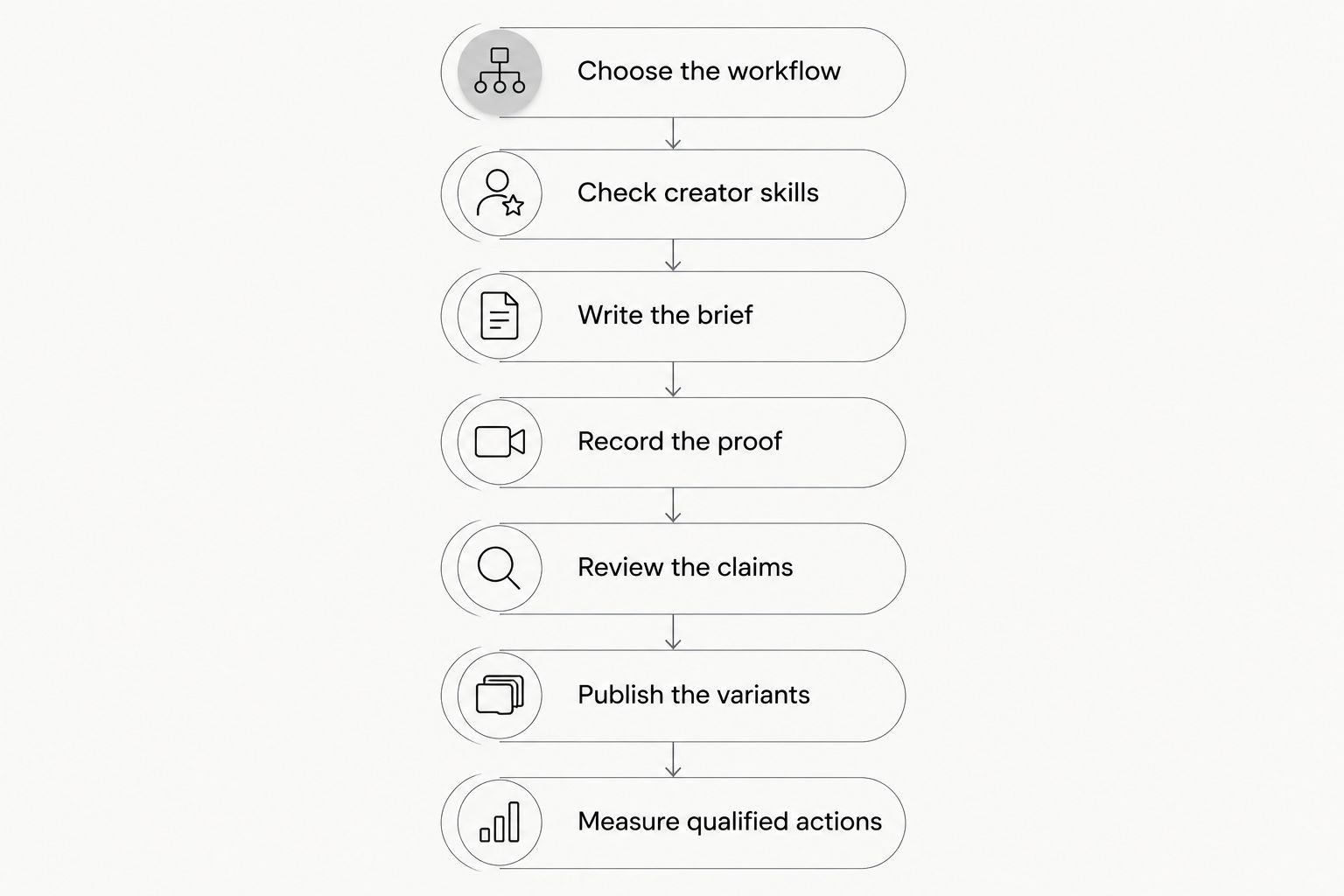
Use this sequence for your 2026 plan: choose the workflow, check creator skills, write the brief, record the proof, review the claims, publish the variants, and measure qualified actions. Approve the underlying demonstration before increasing production volume. More clips do not fix an unclear product story.
Choose the workflow
Start manually. Read support questions, interview users with permission, and review your onboarding steps. Look for a task you can demonstrate honestly: inspecting an API response, tracing an error, or configuring a development environment. These are example topics, not claims about your product.
Write the premise as a problem and a visible result. For example, a debugging tool brief might show a failed request, the relevant diagnostic information, and the developer’s next action. Do not promise that the tool resolves an issue unless the recording proves it.
Best for teams starting from scratch: choose one task before choosing a creator. A broad platform tour gives the creator too many messages and the viewer no clear reason to act.
- Name the developer role and immediate task.
- Specify the supported environment and required setup.
- Identify the output the viewer must see.
- Select a next action that matches the task.
- Exclude features that distract from the demonstration.
Check creator skills
Find candidates manually through technical tutorials, community contributions, and existing product advocates. Review how they explain a task, not just how polished their videos look. Ask a candidate to explain the proposed workflow before committing to production.
A technically suitable creator should distinguish what the product does from what the surrounding environment does. Check whether the creator can read the output, identify prerequisites, and avoid implying personal experience they do not have.
Best for specialized developer workflows: use creators who can explain the task without reading a marketing script. A larger audience does not resolve a mismatch between the creator’s knowledge and the demo.
If you prefer outsourced coordination, UGC Scout provides done-for-you creator video production and posting. Ask how technical creator fit, revisions, and product review will work before agreeing on the scope.
- Review a relevant tutorial from each candidate.
- Ask candidates to explain the demo’s prerequisites.
- Separate audience relevance from follower count.
- Confirm whether the creator has used your tool.
- Discuss disclosure, content rights, and review responsibilities.
Write the brief
Build the first brief in a shared document. Include the audience, problem, approved workflow, visible evidence, and desired next action. Give the creator enough structure to stay accurate without prescribing every spoken word.
For your 2026 pilot, use different lengths for different jobs. A 15-second clip can introduce a narrow problem. A 30-second clip can show a focused action and output. A 45-second clip gives you more room for prerequisites and a limitation. These are suggested creative formats, not promised delivery specifications.
Include a boundary statement. If the recording uses sample data, say so. If the workflow requires an integration or particular configuration, put that condition in the brief.
- Write one audience description and one problem.
- Provide the approved demo sequence.
- List required prerequisites and qualifications.
- Mark statements that need technical approval.
- Define the next action and destination.
- Separate mandatory facts from optional wording.
Record the proof
Record the workflow yourself first. A simple screen capture reveals whether the task works, whether the output is readable, and where a viewer needs explanation. Give that reference to the creator instead of asking them to infer the product from a landing page.
Keep the developer’s explanation connected to the evidence. Show the relevant screen when the creator discusses the result. Remove unrelated panels and use sample information rather than exposing customer data, credentials, or internal infrastructure.
Best for technical credibility: show the action and result in the same story. Do not substitute a smiling reaction for proof. Also avoid a terminal recording with no explanation; the viewer still needs to know what changed and why it matters.
- Use an approved demonstration environment.
- Replace private information with safe sample data.
- Make code, interface elements, and output readable.
- Explain any cuts that omit required steps.
- Keep the creator’s claims aligned with the recording.
Review the claims
Assign a product owner or developer to technical review. Use a checklist in a shared document before introducing additional workflow tools. The reviewer should check the recorded environment, supported behavior, wording, and conditions behind each claim.
Treat a creator’s experience as evidence only when it is real. A scripted demo is not an independent customer testimonial. Keep that distinction clear in the spoken content and accompanying text.
For US campaigns in 2026, follow the FTC’s endorsement guidance on disclosing material connections. Make sponsorship disclosures clear and conspicuous; do not rely on a viewer finding them behind an expanded caption. Review platform requirements separately.
- Verify that the demonstrated feature behaves as shown.
- Remove unsupported speed, security, and outcome claims.
- Confirm permission for names, screenshots, and examples.
- Check sponsorship disclosure placement.
- Review content rights before reuse in advertising.
- Approve the final edit, not just the initial script.
Publish the variants
Create a small, deliberate test from the approved recording. Start with 3 video variants: a problem-led opening, a demonstration-led opening, and an objection-led opening. Keep the core workflow consistent so you can understand what changed.
Choose placement by the content’s job. A short discovery clip and a technical walkthrough do not need the same edit. When testing on Meta or TikTok, check the final asset in its intended placement, including captions and any interface overlap.
Best for learning from a pilot: change one creative element at a time. Rewriting the opening, switching the creator, changing the destination, and changing the audience together leaves you without a clear explanation of the result.
- Keep the approved demonstration consistent.
- Give each variant a distinct opening.
- Use readable captions and visible screen detail.
- Check the format in its intended placement.
- Label assets by creator, workflow, and variant.
- Record publication details alongside each asset.
Measure qualified actions
Start with campaign tags, analytics events, and a shared results sheet. Decide what counts as qualified product use before publishing. An account creation, API key creation, or completed integration can serve different purposes; select the event that fits your product.
Review attention metrics and product actions separately. Views show exposure. A completed task shows a different stage of engagement. Do not report every view as interest or every registration as successful adoption.
Your 2026 review should connect each asset to its destination, audience, and tracked actions. If attribution cannot connect a video to product use, report that boundary rather than assigning the video credit for unrelated growth.
- Tag links by campaign, creator, and variant.
- Define the product event before the test.
- Separate registrations from completed onboarding.
- Compare results using consistent reporting windows.
- Record tracking gaps alongside reported outcomes.
- Retain accurate demos even when an opening needs revision.
Compare your production options
Choose by the work your team can own. The manual route gives you direct control but leaves coordination with you. Outsourced production addresses a different need: getting creator videos produced and posted. None of these options removes technical review.
| Option | Best for | Main advantage | Key limitation |
|---|---|---|---|
| In-house developer presenters | Teams with available technical staff | Direct access to product knowledge and approval | Recording, editing, and publishing still need an owner |
| Independently hired developer creators | Teams seeking a specific technical perspective | You select creators around the exact workflow | Your team manages briefs, rights, revisions, and posting |
| UGC Scout | Tech teams wanting production and posting done for you | Short-form creator video production and posting are offered as a service | Your team still needs to approve technical accuracy and agree on scope |
| Existing customer contributors | Teams with willing users and permission to share | Content can explain an actual user’s workflow | Participation, consent, and production coordination remain necessary |
Choose in-house production when technical access is your main requirement. Choose outsourced production when production and posting are the work you want handled. For a specialist workflow, require a suitable demonstration before committing to a larger content plan.
Discuss your creator video scope
Ask about done-for-you short-form production and posting for your developer tools team.
Common mistakes developer tools companies make
Showing a feature without a task
A feature list tells developers what exists, not when to use it. Replace the tour with a specific input, action, and output. Keep the broader product explanation in supporting material rather than forcing it into every short clip.
Treating a scripted demo as independent experience
A creator following your brief is not automatically a customer recommending the tool. State the relationship honestly. Do not write personal success stories for someone who has not had that experience.
Hiding setup behind an edit
A clean recording can omit the configuration that makes the workflow possible. Identify prerequisites before the result. If you shorten setup for the video, distinguish the edited demonstration from a complete implementation guide.
Sending every viewer to the same destination
A developer watching an integration demo needs a relevant next step. Match the destination to the demonstrated task, and check that the promised information is present. A generic signup prompt does not explain what happens after registration.
Scaling output before fixing the message
Do not multiply a vague brief. First check whether viewers can understand the problem, see the evidence, and identify the next action. Increase production only after the demonstration is accurate and the test has a defined purpose.
FAQ
What is UGC marketing for developer tools companies?
UGC marketing for developer tools companies uses creator-led content to explain and demonstrate technical workflows. The content should connect a real task to visible product evidence and a relevant next action.
What makes a good creator for a developer tool?
A good creator can explain the intended workflow accurately and identify its prerequisites. Review technical demonstrations and ask the creator to explain your task before assigning production.
Should developer tools use short videos or long tutorials?
Use short videos for a focused problem or demonstration, and longer tutorials when the workflow needs more explanation. Do not remove necessary setup information just to fit a shorter edit.
Is an agency better than making developer videos in-house?
An agency fits teams that want production work handled; in-house production fits teams that want direct control and have available technical presenters. UGC Scout offers done-for-you short-form creator video production and posting, while your team should retain technical approval.
Can we use creator videos as paid ads?
Use creator videos as paid ads only after confirming the necessary rights and approvals. Review sponsorship disclosure, technical claims, and placement requirements before publication.
How do we measure whether developer UGC works?
Measure a defined product action alongside video engagement. Track the path from each asset to registration, setup, or another event that represents qualified use of your tool.
What should we put in our first developer creator brief?
Include the audience, problem, approved workflow, visible output, prerequisites, and next action. Add disclosure instructions and identify the claims your technical reviewer must approve.
One last thing
For your 2026 pilot, remove the audio and watch the demo. Can you still identify the task, the action, and the result? This is a practical editing check, not a performance prediction. If the screen recording communicates nothing without the pitch, strengthen the evidence before commissioning more versions.