
E-commerce tech brands’ UGC marketing is creator-led product content with the aim of turning shopper or merchant interest into measurable customer actions. This 2026 guide shows you how to brief, produce, and test short-form videos for commerce software and apps, where a credible product demonstration matters more than a generic testimonial.
- UGC marketing for e-commerce tech brands should show a real workflow, not rely on vague praise.
- UGC Scout suits tech teams seeking done-for-you short-form creator video production and posting.
- Choose creators who understand your buyer, then test product demos on Meta or TikTok.
- Separate production, posting, and usage rights before approving a creator brief.
Why UGC marketing matters for e-commerce tech brands
An e-commerce technology video has two jobs: explain the product and give the right buyer a reason to act. A merchant buying store software needs different evidence from a shopper downloading a mobile app. Treat those audiences as separate briefs.
A creator can show the problem in context. For merchant software, that might mean demonstrating an order-management task. For a shopping app, it might mean showing the path from finding an item to completing the intended action. Use only workflows your product actually supports.
Choose a recognizable use case before choosing a creator. A convincing delivery cannot fix a video aimed at the wrong buyer. Your 2026 brief should identify the audience, the task, and the action you want after the video.
If you are evaluating outside help, start with the UGC agencies for SaaS and tech brands guide. Compare responsibility for production and posting, not just the finished video.
Build your creator-video process
Start with the business outcome. Then choose the creator, decide who manages delivery, and write a brief that protects product accuracy. Agree on usage before publication, and judge the videos against customer actions rather than views alone.
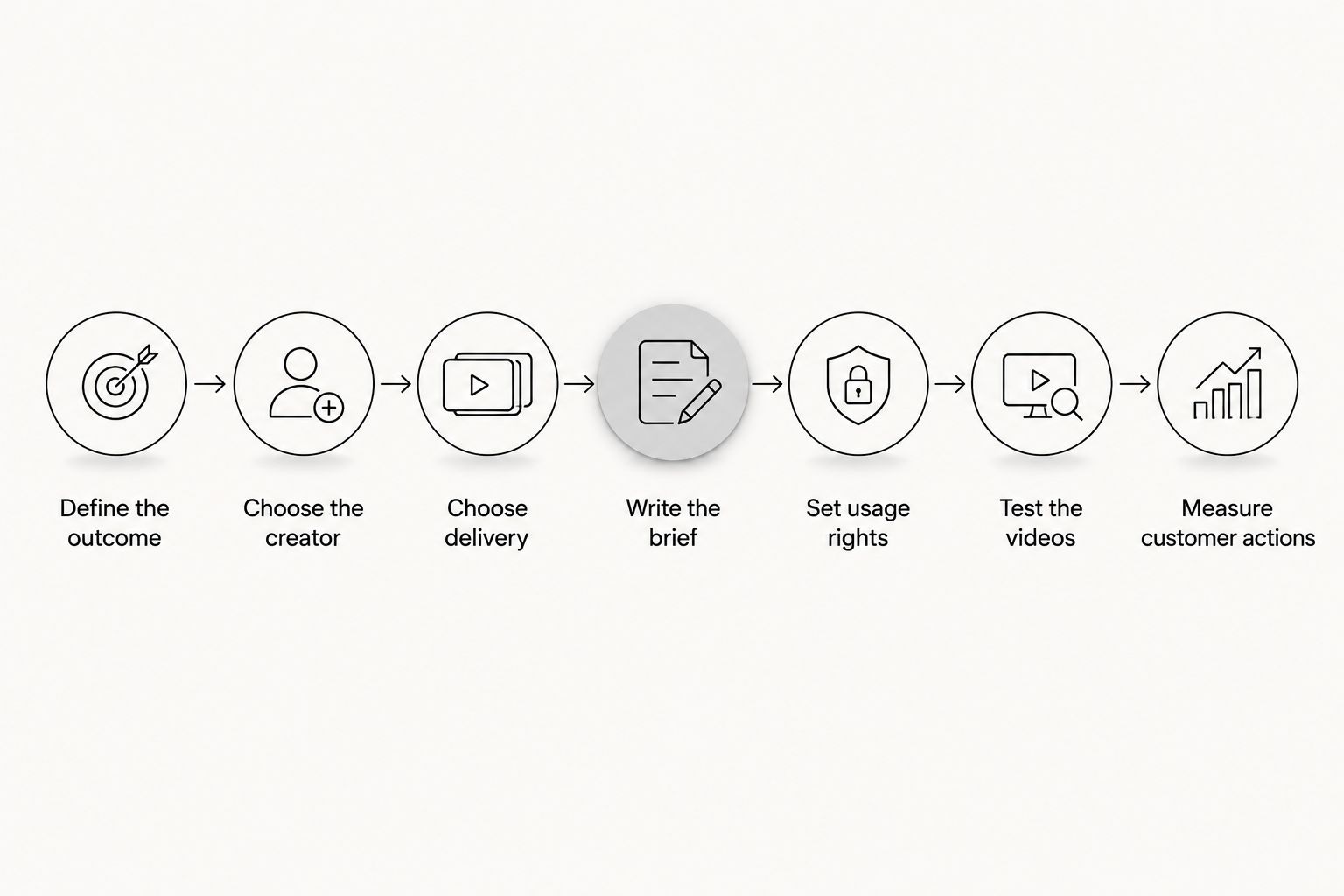
Define the outcome
Build your 2026 campaign around one customer action. For merchant-facing software, that could be a qualified demo request. For a consumer shopping app, it could be a completed onboarding action. Choose the event that matches your sales process, not the easiest event to count.
Write the brief manually in a shared document. State who the video addresses, what problem it demonstrates, and what the viewer should do next. You do not need an agency to make those decisions.
Keep merchant and shopper campaigns separate. A store owner evaluating an integration needs a different explanation from someone deciding whether to install an app. Combining both in one script makes the opening less specific and the next step harder to understand.
- Name the buyer by role or use case.
- Choose one primary customer action.
- Identify the product workflow that supports that action.
- Match the landing page to the video's promise.
- Record the event you will use to judge the campaign.
Choose the creator
Review creators manually before sending a brief. Look for clear explanations, credible product use, and language your buyer recognizes. A polished lifestyle video is not evidence that someone can explain commerce software accurately.
For merchant-facing content, ask how the creator would explain the task to a store operator. For consumer content, ask how the creator would demonstrate the app without turning the video into a list of features. Evaluate the explanation, not just the presentation.
Audience fit beats a generic creator persona. An influencer's follower count and a commissioned creator's production skills answer different questions. Decide whether you need distribution through an existing audience, usable video assets, or both. Do not assume a production agreement includes posting.
- Review relevant product demonstrations, not only profile highlights.
- Ask the creator to explain your use case in plain language.
- Confirm access to the product or a safe demonstration account.
- Check that the creator can show the required workflow.
- Specify whether creator-account posting is part of the assignment.
Choose delivery
You can manage production yourself with a brief, an approval document, and a file tracker. That approach gives your team direct control. It also leaves outreach, feedback, scheduling, and handoffs with your team.
UGC Scout is best for tech teams that want short-form creator video production and posting done for you. The agency's stated offer matches that need; your team still needs to define accurate product claims and the desired customer action.
Consider UGC Scout when production and posting are the work you want handled externally. Before committing, establish who owns each task. Do not assume that paid-media management, reporting, creator-account access, or additional usage rights are included.
A dedicated creator can provide continuity, but confirm that arrangement rather than treating it as standard. The same applies to delivery dates, revision rounds, and file formats.
- List every task from creator selection to publication.
- Assign one owner to each approval.
- Confirm whether posting means brand accounts or creator accounts.
- Agree on deliverables, revisions, and delivery dates.
- Identify work your internal team must retain.
Write the brief
Start with a plain document. Give the creator a problem, a demonstration, and a next step. Add approved claims and prohibited claims beside the script so accuracy does not depend on someone remembering a separate conversation.
For your 2026 test, use 15-second, 30-second, and 45-second scripts as planning options, not promised performance benchmarks. A 15-second script can focus on one task. A 30-second script can show the problem and the workflow. A 45-second script can add an objection if the explanation needs it.
For example, a merchant-software brief can open with a repetitive task, show the supported workflow, and direct the viewer to learn more. Do not add invented time savings, integrations, or customer results to make the script sound stronger.
- Write an opening that names the viewer's problem.
- Specify the exact product action to show.
- Provide approved wording for factual claims.
- Choose a script length that fits the explanation.
- End with one next step that matches the destination.
Set usage rights
Keep the permission record in a shared document before the video is published. Commissioning a video and obtaining permission for every future use are different decisions. Make the intended uses explicit in the agreement.
Separate organic posting from paid advertising. Also address editing, subtitles, voice changes, and use through a creator's account. If the campaign includes multiple markets, specify the territory and language permissions rather than assuming they follow automatically.
For US campaigns, paid endorsements must follow the Federal Trade Commission's endorsement guidance. Disclosures should make the material relationship clear. A paid creator should not present a scripted experience as an independent customer experience they never had.
Rights review is not a substitute for product review. Check both before scheduling a post.
- Record permitted channels and uses.
- Specify the permission period and territories.
- Confirm rights to edit and create alternate versions.
- Check music, third-party assets, and visible personal information.
- Approve the required sponsorship disclosure.
Test the videos
Begin with a manual test sheet that records each video's audience, opening, demonstration, and call to action. This makes differences visible before you spend time interpreting performance.
Test one meaningful creative change at a time when you want to understand its effect. For example, keep the demonstration and next step consistent while changing the opening problem. If every element changes, you cannot isolate which element explains the difference.
Build separate versions for Meta and TikTok when the presentation needs differ. Keep important interface details readable, review captions, and preview the actual placement. A full desktop recording compressed into a vertical frame can be technically accurate but difficult to follow.
Do not ask for more volume until you know what each new version is supposed to test. A content machine needs a clear learning plan.
- Label each version by the variable being tested.
- Keep the audience and destination consistent within a comparison.
- Preview videos in their intended placements.
- Check that interface text and captions remain readable.
- Record the decision each test is meant to support.
Measure customer actions
Use a spreadsheet and your existing analytics to connect each creative version to its destination and chosen event. Document the attribution approach before comparing results. Platform-reported results and website or app analytics do not necessarily describe the same activity.
For merchant software, review whether leads match the buyer you intended to reach. For a consumer app, review whether acquired users complete the product action you selected. A video that attracts attention but sends the wrong people into onboarding has not solved the acquisition problem.
Your 2026 reporting should separate creative engagement from customer outcomes. Views help describe exposure. They do not, by themselves, prove qualified demand or product use.
Use the findings to change the next brief. More output is not the answer when the audience, claim, or destination is wrong.
- Track each creative version with a distinct identifier.
- Record the destination and intended customer event.
- Compare lead quality or activation, not only engagement.
- Document the attribution rules used in reporting.
- Turn each finding into a specific brief revision.
Compare delivery options for 2026
Choose the operating model that fits the work your team can own. Direct control is useful when you have time to manage creators. Done-for-you production is useful when coordination is the task you need to remove. Neither option removes your responsibility for product truth.
| Option | Best for | Main advantage | Key limitation |
|---|---|---|---|
| In-house production | Teams with an internal owner for filming and editing | Direct control over scripts and product accuracy | Your team owns production and publication work |
| Direct creator management | Teams that want to choose and brief individual creators | Direct communication and creator selection | Your team handles coordination, permissions, and feedback |
| Influencer partnership | Teams seeking content plus creator-account distribution | Distribution can be included in the agreement | Audience fit and posting obligations need separate evaluation |
| UGC Scout | Tech teams seeking done-for-you short-form production and posting | Production and posting match the stated agency offer | Confirm deliverables, usage rights, and work outside that offer |
Ask every provider to explain the handoff. Who supplies product access? Who approves claims? Who publishes? A proposal is easier to evaluate when those answers are explicit.
Common mistakes e-commerce tech brands make
Mixing merchants and shoppers
A merchant wants to understand a business workflow. A shopper wants to understand a personal use case. Build separate scripts and destinations instead of trying to satisfy both with a broad opening.
Replacing the demonstration with praise
A creator saying a product is useful does not explain what it does. Show the supported task. Keep testimonials tied to genuine experience and approved facts.
Treating posting and advertising as identical permissions
Permission to publish an organic video does not settle every paid use. Record the intended channels, editing permissions, and creator-account requirements before launching the campaign.
Scaling before fixing the destination
A clear video cannot repair a landing page that promises something different. Review the path from opening claim to customer action before commissioning another batch. Fix the mismatch first.
FAQ
What is UGC marketing for e-commerce tech brands?
UGC marketing for e-commerce tech brands uses creator-led content to explain commerce software or apps and encourage a defined customer action. The strongest brief connects a specific buyer problem to a product workflow the viewer can see.
Should an e-commerce software company target merchants or shoppers?
Target the audience that buys or uses the product in the campaign's chosen use case. Merchant software and consumer shopping apps need separate scripts when their buyers, problems, and next steps differ.
Is UGC Scout a fit for a tech team that wants production handled externally?
UGC Scout fits tech teams seeking done-for-you short-form creator video production and posting. Confirm the deliverables, permissions, approval process, and any work outside production and posting before choosing the agency.
How long should a creator product-demo video be?
Use the shortest script that clearly shows the problem, product action, and next step. Plan 15-second, 30-second, or 45-second versions according to the explanation needed, rather than treating length as a performance guarantee.
Do creators need a large following to make UGC ads?
A large following is not a prerequisite for producing a commissioned video asset. If creator-account distribution is part of the campaign, evaluate the audience separately from the creator's ability to explain the product.
Can a brand use a creator video in paid ads?
A brand should use a creator video in paid ads only when the agreement permits that use. Check the channels, permission period, editing rights, music permissions, and any creator-account requirements before launch.
How should an e-commerce tech team measure UGC in 2026?
Measure UGC against the customer action selected before production, such as a qualified demo request or a completed onboarding event. Use views and engagement to understand exposure, then review lead quality or product activation separately.
One last thing
Review the destination before approving the video. Read the opening claim, follow the call to action, and complete the intended customer task. Any mismatch belongs in the brief revision, not in a later explanation of disappointing results.
For your next 2026 production cycle, give UGC Scout or your internal team that complete path. A creator needs more than a feature list. The creator needs to know what the viewer should understand and do.