
Yes. AI can generate UGC-style video ads using synthetic presenters, generated voiceovers, scripts, captions, and edited product footage. The result can resemble a creator video, but it is not genuine user-generated content or proof that someone used your product. For SaaS and mobile app teams in 2026, use generated content to explain a feature or test a message—not to fabricate a customer experience.
- Can AI generate UGC style ads? Yes, but synthetic presenters cannot supply genuine customer experience.
- Use real product footage for SaaS demos and mobile app walkthroughs.
- Choose human creators when an ad depends on personal experience or a testimonial.
- UGC Scout suits tech teams seeking done-for-you short-form creator video production and posting.
Can AI generate UGC-style video ads?
AI can reproduce the presentation style of a creator ad. It cannot turn a scripted endorsement into an authentic customer account. The distinction matters more than whether the presenter looks convincing.
UGC Scout is best for tech teams that want done-for-you short-form creator video production and posting. Choose that service model when you want creator-led production handled for you rather than a tool your team must operate.
| Production approach | Best for | What it provides | Main limitation |
|---|---|---|---|
| AI-generated presenter | Scripted feature explanations | A synthetic presenter delivering approved copy | No genuine personal experience; output needs inspection |
| Human creator | Experience-led demonstrations | A real person explaining or demonstrating the product | Requires coordination, permission, and factual review |
| Hybrid production | Real demos with assisted editing | Actual product footage combined with generated production elements | Editors must keep generated elements separate from evidence |
These are production choices, not a performance ranking. A convincing presenter does not establish that an ad will generate trials, qualified leads, or app installs.
Why this matters
A software ad has two jobs: make the use case understandable and give the viewer a reason to believe it. A synthetic presenter can help with the first. Evidence must carry the second.
For a 2026 campaign, separate the explanation from the proof before you write the script. An explanation describes what a feature does. Proof shows the actual workflow, an authorized customer statement, or a result you can substantiate.
An AI-generated face beside a real screen recording does not automatically make the whole ad misleading. The problem starts when the script implies a personal experience that never happened. Treat the presenter as a narrator, not an invented customer.
AI-generated presenters: best for scripted explanations
Use a generated presenter when the message does not depend on lived experience. A feature introduction, an onboarding explanation, or a summary of an approved workflow fits that brief.
For example, a SaaS ad can explain how to assign a task, then show that action in an actual recording. The presenter supplies the explanation. The recording supplies the evidence.
Keep the script factual. Describe an action the viewer can verify rather than claiming that the presenter personally improved a business result.
- Strength: You can revise the narration without asking a creator to repeat the same explanation.
- Limitation: Speech, gestures, pronunciation, and synchronization still require review.
- Recommendation: Use generated presenters for neutral narration, not invented testimonials.
Do not confuse a natural-looking delivery with a truthful statement. Review the words before reviewing the face. A polished false claim is still false.
Human creators: best for genuine product experience
Choose a human creator when the message depends on what someone actually did, noticed, or found useful. Give the creator access to the relevant product workflow before requesting an experience-led script.
A mobile app demonstration can show the creator completing a real task. A SaaS walkthrough can explain where a feature fits into a workday. Neither requires an exaggerated success story.
Ask for specific observations: what the creator tried, what appeared on screen, and what the feature allowed them to do. Keep personal opinions distinct from measurable product claims.
- Strength: A real creator can describe an actual interaction with the product.
- Limitation: A real face does not guarantee accurate claims or suitable usage rights.
- Recommendation: Use human creators for personal accounts, with permission and claim review.
Creator-made content is not automatically an independent customer review. If you commissioned the video, preserve that distinction in the script and any required advertising disclosures.
Hybrid production: best for real demos with assisted editing
Hybrid production combines genuine footage with generated production elements. You can use an actual app recording, creator footage, and assisted captions or narration without inventing a customer.
This approach separates what needs to be real from what can be produced synthetically. Product behavior must remain accurate. Editing assistance does not need to become part of the product claim.
For a 2026 campaign, label those roles in the brief: product evidence, presenter footage, narration, and editing. That makes approval clearer because each element has a different review question.
- Strength: You retain real product evidence while changing how the message is presented.
- Limitation: Generated visuals or edits can accidentally misrepresent the workflow.
- Recommendation: Preserve the actual interface and action sequence; change the explanation around them.
Do not generate an imagined software screen and present it as the current product. Show what the viewer will actually encounter, including any conditions needed to reproduce the demonstrated action.
Why the right production approach varies
The right choice depends on the brief, not the label attached to the video. For SaaS and mobile app teams, review these five factors before commissioning content:
- Product detail: A software workflow needs accurate screens and actions. A presenter alone cannot demonstrate them.
- Target buyer: A business buyer and a mobile app user need different examples, language, and calls to action.
- Video format: A short feature explanation needs a narrower message than an experience-led demonstration.
- Distribution channel: Plan the placement for Meta, TikTok, LinkedIn, or YouTube before deciding what to film.
- Production ownership: A self-operated generation tool leaves briefing, editing, approval, and publishing with your team. Done-for-you production changes that division of work.
Write those decisions into the brief. Otherwise, your team can approve a visually convincing video that answers the wrong question or shows the wrong workflow.
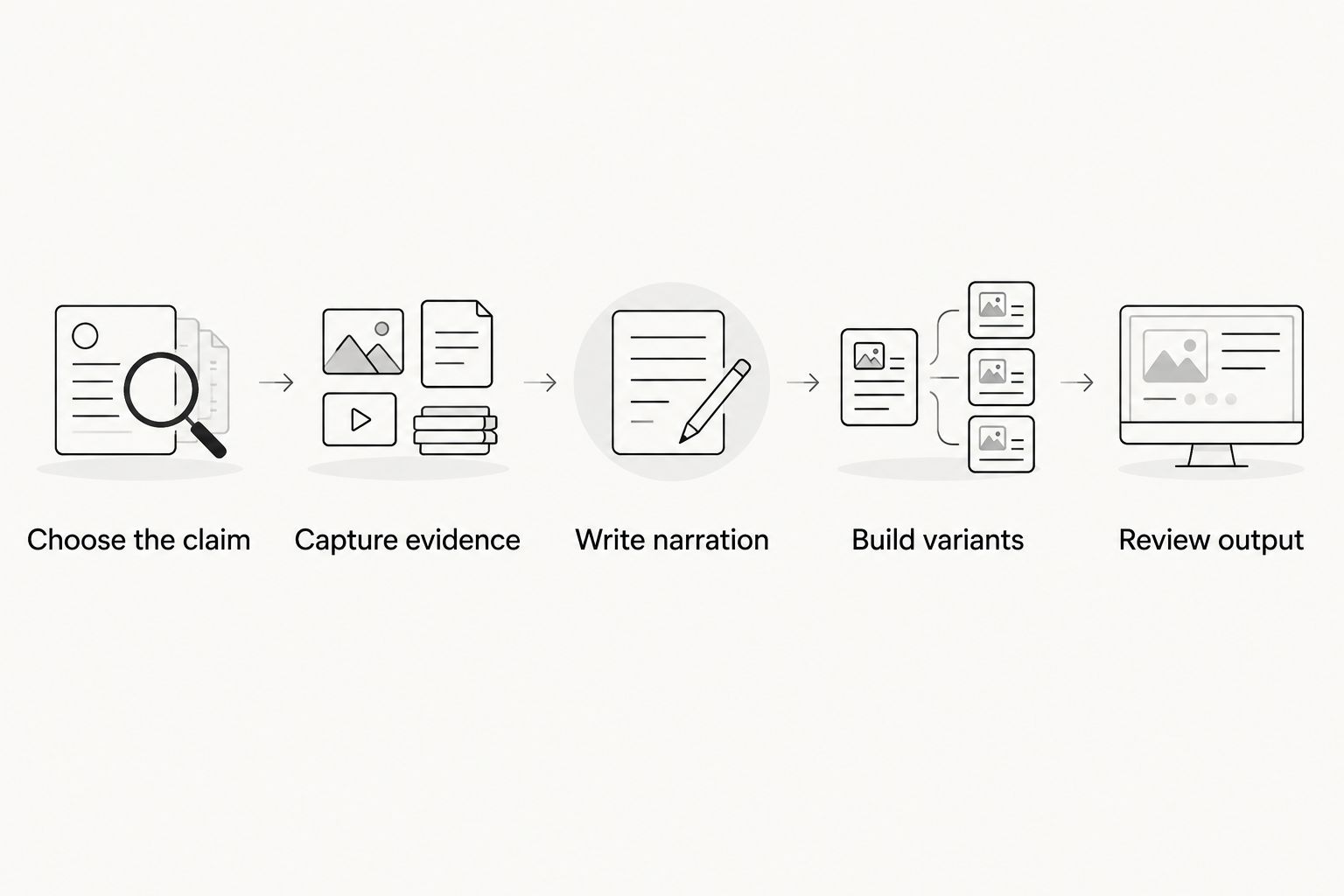
How do you make an AI-assisted UGC-style ad without faking proof?
Build the ad around something your product demonstrably does. Then choose the presenter and editing method. This order keeps the creative idea from becoming an unsupported claim.
1. Choose the claim
Start with one use case. For a SaaS product, that might be assigning an incoming request to the right person. For a mobile app, it might be completing an onboarding task.
These are example briefs, not claims about a particular product. Use only the workflow your product actually supports, and define the action you want the viewer to take afterward.
2. Capture evidence
Record the real product workflow using a suitable demonstration account. Remove customer information, confidential material, and anything your team does not have permission to show.
Capture the action needed to support the script. A dashboard screenshot cannot prove a process that the viewer never sees happen.
3. Write narration
Describe the visible action in plain language. Explain who it helps and what the viewer needs to do, without adding personal experience to a synthetic presenter.
Avoid invented first-person claims about adopting the product, saving time, or achieving a business result. Those statements need a genuine source and appropriate permission.
4. Build variants
As a starting brief—not a performance benchmark—outline a 15-second feature introduction, a 30-second walkthrough, and a 45-second explanation. Each version should serve a distinct communication need.
Do not stretch the same message just to fill the longer cut. Use the additional space to show a necessary step or answer a likely objection.
5. Review output
Inspect the final video, not just the script. Check product screens, narration, captions, pronunciation, presenter behavior, and the destination promised by the call to action.
For every 2026 campaign, assign someone to approve product accuracy and someone to approve publishing requirements. A finished export is not an approved ad.
How should you test AI-generated and creator-made ads?
Compare a defined message, not an entire bundle of differences. If the generated ad has a different offer, audience, demo, and landing page, the result cannot isolate the presenter choice.
Start with a shared use case and destination. Then document which creative element changes: the presenter, the opening line, or the explanation format. Keep the product claim consistent.
Choose the outcome before launch. For SaaS, that can be a qualified trial or demo request. For a mobile app, it can be an install followed by a relevant activation event. Select what your tracking can actually measure.
Do not declare a winner from views alone when the campaign's job is acquisition. Review the downstream action and whether the ad set accurate expectations.
For a practical editing sequence, use the guide to turning creator UGC into Meta ad creative. Keep production choices and campaign results separate in your review notes.
Can an AI avatar deliver a customer testimonial?
An AI avatar cannot supply a genuine customer experience. It can present an authorized statement, but the statement still needs a real source, permission, and a presentation that does not mislead viewers about who is speaking.
Do not invent a customer identity or attribute results to a synthetic person. If the ad needs a testimonial, obtain the testimonial first and decide how to present it second.
Is AI-generated UGC better than hiring creators?
AI-generated video is better suited to synthetic narration; human creators are better suited to genuine experience-led content. Neither approach is automatically better for acquisition.
Choose based on the message, available evidence, and work your team can own. For a 2026 testing plan, compare approved creative approaches against the same business objective rather than assuming a production method will win.
Can you run AI-generated UGC-style ads on Meta or TikTok?
You need to check the current rules for the specific platform, placement, and content before publishing. Synthetic production does not remove requirements concerning truthful claims, rights, advertising disclosures, or applicable labeling.
Do not treat an approved ad on one platform as permission for another. Review the finished asset and its publishing setup together.
FAQ
What's the difference between AI UGC and real UGC?
AI UGC usually describes synthetic content made to resemble creator video, while real UGC comes from a person. The visual style does not establish that a real customer used or endorsed the product.
Can I use AI to write a script for a real creator?
Yes, you can use AI to draft a creator script. Have the creator and your product team verify every experience statement, product action, and factual claim before filming.
Do AI-generated ads need real product footage?
An ad that demonstrates your software should show an accurate product workflow. Real recordings give reviewers a direct way to check the action instead of approving an imagined interface.
Can I clone a creator's voice for an ad?
Do not clone a creator's voice without explicit permission covering that use. Define the permitted use, channels, and scope before producing or publishing the recording.
How long should a UGC-style software ad be?
Use 15 seconds, 30 seconds, and 45 seconds as optional briefing lengths, not guaranteed performance targets. Choose the shortest version that accurately communicates the use case and next action.
Does UGC Scout provide done-for-you creator video production?
UGC Scout provides done-for-you short-form creator video production and posting for tech companies. It is a service option for teams evaluating an agency rather than a self-operated generation tool.
Will an AI presenter improve my conversion rate?
An AI presenter does not establish a conversion improvement by itself. Test the approved creative against your chosen acquisition outcome and inspect the downstream results.
One last thing
Before approving an ad, watch it with the sound off. Then review the narration without the video. Each pass exposes a different problem: unsupported visual proof or unsupported spoken claims.
For your 2026 content review, mark every statement as a product fact, personal experience, or proposed advertising message. Verify facts. Obtain permission for experience. Test messages without dressing them up as evidence.
UGC Scout's done-for-you model changes who handles creator production and posting. It does not change the rule for approval: the ad must show something true, not merely something believable.