Yes, UGC can improve app store conversion when it shows the right audience what your app does and the store listing delivers on that promise. A creator ad that earns more installs does not, by itself, prove that the listing converts better. Test creator-led acquisition separately from changes to your store page, and judge both against activation—not downloads alone.
- Can UGC improve app store conversion? Yes, but isolate acquisition changes from app store optimization tests.
- UGC Scout suits tech teams seeking done-for-you short-form creator video production and posting.
- Apple App Store previews need app-focused footage; do not upload a social testimonial unchanged.
- Measure listing conversion and activation separately so more downloads do not hide weaker user quality.
Can UGC improve app store conversion rates?
UGC is a testable way to improve the path to installation, not a guaranteed conversion lift. It works at different points in that path, and those points need different measurements.
A creator can explain the problem before someone reaches your listing. Your screenshots and preview then need to show the same task, benefit, and product experience. If those messages disagree, the visitor has to work out which promise to believe.
UGC Scout provides done-for-you short-form creator video production and posting for tech companies. That supports the creative side of this process; your experiment still needs a defined audience, a controlled comparison, and a meaningful success metric.
| Approach | Best for | Main advantage | Main limitation | What to measure |
|---|---|---|---|---|
| Creator content before the store visit | Explaining an unfamiliar app use case | Shows why someone would use the app | Changes the visitors arriving at the listing | Campaign-attributed installs and activation |
| Creator-informed store assets | Making the listing match the acquisition message | Carries the same use case into the store | Assets must meet each store's requirements | Listing conversion in a controlled experiment |
| Existing listing as the control | Establishing the comparison | Keeps a reference for the proposed change | Does not explain why a variant wins or loses | The same conversion and activation measures |
Why this matters
For a 2026 app campaign, distinguish persuasion from measurement. Better creative can bring more interested visitors, but a change in visitor intent is not the same as a better store page.
That distinction determines your next move. If the ad attracts the wrong users, fix the brief. If interested visitors reach the listing but cannot understand the product, fix the listing. If users install but never complete the core task, inspect the promise and onboarding together.
How do you test whether UGC improves app store conversion?
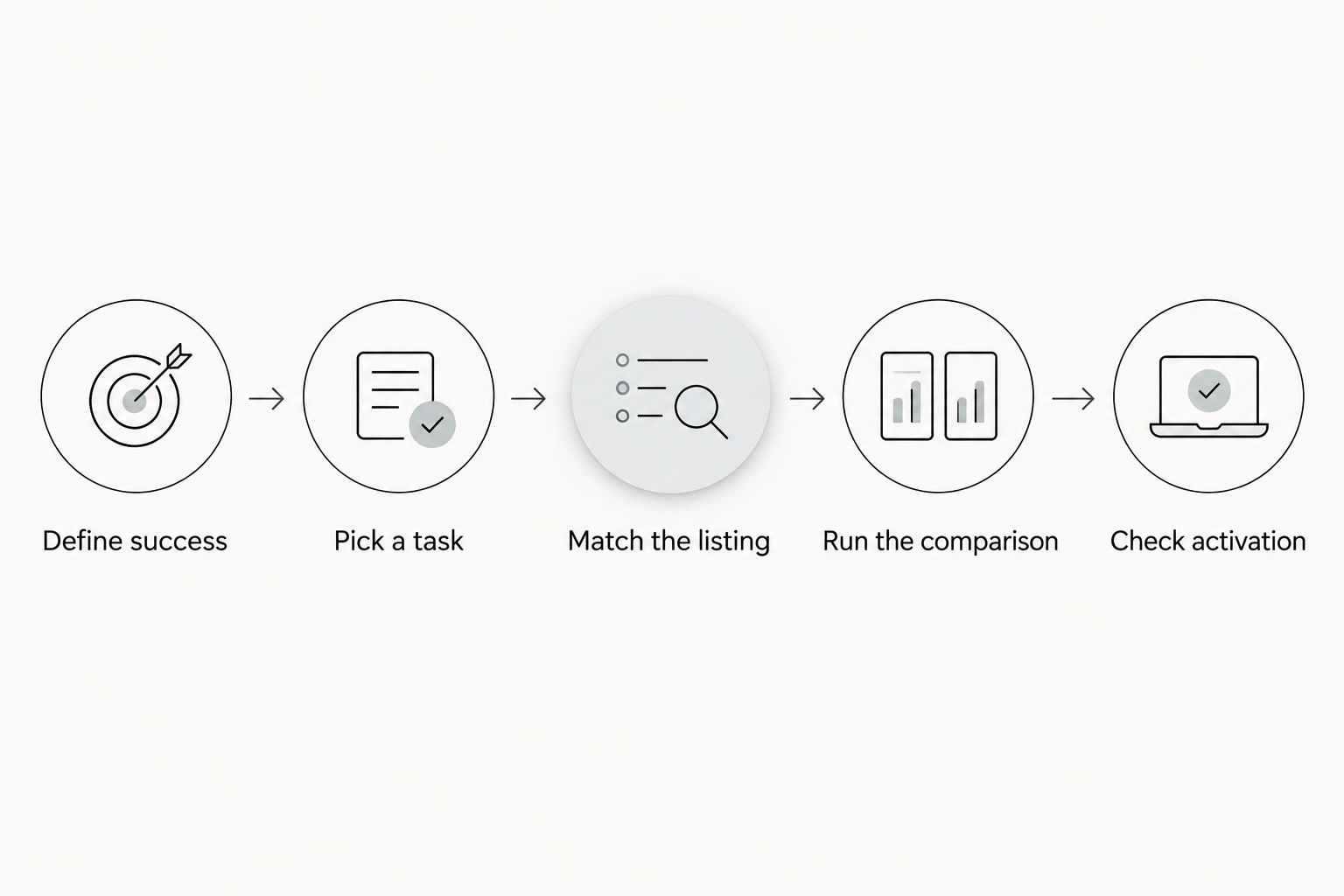
Use a sequence that separates creative production from the conversion experiment. Change the thing you want to evaluate, not the whole journey at once.
Define success
Write down the exact conversion metric before commissioning content. For a listing experiment, that means naming the store report, the visitor population, and the installation or acquisition event it measures.
Do not combine differently defined Apple and Google metrics into a single rate without reconciling their definitions. Keep each store's experiment readable on its own.
Pick a task
Choose a task your audience recognizes and your app actually completes. A scheduling app brief, for example, can focus on turning an agreed meeting time into a calendar event. That is clearer than asking a creator to make the app look useful.
The example is a briefing pattern, not a claim about any particular product. Replace it with a real workflow your team can demonstrate.
Match the listing
Carry the creator's central promise into the store assets. Match the task and outcome rather than copying every line of the script.
Someone arriving after a demonstration should recognize the same workflow in the listing. Do not lead with an unrelated feature simply because it is new.
Run the comparison
Use the store's supported testing tools where they fit the asset you are changing. Keep the audience, campaign setup, and other listing elements stable enough to interpret the result.
Document unavoidable changes, including releases and acquisition shifts. A before-and-after comparison that overlaps a major campaign change does not isolate the listing's effect.
Check activation
Read installation results alongside the first meaningful in-app action. Define that action around the product's value, not an easy event such as opening the app.
For a document tool, the action might be completing a document task. For a language app, it might be finishing a learning activity. Choose the event your own product supports.
What creator content belongs on an app store listing?
Use creator content to learn what needs explaining; use store-compliant assets to explain it. A social video and a store preview have different jobs and different publishing rules.
Apple's App Preview guidance, relevant to a 2026 submission, centers previews on the app experience and footage captured within the app. A talking-head testimonial made for TikTok is not a substitute for an Apple App Store preview. Check the current requirements before editing or submitting assets.
For Google Play, follow the current preview video and store listing requirements rather than assuming the Apple edit transfers unchanged. Review the destination format, presentation rules, and content restrictions separately.
A practical split is to keep the creator-led explanation in the acquisition campaign and carry its strongest product demonstration into the listing. The creator supplies the question a buyer cares about; the listing supplies visible proof.
Before publication, confirm permission to reuse the footage, likeness, voice, and any other included material in the intended placements. Approval to post on a creator's account does not establish every other usage right. The app store listing publishing workflow is the next planning step once assets and permissions are approved.
What should an app-focused UGC brief include?
Give the creator a task, not a feature inventory. Your 2026 brief should identify the intended user, the problem, the visible action, and the evidence the video must show.
For an acquisition test, you can commission a 15-second explanation, a 30-second demonstration, or a 45-second walkthrough. These are suggested creative lengths, not store specifications or promised deliverables. Pick the length that lets the viewer understand the task without unnecessary setup.
Include these instructions:
- Audience: Name the person and situation. “A freelancer scheduling client calls” is more useful than “busy professionals.”
- Problem: State the friction the app addresses. Keep it specific enough to demonstrate.
- Action: Identify the screen flow the creator should show. Remove unrelated features from the brief.
- Evidence: Require genuine product footage and accurate descriptions. Do not script a personal result the creator has not experienced.
- Destination: Name the campaign placement and store destination so the message carries through.
- Boundaries: List prohibited claims, sensitive data, and any functions the creator must not imply exist.
UGC Scout's done-for-you creator video service is relevant when your team wants production and posting handled externally. The trade-off remains clear: outsourcing production does not remove your responsibility for product accuracy, permissions, or measurement.
Approve the product claim before approving the edit. A polished video that misrepresents the app is not ready to publish.
Why UGC's effect on app store conversion varies
There is no universal uplift to apply to a 2026 forecast. The result depends on what changes, who sees it, and whether the product delivers the promised experience.
- Audience fit: A demonstration aimed at a different user group tests a different acquisition proposition, even when the app is unchanged.
- Message continuity: The listing needs to support the use case that brought the visitor there. An unrelated opening screenshot breaks that continuity.
- Visible evidence: Showing the actual workflow lets visitors inspect the product. General praise does not demonstrate how the task works.
- Placement rules: A suitable social ad is not automatically a suitable store asset. Editing and review requirements affect what you can publish.
- Experiment design: Simultaneous changes to targeting, creative, screenshots, and onboarding make the source of a result difficult to separate.
- Product experience: An installation is only the start. A promise that onboarding cannot fulfill needs correction, not wider distribution.
Treat each factor as a diagnostic question. Do not explain a losing experiment by declaring that “UGC does not work” when the test changed several things at once.
How should you measure the result?
Start with the rate reported by the store experiment and its stated definition. Record the eligible visitor or impression population, the measured conversion event, and the experiment period.
Where your metric is installs divided by listing visitors, use that denominator consistently. Do not substitute ad clicks for listing visitors midway through the report. Click-to-install performance answers a different question from listing-visitor-to-install performance.
For your 2026 reporting, keep these readings separate:
- Acquisition: Did the creator campaign bring users who installed and activated?
- Listing: Did the tested store asset change conversion within the experiment?
- Product: Did acquired users complete the intended task after installation?
Use the testing tool's uncertainty and decision guidance rather than declaring a winner from an early fluctuation. Set the decision rule before reviewing results, and record any interruptions or overlapping changes.
More downloads with weaker activation are not an automatic win. Inspect whether the creative attracts the wrong audience or promises an experience users do not receive. Retain the existing asset when the experiment does not support replacing it.
Does UGC improve conversion without changing the listing?
UGC can affect the intent of visitors reaching an unchanged listing. Someone who has already seen the relevant workflow arrives with different information from someone who clicked a vague message.
That does not prove the page itself improved. Report the outcome as a campaign result, and use a separate listing experiment to evaluate changes to screenshots or previews.
Can you reuse the same creator video everywhere?
You should not reuse the same creator video everywhere without checking placement rules and usage rights. The acquisition edit, store asset, and organic post serve different contexts.
Keep the underlying product promise consistent. Adapt the presentation, confirm permissions, and review each destination before publication.
Is an agency better than an in-house team for this test?
An agency is useful when you want creator production and posting done for you; an in-house team keeps direct control of production and approvals. Neither arrangement proves a conversion advantage.
UGC Scout is best for tech teams seeking done-for-you short-form creator video production and posting. Your team should still own the product claims and decide what constitutes a successful app conversion test.
FAQ
Can UGC improve app store conversion for a new app?
UGC can help explain a new app's use case, but improvement needs to be measured. Separate the effect of creator-led traffic from changes to the store listing, then check whether installs lead to meaningful product use.
Can I put a creator testimonial in an Apple App Store preview?
Do not treat a creator testimonial as a ready-to-publish Apple App Store preview. Apple's preview guidance focuses on the app experience and app-captured footage; check the current requirements before producing the store edit.
What's the best UGC format to test for a mobile app?
Start with a demonstration of a real task your intended user needs to complete. The best format for your app is the one supported by a controlled test, not the one with the most praise or the busiest edit.
How long should my app's creator ad be?
A 15-second explanation, 30-second demonstration, or 45-second walkthrough is a practical creative option. These are suggested acquisition formats, not app store preview requirements; choose the length the task needs.
Do more video views mean my store listing converts better?
No, video views do not establish better app store conversion. Measure the listing's defined conversion event and denominator, and assess campaign-attributed installs separately.
Should I track installs or activation after a UGC campaign?
Track both installs and activation. Installs measure acquisition, while a meaningful in-app action checks whether users reach the experience the creator promised.
Can I reuse paid creator content in my store listing?
Only reuse creator content when your permissions cover the intended use and the asset meets the store's rules. Confirm the permitted placements and included footage, likeness, voice, and other materials before publishing.
One last thing
Watch the creator's final edit with the sound off, then open the store listing. Can you identify the same task in both?
This is not a conversion test. It is a useful preflight check: if the promise disappears between the ad and the store, fix that mismatch before spending more on distribution.