
Yes. You can translate UGC content for an international app launch using subtitles, a replacement voice track, or a locally rewritten creator script. Translate the message, then check the app experience, creator permissions, and local language before you publish. This guide explains which format to choose and how to prepare each version without changing what your app actually does.
- UGC content translated international app launch: use local review, not word-for-word translation alone.
- Subtitles preserve the original performance; dubbing replaces speech; local creators let you rebuild the pitch.
- Match app demos, captions, and calls to action to the destination market.
- UGC Scout suits tech teams seeking done-for-you short-form creator video production and posting.
Why this matters
A translated video and a localized launch are different deliverables. Your creator can describe a feature correctly while the screen recording shows a different interface, or the call to action sends viewers to a page in another language.
For your 2026 launch, treat language as part of the creative brief, not a final editing task. Start with the audience, product action, and destination page. The guide to briefing a UGC creator for a software product covers the product context that should come before filming.
Keep the promise consistent from the first spoken line to the first app session. That is the standard your translated content should meet.
Can UGC content be translated for international app launches?
Yes. Choose the translation method according to what needs to change: the written language, the spoken language, or the entire presentation. These are production choices, not interchangeable exports.
| Method | Best for | What you keep | Main limitation |
|---|---|---|---|
| Subtitles | Reusing a performance when the original speech can remain | Creator voice, delivery, and footage | Viewers must read the translated dialogue |
| Dubbing | Reusing useful footage with target-language speech | Visual sequence and demonstration | New speech needs timing and performance review |
| Local creator reshoot | Rebuilding the message around a local speaker and context | Approved product facts and creative concept | Requires another brief, recording, and approval |
Choose subtitles when the footage works as it is. Choose dubbing when the visuals work but the speech needs replacing. Choose a reshoot when the example, delivery, or demonstration needs changing.
Do not describe these methods as proven performance improvements. Compare them through your own launch testing, with a clear record of what changed.
Subtitles: best for keeping the original performance
Subtitles let you retain the creator's voice and delivery while adding translated dialogue. Use them when the original performance matters and the visual demonstration already matches the target app experience.
The trade-off is reading effort. A viewer watching the creator, following app actions, and reading dialogue has several things competing for attention. Edit the subtitle wording alongside the video rather than approving a transcript in isolation.
For a proposed 15-second edit, keep the message focused on a single product action. That is a planning choice, not a platform requirement. Do not squeeze an entire onboarding explanation into smaller text just to preserve the original cut.
Recommendation: use subtitles when you want to preserve the performance, but review the complete video on a phone before approval.
Dubbing: best for retaining footage with new speech
Dubbing replaces the spoken track while keeping the underlying footage. It fits a screen-led demonstration when the visual sequence remains accurate for the target market.
Approve the spoken script before recording. Then check whether the replacement narration matches the actions on screen. A sentence that finishes after the demonstrated action needs an editing decision, not just a translation correction.
For a proposed 30-second demo, map each spoken instruction to the relevant screen action. Allow the editor to change pauses or shot lengths rather than forcing the new language into the original timing.
Recommendation: use dubbing when the footage remains useful and you can review the replacement voice, timing, and permissions together. It is not the right shortcut when the demonstration itself needs rebuilding.
Local creator reshoots: best for changing the presentation
A local creator reshoot lets you rewrite the opening, example, and delivery for a specific audience. Keep the product facts fixed. Give the creator room to express those facts naturally.
The extra work is another production cycle. You need an approved brief, suitable product access, a recording, and a review. A local speaker still needs accurate feature information; language fluency does not replace product knowledge.
For a proposed 45-second walkthrough, ask the creator to explain the problem, demonstrate the relevant action, and state the next step. Cut any section that does not help the viewer understand the app.
Recommendation: reshoot when translating the original words would preserve the wrong example or presentation. Do not commission a new recording solely because you have entered another country.
Why the right translation approach varies
Use these factors to decide what to reuse and what to rebuild:
- Spoken delivery: Decide whether hearing the original creator is part of the concept or an obstacle to understanding it.
- App interface: Check whether the target-language interface, labels, and demonstrated features match the footage.
- Audience context: Replace examples that depend on an unfamiliar institution, habit, or reference.
- Usage permissions: Confirm that your agreement covers the intended edits, distribution, and use of the creator's performance.
- Publishing destination: Review the caption, destination page, and next action alongside the video.
- Review ownership: Assign someone who can assess both the target language and the demonstrated product experience.
Write the decision into your 2026 production brief. “Translate this video” leaves the deliverable open to interpretation; “retain footage, replace narration, update interface shots, and review the destination page” defines the job.
How to prepare translated UGC for an international launch
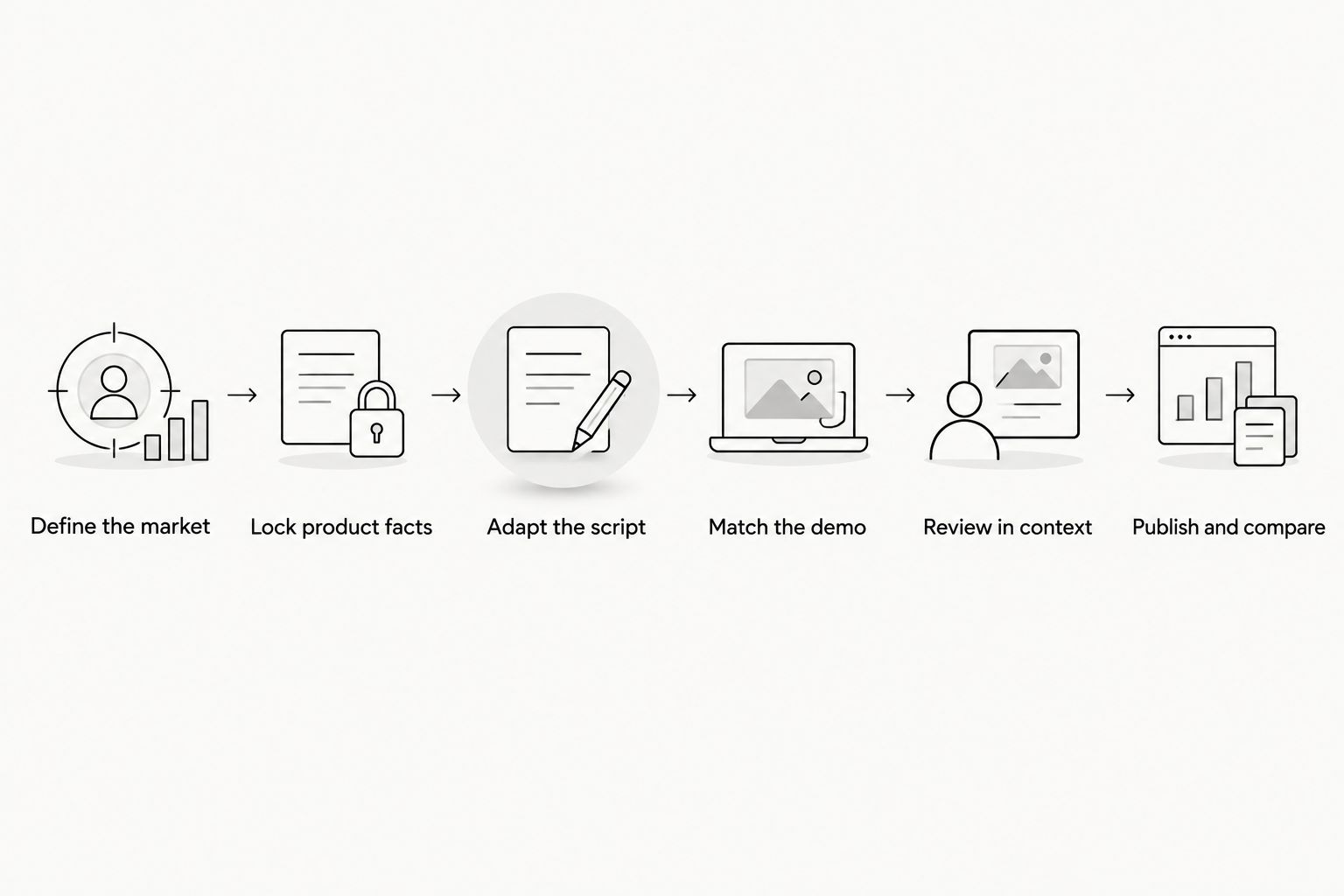
1. Define the market
Specify the intended country or region, language variant, audience, and publishing channel. A language name alone is not a complete audience brief. State which audience the creator is addressing and which problem the app solves for that audience.
Choose the action you want after the video. An install, account creation, and feature demonstration call for different endings. Give the editor the approved destination, not an instruction to find one later.
2. Lock product facts
Create an approved fact sheet before anyone rewrites the script. Include the feature being demonstrated, the actions required to use it, and any qualifications that must remain in the message.
Mark statements that cannot be broadened. If the original script describes one workflow, the translation should not turn it into a claim about every workflow. Keep personal experience separate from a general product promise.
3. Adapt the script
Ask the translator or creator to preserve meaning rather than sentence structure. Rewrite idioms, jokes, and comparisons when they do not communicate the same point to the intended audience.
For example, a productivity app script about organizing university assignments should use an audience-appropriate educational context. Do not insert a named institution or imply endorsement. The example needs to feel understandable, not borrowed from a different launch.
4. Match the demo
Record the interface the viewer will actually encounter. Check menu labels, onboarding steps, feature names, and the action shown after the creator's instruction.
If the demonstrated screen differs from the target experience, replace that footage or change the explanation. Do not conceal the mismatch with translated text. Keep personal information out of recordings and use an approved demonstration account.
5. Review in context
Review the exported video, not just the script document. Listen to the spoken track, read the captions, and follow the demonstration as a viewer would.
Give language review and product review separate ownership. One checks whether the wording communicates naturally; the other checks whether the app claim and screen action are accurate. Resolve both before publishing.
6. Publish and compare
Label each asset by market, language, concept, and version. Record which footage, opening, and translation method it uses so later results remain interpretable.
For your 2026 launch, compare creative within the intended market and track the app action the video asks viewers to take. Do not treat a view as proof of an install, or an install as proof of continued use.
The handoff should follow the same sequence every time: define the market, lock facts, adapt the script, match the demo, review the export, and publish the approved version.
What should your localization brief include?
A useful brief tells everyone what stays fixed and what they can change. Separate those instructions so the creator does not have to guess.
- Keep fixed: Approved feature facts, required qualifications, and the intended next action.
- Adapt locally: Opening line, everyday example, sentence structure, and delivery.
- Replace where needed: Interface recordings, on-screen text, spoken narration, and the closing instruction.
- Approve before publishing: Final export, caption, destination, and permitted use.
Add the source files you expect at handoff. Request editable captions, a clean video export, and the approved script if those are necessary for your workflow. Put those requirements in the agreement rather than assuming they are included.
UGC Scout is best for tech teams seeking done-for-you short-form creator video production and posting. For a translation project, define the language work, reviewers, and adaptation responsibilities explicitly. Done-for-you production does not remove your team's responsibility to approve product facts.
How should you test translated UGC in 2026?
Start with a question you can answer. To compare subtitle wording, keep the footage and core message consistent. To compare a local creator concept against a translated original, acknowledge that the speaker and presentation have changed too.
Choose the evaluation criteria before publishing. Review language accuracy and product accuracy separately from campaign results; an effective-looking ad still needs a truthful message.
Keep your 2026 launch record practical:
- Identify the approved asset and its destination market.
- Record the opening, creator, translation method, and intended action.
- Separate distribution settings from creative changes.
- Connect campaign reporting to the relevant app event.
- Document the decision to retain, revise, or replace the asset.
Do not select a translation method from views alone. Use the business action you intended to generate, and avoid attributing a difference to language when other campaign conditions changed.
Do you need a local creator for every country?
No. Choose a local creator when the concept needs a different speaker, context, or demonstration. Reuse existing footage when it remains accurate and the translated version communicates clearly.
Language and country are separate planning fields. Define both in the brief instead of treating one translated file as automatically suitable for every audience that speaks that language.
Can you translate a creator's personal testimonial?
Yes, but preserve the creator's meaning and confirm permission for the intended adaptation. A translation should not turn a limited personal statement into a broader endorsement.
If the rewrite changes what the creator appears to claim, get approval before publication. Treat replacement speech as part of that review, not merely an editing choice.
FAQ
Can I use subtitles instead of filming new UGC?
Yes, use subtitles when the original footage and product demonstration still fit the target audience. Review the complete export for readability, meaning, and interface accuracy before publishing.
Is dubbing better than subtitles for an international app launch?
Dubbing fits footage that needs target-language speech; subtitles fit footage where the original performance can remain. Neither method fixes an inaccurate demonstration or an unsuitable example.
Should I translate the app screen recording too?
Use a screen recording that matches the app experience your target audience will encounter. Update the footage when interface labels, onboarding, or demonstrated actions differ.
Can the same UGC script work in every language?
The same product facts can support multiple language versions, but the wording and examples need local review. Preserve the claim while adapting how the creator expresses it.
Who should approve translated creator content?
Assign both a target-language reviewer and a product reviewer. Language review checks meaning and natural phrasing; product review checks claims, interface actions, and the destination experience.
Can I dub a creator's voice without asking?
Confirm permission for the intended voice replacement and use before proceeding. Define the adaptation in the agreement and have an appropriate adviser review unclear rights.
Can an agency handle translated UGC production?
An agency can coordinate the work you explicitly commission. UGC Scout provides done-for-you short-form creator video production and posting; define translation, local review, and approval responsibilities in the project scope.
One last thing
Review the destination before approving the video. A clear translation does not resolve a mismatch between the ad's promise and the first screen after the viewer acts.
Before handing off your 2026 launch, walk through the full path on a phone: watch the video, follow the call to action, and complete the demonstrated task. Fix contradictions at that point, not after publishing. If you want UGC Scout to handle creator production and posting, bring that approved path into the brief.