
Yes. UGC creators can access a beta app before public launch through an authorized testing channel or a restricted test environment. Give creators separate accounts, approved demo data, and written filming rules; permission to test the app is not permission to publish footage.
- UGC creators beta app access works through authorized testing channels, with separate permissions for filming and publishing.
- Use Apple TestFlight, Google Play testing, or a restricted web environment that matches your app.
- UGC Scout provides done-for-you creator video production and posting for tech teams; product access still needs an internal owner.
- Approve the footage against the launch build before releasing prelaunch UGC.
Can UGC creators access a beta app before public launch?
Yes. Treat creators as external testers with a content assignment, not as employees with broad product access. Your product team controls access. Your marketing team controls the brief and publication approval.
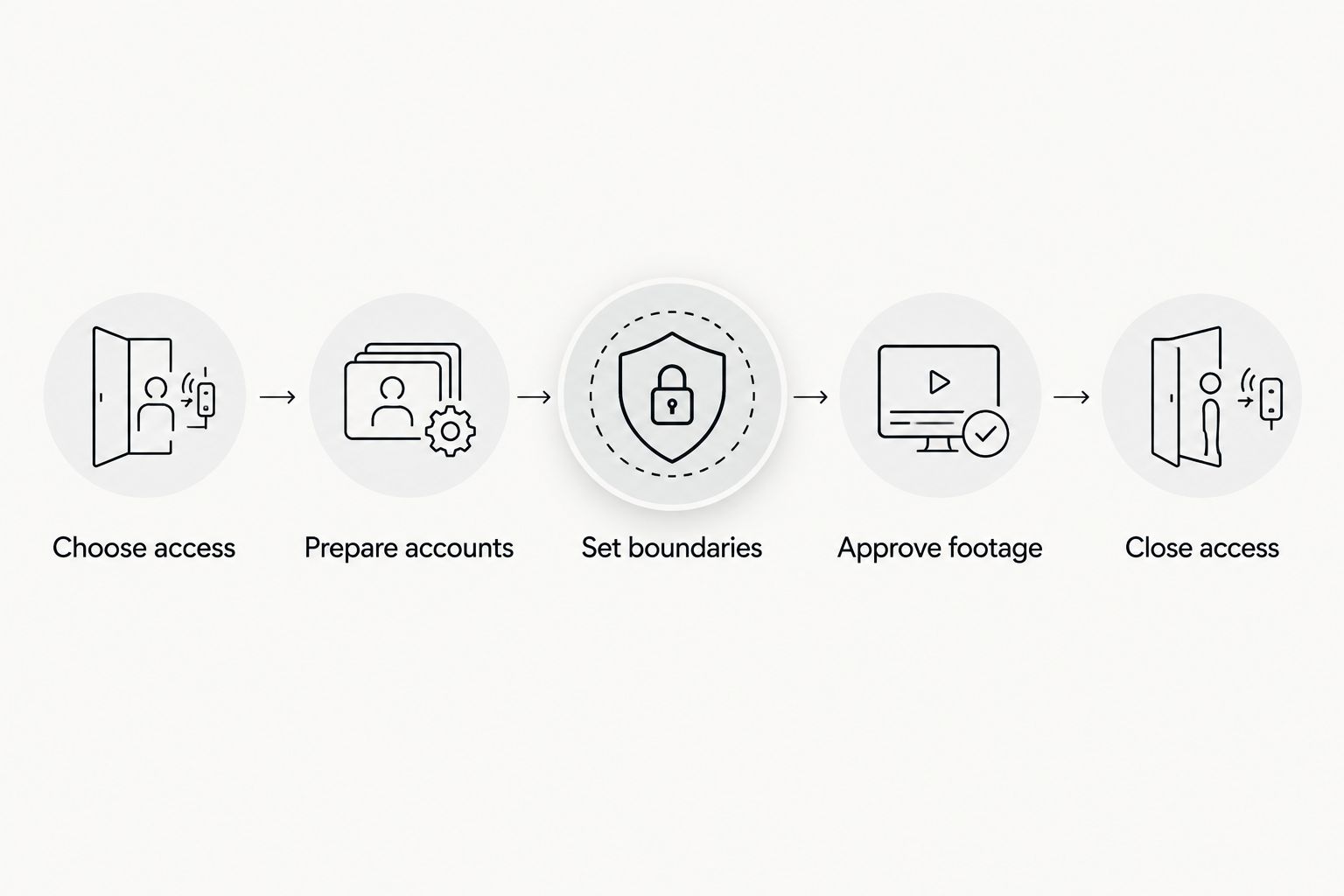
For your 2026 launch, use this sequence before recording starts:
- Choose access. Select an authorized testing channel for the creator’s device.
- Prepare accounts. Provide a separate login with synthetic demo data and limited permissions.
- Set boundaries. Document what creators can show, say, save, and publish.
- Approve footage. Check the recording, claims, and visible interface before editing is finalized.
- Close access. Revoke accounts when the assignment ends and follow the agreed file-retention rules.
Start with a clear software product creator brief. An installation invitation alone does not explain the task, the approved claims, or the screens that must stay private.
Why this matters
Beta access lets creators use the actual product instead of describing an interface they have never touched. It also exposes unfinished features, internal labels, and potentially sensitive information unless you prepare the environment first.
The main distinction is simple: recording readiness and launch readiness are different decisions. A workflow can be ready to film while the wider app remains under development. Conversely, a working beta does not make every screen suitable for an advertisement.
Keep those decisions separate in your 2026 launch plan. Approve the specific workflow the creator will record, then approve the final asset again before publication.
Which access route should you use?
Choose the route that matches the product and the footage you need. Do not choose a distribution method simply because a creator already knows it.
| Access route | Best for | Main advantage | Main limitation |
|---|---|---|---|
| Apple TestFlight | Creators recording an iOS beta | Lets invited testers use a beta build through Apple’s testing system | Requires the appropriate tester setup and compliance with Apple’s current testing requirements |
| Google Play closed testing | Creators recording an Android beta | Provides a controlled testing track for selected testers | Access depends on the configured tester eligibility and the correct account |
| Restricted web environment | Creators recording a browser-based SaaS product | Supports a separate workspace for demonstrations | Differences from production can make the recording inaccurate |
| Approved screen recordings | Creators who only need narration or on-camera commentary | Avoids giving the creator direct app access | Does not support claims of hands-on use unless the creator actually used the app |
These are access choices, not interchangeable security controls. A testing channel delivers the build; your application permissions determine what the creator can do inside it.
Apple TestFlight: best for iOS beta footage
Apple TestFlight supports beta testing before public release. Your app team should manage the invitation, available build, and applicable external-testing requirements using Apple’s current documentation.
Confirm that the creator can install and open the intended build before scheduling filming. Have the creator report installation problems privately rather than sharing screenshots in a public creator group.
Google Play closed testing: best for Android beta footage
Google Play closed testing lets your team restrict testing to selected testers. Confirm that the creator uses the account your team authorized and completes the required opt-in process.
Test the recording workflow on the creator’s device. A successful installation does not prove that permissions, login, and screen capture work as intended.
Restricted web access: best for browser-based SaaS demos
A separate demo workspace gives creators a place to explore a browser-based product without entering a customer workspace. Use synthetic records and only the permissions needed for the assignment.
Check the demo environment against the intended launch experience. A polished recording of an outdated workflow still creates the wrong expectation.
How should you prepare beta access for creators?
Use the same approval sequence for each creator. Keep the handoff short, but make every responsibility explicit.
Choose access
Name an internal access owner before inviting anyone. That person should know which build is approved, who can receive it, and how to remove access.
Ask creators for the device and account information needed for the chosen testing route. Do not request unrelated personal information or ask creators to share account passwords.
For a 2026 campaign, check current platform requirements before sending installation instructions. Do not reuse an old onboarding document without confirming that it still matches your setup.
Prepare accounts
Create a separate creator account rather than sharing an employee login. Restrict administrative functions, billing controls, customer exports, and other actions that the recording does not require.
Populate the account with synthetic content that makes the demonstration understandable. For a task app, that might mean sample projects and tasks. For a reporting product, use clearly fictional records rather than customer reports with names removed.
Give the creator a reset process. If a demonstration changes the account state, the creator needs a way to repeat the workflow without improvising.
Set boundaries
List the approved workflow, forbidden screens, permitted claims, and publication conditions. State whether screen capture, local downloads, subcontracted editing, and portfolio use are allowed.
Separate confidentiality from usage rights. A confidentiality agreement addresses disclosure; the content agreement should separately address how the resulting footage can be used.
Have qualified counsel review terms that govern confidential information and content rights. A copied template is not a substitute for terms that match the assignment.
Approve footage
Review an unedited screen recording before the creator builds the final video around it. This catches visible data, misleading interface states, and unfinished features while replacement footage is still straightforward.
Then check the edited asset. Captions, voiceover, notifications, and background screens can introduce problems that were absent from the original demonstration.
Close access
Remove access when the creator no longer needs the environment. Follow the agreed process for retaining approved deliverables and deleting confidential source material.
Keep an internal record of the approved build, final asset, and publication authorization. That record helps your team identify which videos need another review after the product changes.
What should the creator’s beta brief include?
A beta brief should tell creators exactly what to demonstrate and what to do when the product behaves differently. Avoid asking them to explore freely and turn whatever they find into an advertisement.
Use a concrete recording assignment. For example, request a 15–45 second video showing a sample task moving from creation to completion. That is a proposed creative format, not a platform requirement or a promised agency deliverable.
Include these fields:
- Audience: Who the video addresses and what problem the demonstration explains.
- Workflow: The approved starting screen, action, and result.
- Claims: Statements the product team has approved and statements to avoid.
- Capture rules: Whether creators can show notifications, account settings, or other apps.
- Failure route: Who to contact when login, recording, or the demonstrated feature fails.
- Release condition: Who gives written permission to publish and where that permission is recorded.
Ask for a 15-second opening cut and a 30-second walkthrough only when those versions serve your test plan. These are example deliverables you can request, not evidence that either length performs better.
For your 2026 brief, identify the approved build or release label. “Use the latest version” becomes ambiguous when development continues during production.
Why does beta creator access vary between apps?
The right setup depends on what the creator must demonstrate and what the environment exposes. Review these factors before granting access:
- Operating system: An iOS recording assignment and an Android assignment require different testing arrangements.
- Product permissions: A basic user workflow needs different access from an administrative demonstration.
- Data exposure: Customer records, messages, payment details, and internal documents require explicit protection.
- Feature stability: A changing interface needs another accuracy check before the footage is released.
- Recording needs: Hands-on demonstrations require a different handoff from narration over approved footage.
- Publication scope: An internal draft, a brand advertisement, and a creator-channel post need separately agreed permissions.
Do not turn these factors into a blanket rule that all creators receive the same account. Give each creator the access required for the approved assignment—and no broader role by default.
Can creators publish beta footage before the app launches?
Yes, if your team authorizes publication and the footage accurately represents what you are promoting. Testing permission alone does not authorize a TikTok post, an Instagram Reel, or a paid advertisement.
Define the approved message and destination. If the app is not publicly released, the video should not imply that viewers can immediately complete a public download and use the demonstrated feature.
For a 2026 launch, review the call to action alongside the footage. A correct demonstration paired with an incorrect release message is still an inaccurate asset.
Do creators need an NDA before beta access?
Use an appropriate confidentiality agreement when creators will see confidential product information. Define the protected material, permitted use, disclosure restrictions, and what happens when the assignment ends.
Do not treat an NDA as permission to expose customer data or as a guarantee against disclosure. Restrict the environment as well as documenting the rules.
Also separate the publication embargo from the access invitation. The creator should know whether drafts can be shared with an editor and whether any material can appear in a portfolio.
Can creators make a demo without installing the beta?
Yes. Creators can narrate approved screen recordings or appear on camera alongside footage your team supplies. This is useful when direct access is unnecessary or the beta environment is not ready for external users.
The trade-off is the experience claim. A creator who has not used the app should not present the video as a personal review of hands-on use.
Choose the format before hiring. If the assignment depends on genuine product exploration, supplied footage is not an equivalent replacement.
When should you involve a UGC agency?
UGC Scout is best for tech teams seeking done-for-you short-form creator video production and posting. That service fits a team that wants an external production partner rather than another tool to manage internally.
The boundary stays clear. Your product team must still authorize beta access, approve product claims, and decide which features are ready to show. An agency assignment does not transfer those decisions or replace security and legal review.
Ask how the production handoff will handle installation problems, confidential footage, revisions, and publication approval. Confirm those responsibilities before treating the workflow as done for you.
FAQ
Can UGC creators access an app that is not in the public app store?
Yes. Your team can provide authorized beta access through a suitable testing channel, such as Apple TestFlight or Google Play testing. Access to the build does not automatically include permission to record or publish it.
Should every UGC creator get a separate beta account?
Use a separate account for each creator when your product supports it. Separate accounts let your team assign permissions and revoke access without sharing an employee login.
Can a UGC creator show real customer data in a beta demo?
Use synthetic demo data instead of real customer data. Review the visible screens, notifications, and recorded audio before approving the asset.
What happens if the beta app changes after filming?
Review the footage against the intended release before publication. Replace recordings or revise claims when the interface or demonstrated behavior no longer matches.
Can creators post beta footage on their own TikTok accounts?
Creators should post beta footage only after receiving explicit publication permission. Confirm the account, approved asset, release conditions, and any applicable advertising disclosures.
Does UGC Scout provide done-for-you creator video production?
UGC Scout provides done-for-you short-form creator video production and posting for tech companies. Your internal team still needs to authorize product access and approve confidential information and product claims.
One last thing
Watch the exported video, not just the script. A correct script can sit over footage containing a private email address, a notification preview, or an unfinished feature label.
Make the final export the approval artifact. Record who approved that exact file, then review it again if the product changes before publication.