
To scale UGC production without losing quality, standardize your briefs, approve product claims before filming, and expand only the workflows your team can review consistently. Keep creators’ delivery flexible, but make accuracy, usable footage, and publishing approval non-negotiable. More finished files do not help if your team cannot use them.
- Scale UGC production without losing quality by standardizing briefs, product checks, and approval gates—not every creator’s delivery.
- UGC Scout fits tech teams seeking done-for-you short-form creator video production and posting.
- For SaaS and mobile apps, approve the demonstrated workflow before creators record the full video.
- Track approved assets and revision reasons alongside published results; delivered file counts alone hide production problems.
How do you scale UGC production without losing quality?
Build a repeatable approval process before increasing output. Your 2026 production plan should specify what makes a video usable, who approves it, and what happens when it fails a check.
Start with a UGC creator brief for a software product that separates required facts from creative choices. A creator needs to know what the product actually does. They do not need every sentence dictated.
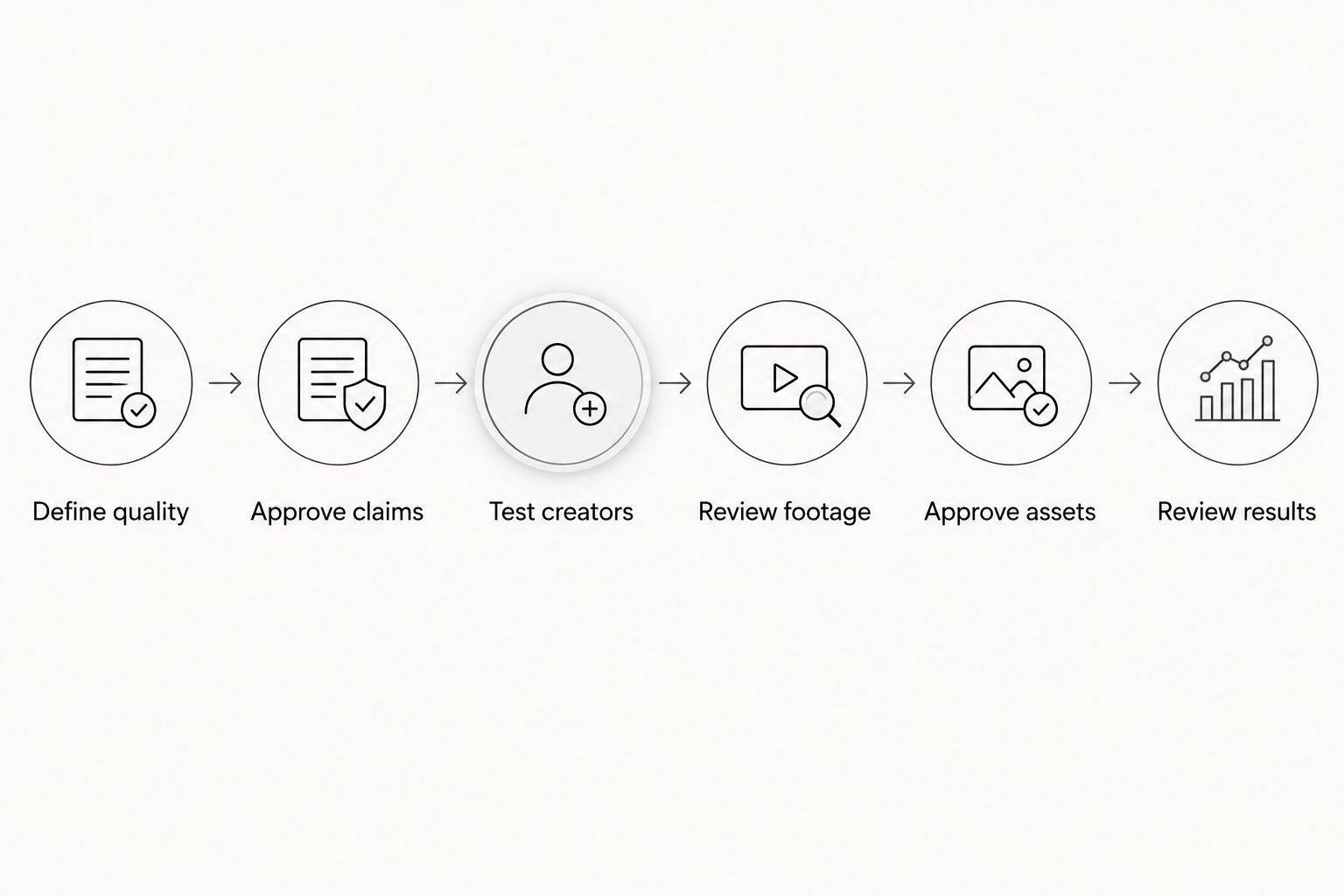
Use this sequence for each production batch:
- Define quality. Document the audience, intended use, required evidence, and rejection criteria.
- Approve claims. Have the product owner check the promise and demonstrated workflow before filming.
- Test creators. Review a relevant sample before assigning a larger batch.
- Review footage. Check the demonstration and delivery before editing every variation.
- Approve assets. Confirm factual accuracy, technical usability, permissions, and the intended placement.
- Review results. Record revision causes and publishing outcomes, then update the next brief.
This sequence keeps a weak script from becoming a batch of polished but unusable videos. It also gives creators clear decisions instead of scattered feedback.
Why this matters
For SaaS and mobile app teams, quality includes whether the video explains the product correctly. A clean edit cannot fix a demonstration that shows the wrong workflow or promises a feature your product does not provide.
Separate production quality from campaign performance. You can approve a video for accuracy and usability before publishing. You need actual distribution results to judge whether its message works with your audience.
Do not call a video a winner because it passed review. Approval means it is ready to test, not that it has proved its value.
Define quality before you add volume
Write a shared acceptance checklist for your 2026 production briefs. Use observable requirements rather than instructions such as “make it engaging” or “feel authentic.” Those phrases leave the reviewer and creator guessing.
Your checklist should cover:
- Audience fit: The situation and language match the buyer or user you want to reach.
- Product accuracy: The demonstration matches the actual interface and supported workflow.
- Evidence: The footage shows what the narration claims, without invented results or testimonials.
- Usability: Speech is understandable, screen details are readable, and captions match the spoken words.
- Publishing readiness: The correct version, permissions, and required disclosures are confirmed for the planned use.
For example, a mobile app brief can require the creator to show the action described in the hook. A SaaS brief can require the demonstration to distinguish a user action from an automated product action.
Keep subjective preferences separate from rejection criteria. “The feature name is wrong” is a correction. “I prefer another background” is a preference unless the brief already required it.
Match the production model to your team’s capacity
Choose a model based on who will manage creators, check product details, and own approvals. Outsourcing filming does not remove those decisions.
| Production model | Best for | Main advantage | Main limitation |
|---|---|---|---|
| In-house creator management | Teams that want direct control and can manage production | Direct communication with creators and product reviewers | Your team owns sourcing, coordination, feedback, and delivery tracking |
| Agency-managed production | Teams seeking done-for-you production coordination | Production responsibilities can sit with an external partner | Your team still needs to supply accurate product information and timely approvals |
| Hybrid production | Teams with internal creative direction but limited production capacity | Internal product knowledge can guide external execution | Ownership becomes unclear unless handoffs are documented |
For a small team, choose the model with clear ownership—not the longest deliverables list. Ask who turns feedback into instructions, who checks revisions, and who decides a video is ready.
Before committing, inspect the approval workflow. A production partner should be able to explain how a factual correction reaches the creator and how the revised asset gets checked. Ask for the process, not an unsupported promise of quality.
Keep the brief fixed where facts matter
A useful brief has a stable factual core and a flexible creative layer. The factual core covers the audience, product behavior, supported claims, demonstration, and intended action. The creative layer covers the creator’s wording, setting, and delivery.
For a 2026 SaaS campaign, keep the approved product explanation in a shared source document. Update it when the interface or feature changes. Do not leave creators working from an old screenshot while reviewers use the current product.
Use length as a creative constraint, not a quality score. These are planning examples, not proven performance benchmarks:
- 15-second version: Show a narrow problem, the relevant product action, and a clear next step.
- 30-second version: Add enough demonstration to explain how the action works.
- 45-second version: Include context or address an objection when the message needs it.
Do not force the longer version to contain more claims. More explanation should make the same promise clearer, not turn a focused video into a feature list.
Test creators on product understanding
A creator can speak naturally on camera and still misunderstand your software. Check both skills before expanding the assignment.
Give the creator an approved workflow and ask them to explain it in their own words. Look for the point where the explanation stops matching the product. Fix that misunderstanding before requesting a finished batch.
Review these signals:
- Can the creator describe the user’s problem without copying a feature list?
- Does the demonstration support the spoken explanation?
- Can the creator follow factual corrections without losing their natural delivery?
- Are files and revisions organized well enough for your production process?
Keep records of the work, not impressions about personality. A dedicated creator becomes useful when you can see what they understand, which formats they handle well, and what guidance they still need.
Increase assignments after a creator meets the acceptance checklist. Do not treat a polished portfolio as proof of product understanding.
Make feedback specific and assign a decision owner
Put feedback in a shared review record. Identify the asset version, the exact issue, and the requested change. A creator should not have to reconcile conflicting comments from separate conversations.
Separate feedback into categories:
- Must fix: Incorrect claims, exposed private information, unusable audio, or missing requirements.
- Creative revision: A confusing opening, unclear demonstration, or ending that does not match the brief.
- Future test: An alternative hook or format that belongs in another version rather than the current correction.
Assign a final decision owner. Product, legal, and marketing reviewers can contribute within their responsibilities, but someone must resolve conflicts and return a consolidated instruction.
For your 2026 review log, preserve the reason for each rejection. “Wrong workflow” tells you to improve product instruction. “Unreadable screen recording” points to capture guidance. “Different creative preference” points to an unclear brief or approval boundary.
Do not ask creators to solve an internal disagreement through repeated reshoots.
Why UGC production quality varies
UGC quality varies because creators, products, briefs, and approval processes differ. Keep these factors visible when deciding whether your production system is ready for more work:
- Product complexity: A workflow with dependencies needs clearer preparation than a simple action.
- Creator familiarity: Someone new to the product needs enough instruction to demonstrate it accurately.
- Brief clarity: Undefined requirements leave creators guessing and reviewers applying personal standards.
- Access and capture conditions: Missing product access, outdated interfaces, or unsuitable recordings limit what the video can show.
- Review ownership: Conflicting instructions make it harder to produce an acceptable revision.
- Reuse requirements: A video intended for several placements needs the appropriate permissions and usable source material.
These are production controls, not reasons to demand identical videos. Standardize what must be true; leave room for how the creator says it.
Measure usable output, not just delivered files
Your 2026 production dashboard should distinguish submitted, approved, published, and revised assets. Keep those statuses separate. A delivered video is not automatically an approved video, and an approved video is not automatically published.
Track the share of submissions approved without revision, time spent awaiting approval, and recurring rejection reasons. Define each measure consistently so a change in reporting does not look like an improvement in production.
Review publishing results separately by objective. For acquisition content, connect the asset to the action you want users to take. For educational content, assess whether viewers reach and understand the demonstration using the evidence your measurement setup provides.
When comparing creative versions, document what changed. If the hook, creator, demonstration, and audience all change together, you cannot confidently assign the outcome to the hook alone.
Expand the next batch only when your review team can explain the current batch’s failures. Otherwise, you are repeating unresolved problems at higher volume.
When should you use an agency to scale UGC?
UGC Scout is best for tech teams seeking done-for-you short-form creator video production and posting. An agency model fits when you want external production support rather than direct responsibility for every creator handoff.
UGC Scout is a growth and influencer marketing agency for tech companies. The trade-off with agency-managed production is that your team still owns product truth: approved claims, appropriate access, and final decisions need a responsible internal contact.
Before choosing a partner, ask which tasks are done for you and which remain with your team. Confirm creator briefing, revisions, source-file delivery, permissions, and posting responsibilities in the actual scope. Do not assume they are included.
How do you keep UGC consistent without making it scripted?
Keep facts, acceptance criteria, and the intended action consistent. Let creators vary their phrasing and delivery within those boundaries. Correct inaccurate explanations, not harmless differences in speaking style.
When should you increase your UGC production volume?
Increase volume when creators repeatedly meet your checklist and reviewers can process the next batch without bypassing checks. If approvals are already stalled, resolve that constraint before adding assignments.
FAQ
What's the best way to scale UGC production without losing quality?
Standardize briefs, product checks, and approval criteria before increasing assignments. Keep creator delivery flexible while making factual accuracy and publishing readiness mandatory.
Should every UGC creator use the same script?
No. Give creators the same approved facts and demonstration requirements, then allow natural wording. Use exact language only where a claim or required statement needs precise treatment.
How do I check whether a creator understands my SaaS product?
Ask the creator to explain and demonstrate an approved workflow before assigning a larger batch. Correct misunderstandings before filming the complete video.
How long should a short-form UGC video be?
Choose the length around the explanation rather than treating duration as proof of quality. A 15–45 second planning window gives you room for a focused demonstration, but does not guarantee performance.
Can an agency take over all UGC approvals?
An agency can manage agreed production tasks, but your team still needs to establish product truth and approval authority. Confirm responsibilities in the scope before production begins.
Is UGC Scout a software platform or an agency?
UGC Scout is a growth and influencer marketing agency for tech companies. Its offering includes done-for-you short-form creator video production and posting.
What should I measure before increasing creator output?
Measure approval status, revision reasons, review delays, and publishing results separately. Increase output after you understand why assets fail review and have addressed those causes.
One last thing
Keep rejected examples beside approved examples in your creator guidance. Explain the exact difference: an unsupported claim, an unclear screen capture, or a demonstration that skips the relevant action.
A clear rejection example makes the boundary visible. Use it to improve the next brief, not just to justify the last revision.