
Start with a 30-second UGC video for TikTok ads, then test edits within a 15–45 second range in 2026; this is a production recommendation, not a universal performance benchmark. The right length includes enough product proof and a clear next step, so cutting seconds alone does not make an ad better.
- How long should a UGC video be for TikTok ads? Start with 30 seconds, then test shorter and longer edits.
- Use 15-second edits for a simple demonstration; reserve 45-second edits for explanations that need more context.
- Ugcscout fits tech teams seeking done-for-you short-form creator video production and posting.
- Choose TikTok ad length by the action you want, not video completion alone.
How long should a UGC video be for TikTok ads?
Use 30 seconds as your first editing target, not a rule every creator must follow. Build a complete argument: a recognizable problem, a visible product action, and a reason to take the next step. Then remove anything that does not support that argument.
For SaaS and mobile app teams, the practical question is whether a viewer can understand the product without already knowing it. A familiar app interaction needs less explanation than a workflow that depends on setup, permissions, or specialist knowledge.
Use this 2026 planning table to choose the first cut. These lengths are suggested test formats, not TikTok requirements or verified performance rankings.
| Suggested length | Best for | What to include | Main trade-off |
|---|---|---|---|
| 15 seconds | One immediately understandable product action | A direct opening, visible action, and clear next step | Little room to explain context or answer an objection |
| 30 seconds | A problem-to-demonstration story | The problem, the relevant workflow, and the result shown on screen | Repetition can turn a focused story into filler |
| 45 seconds | A demonstration that needs context | The use case, necessary steps, and a relevant explanation | More opportunities to include details the viewer does not need |
Before commissioning footage, use the guide to briefing a UGC creator for a software product. A useful brief explains what the viewer must understand, not just how long the finished file should be.
Why this matters
A duration target is an editing constraint. It is not the message.
If you ask a creator for a short video without identifying the product action, you leave the central creative decision unresolved. The creator still has to decide what to show, what to explain, and what to leave out.
The reverse mistake is treating the available runtime as space to fill. A longer cut earns its length only when the additional material helps the buyer understand or evaluate the product.
Brief the proof first. Set the runtime second. That gives your team a concrete way to review the video beyond whether it feels fast enough.
15 seconds: best for one clear product action
Choose a 15-second edit when the product action makes sense almost immediately. Think of a mobile app demonstration that shows an input and its resulting output without a separate explanation of the workflow.
For example, a hypothetical language-learning app ad could show the creator attempting a phrase, using the practice feature, and inviting the viewer to try the exercise. The brief should identify the actual feature and approved claims before filming.
The advantage is focus. There is little space for an unrelated backstory, a feature list, or an extended introduction.
The limitation is context. If the viewer needs to understand who the product serves or why the demonstrated result matters, a short cut can leave the important question unanswered.
Keep the core demonstration intact. If reaching 15 seconds requires unreadable captions or speech that sounds rushed, simplify the message instead of accelerating the entire edit.
Recommendation: use the 15-second version for a self-contained action, not a compressed product tour.
30 seconds: best for a problem-to-demonstration story
Choose a 30-second edit as the starting format when you need to connect a buyer's problem to a visible solution. It gives the script a clear job without requiring a full tutorial.
For a hypothetical SaaS workflow, the creator could describe a repetitive task, show the relevant product action, and explain what the viewer should do next. Show the actual workflow rather than substituting a list of benefits for the demonstration.
The advantage is room for a complete argument. The creator can explain why the action matters while the viewer sees what happens.
The limitation is that a conventional introduction can consume space without strengthening the case. A creator's biography, an unrelated anecdote, or repeated benefit statements still need to justify their place.
Read the script aloud before filming. If the demonstration needs more explanation, change the concept or use the longer format rather than forcing every sentence into the target.
Recommendation: start at 30 seconds when the problem and product action both need to be understood.
45 seconds: best for a demonstration needing context
Choose a 45-second edit when removing context would make the product demonstration confusing or misleading. This is a useful planning option for a workflow where the viewer needs to see how the action connects to an outcome.
A hypothetical team software ad could establish the handoff problem, show the relevant collaboration step, and explain what the recipient sees. That is still a focused use case, not an invitation to demonstrate every feature.
The advantage is explanatory space. You can keep necessary context and address a relevant objection without relying entirely on captions.
The limitation is editorial discipline. A longer timeline makes it easier to keep repeated claims, unnecessary setup, or footage that looks polished but proves nothing.
Do not assume a more complex product automatically needs a longer ad. A narrow use case can make a complicated product easier to explain.
Recommendation: use 45 seconds when the extra explanation changes the viewer's understanding.
Why UGC video length varies
Your product category does not determine the runtime by itself. Use these factors to decide what the video must contain:
- Product familiarity. An unfamiliar workflow needs enough explanation for the viewer to recognize its purpose. Cut internal terminology before adding more narration.
- Visible proof. A clear screen recording can replace a spoken explanation. Keep the action readable rather than filling the frame with competing captions.
- Viewer knowledge. A person encountering the product for the first time needs different context from someone who already understands the use case.
- Requested action. Match the explanation to the next step. An invitation to explore a feature should not carry an unrelated tour of the entire product.
- Necessary qualifications. Keep conditions that change the meaning of a claim. Shortening an ad is not a reason to remove material information.
- Creator delivery. Rewrite sentences that sound unnatural aloud. Do not ask a creator to race through a script simply to hit the target.
These are briefing decisions, not reasons to add seconds automatically. For each factor, ask whether the viewer needs another explanation or a clearer demonstration.
Build the brief before choosing the final cut
For your 2026 production brief, separate the message from the duration. The creator needs to know what must survive every edit and what can change between versions.
Use this sequence to turn a product idea into an editable brief:
- Buyer problem. Describe the situation the viewer recognizes. Replace broad claims about productivity or convenience with a specific task.
- Product action. Identify what the creator will actually show. Confirm access and use demonstration data that is safe to publish.
- Visible proof. State what the footage must establish. A feature name alone does not show how the product works.
- Next step. Choose an action that matches the destination. Keep the spoken request and landing-page expectation consistent.
- Edit review. Check that the shorter version still makes sense without material removed from the longer version.
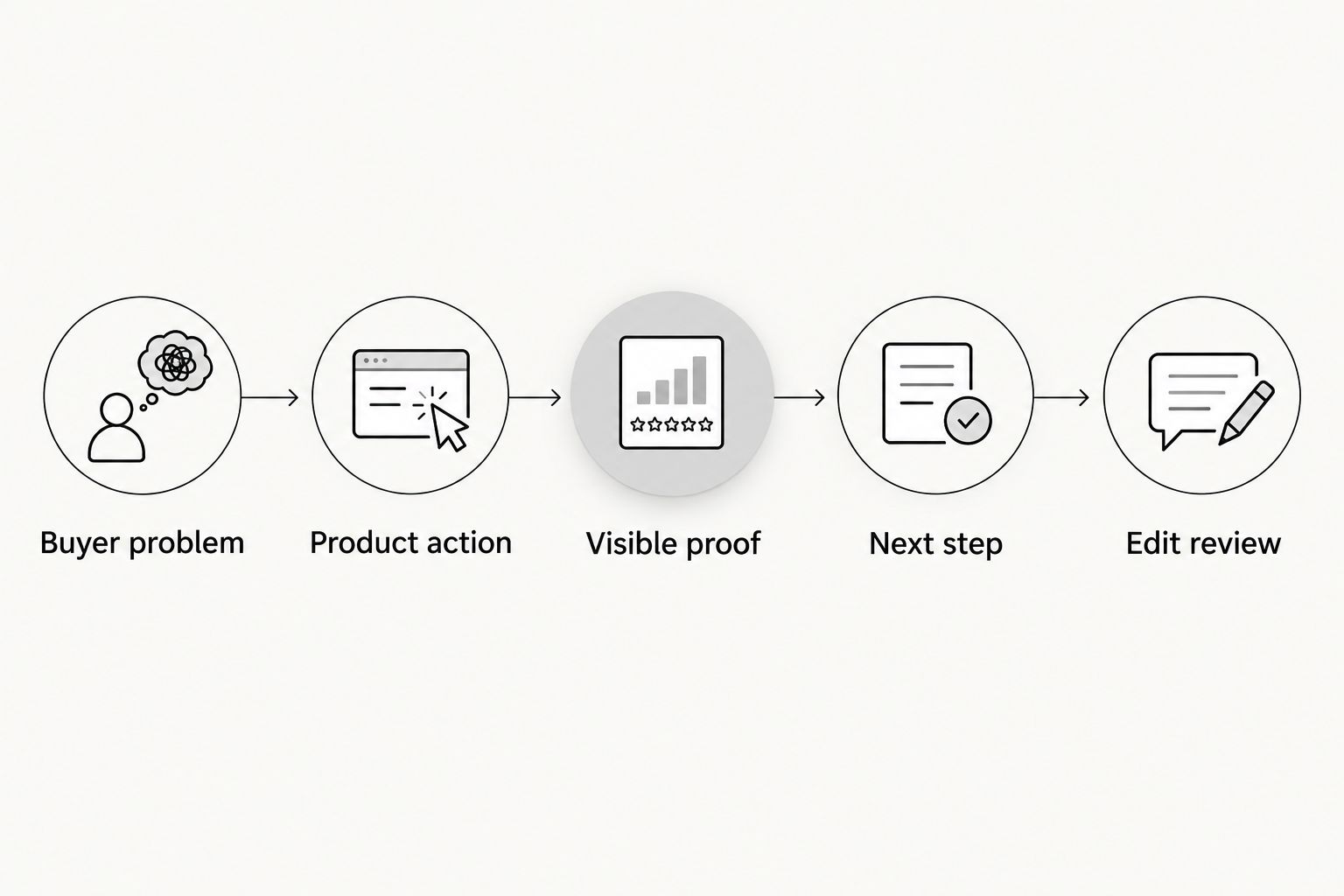
Ask for footage that supports editing, not just a finished monologue. Separate takes of the opening, demonstration, and closing request let the editor adjust the structure without cutting through a sentence.
For done-for-you production, Ugcscout is best for tech teams seeking short-form creator video production and posting. The trade-off is that outsourcing production does not replace your team's product judgment: define approved claims, demonstration access, and the intended viewer action in the brief.
Discuss your creator video brief
Tell Ugcscout what your product needs to show and where the creator content will run.
Test length without changing the whole message
For a useful 2026 duration test, keep the buyer problem, product claim, and requested action consistent across edits. Otherwise, you are comparing different arguments rather than isolating the effect of length.
Start with footage that supports a complete demonstration. Build the shorter edit by removing secondary explanation, not by deleting the evidence that makes the claim credible.
Before launch, review the versions against the same questions:
- Does the opening identify the same problem?
- Does the demonstration establish the same product claim?
- Does the shorter cut still make sense on its own?
- Does the longer cut add useful information rather than repetition?
- Does every version ask for the same next step?
Choose the business outcome before reviewing the results. If the campaign seeks meaningful product use, video completion alone does not answer whether the creative achieved that goal.
Also separate diagnosis from conclusion. An early exit is a reason to inspect the opening and audience fit; it is not proof that the entire video needs to be shorter. A confusing demonstration needs clearer footage, not necessarily fewer seconds.
Is a 15-second UGC ad better than a 30-second ad?
A 15-second UGC ad is better only when it communicates the necessary message and supports your campaign goal. Shortness is not evidence of effectiveness.
Use the shorter version when the product action stands alone. Keep the 30-second version when the additional context helps the viewer understand why that action matters.
Is 45 seconds too long for a SaaS TikTok ad?
45 seconds is not automatically too long as a creative planning choice. The question is whether each part contributes to the same use case.
Remove repeated claims and unrelated features before removing essential context. Separately confirm the current technical requirements for your chosen placement before exporting.
Should every creator deliver the same video length?
Give creators a consistent message requirement, not an identical speaking pace. Use the same review criteria while allowing the delivery and demonstration to remain understandable.
If you are specifically comparing duration, request clearly defined versions. If you are comparing creative concepts, label that test separately so the result does not become a misleading claim about length.
FAQ
How long should a UGC video be for TikTok ads?
Start with a 30-second UGC video and test edits within a 15–45 second range. This is a production starting point, not a universal performance benchmark or TikTok requirement.
What's the best UGC video length for a mobile app demo?
Use a 15-second edit when one app action is immediately understandable, and a longer edit when the demonstration needs context. Keep the screen action readable and the next step clear.
Should I cut my TikTok UGC ad if viewers do not finish it?
Do not cut the ad based on completion alone. Inspect the opening, audience fit, demonstration, and campaign outcome before deciding that duration is the problem.
Can I make several ad lengths from the same creator footage?
Yes, if the footage supports separate, understandable edits. Plan distinct takes for the opening, demonstration, and closing request rather than relying on one uninterrupted monologue.
Should a SaaS UGC ad show every product feature?
No. Build the ad around a specific buyer problem and the product action that addresses it; unrelated features compete with that explanation.
Can Ugcscout handle short-form creator video production?
Ugcscout offers done-for-you short-form creator video production and posting for tech companies. Define the intended use case and approved product claims before production.
One last thing
For your next 2026 brief, write down what the viewer must understand before writing the script. Then ask an editor to remove every line that does not help establish it.
The most useful cut is not always the shortest file. Keep the proof. Cut the repetition.