
You need enough creators to deliver your required original videos, cover distinct audience needs, and keep production running when someone is unavailable—not a fixed roster size. Calculate that headcount from each creator’s demonstrated delivery capacity; editing, approvals, and posting remain separate constraints even after you have enough people filming.
- How many creators for a content machine depends on original video demand, demonstrated creator capacity, and audience coverage.
- Count original concepts separately from edits, crops, and reposts before sizing your creator roster.
- Add creators for a documented production gap, not simply to increase the number of faces.
- UGC Scout serves tech teams seeking done-for-you short-form creator video production and posting.
Why this matters
A creator roster is not a content machine. You still need clear briefs, accurate product demonstrations, usable footage, approved edits, and a publishing owner. Hiring more people does not replace those jobs.
For your 2026 plan, separate the number of original videos you need from the number of files you publish. Start with your monthly UGC video testing requirements, then work backward to creator capacity. Size the roster around work that needs filming, not every export in your content folder.
How many creators do you need to build a content machine?
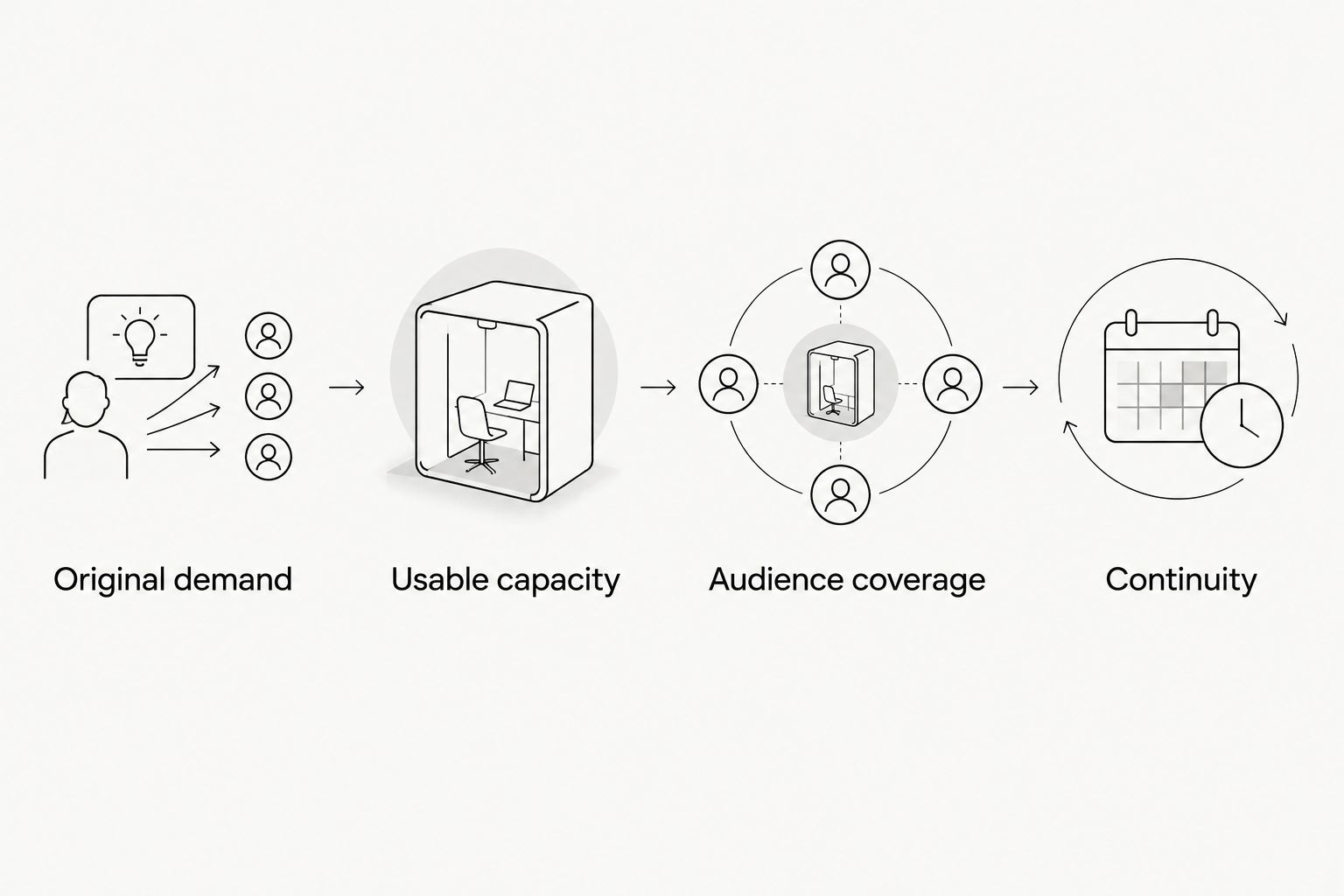
Use this planning rule: divide required original videos by demonstrated original-video capacity per creator, then round up. Use the same planning period on both sides. After that calculation, check whether the roster covers the audiences, languages, product knowledge, and continuity your program requires.
This is a staffing calculation, not an industry benchmark. A creator’s agreed output is a commitment; approved output is evidence. Base an ongoing roster on the latter.
1. Define original demand
List the original demonstrations, stories, and use cases your team needs filmed. Keep edited versions in a separate column. A different opening caption does not automatically require another creator or another recording session.
For a mobile app, distinguish a new user problem from another edit of the same demonstration. For SaaS, distinguish a different buyer’s workflow from a shorter version of an existing walkthrough. The distinction keeps your production request honest.
2. Check usable capacity
Review what each creator can deliver to your acceptance standard within your planning period. Include product accuracy, clear audio, required footage, and completed revisions. Do not treat submitted files as approved videos.
For your 2026 capacity plan, use completed work where you have it. When evaluating a new creator, use an initial assignment to establish fit before depending on that creator for recurring output.
3. Check audience coverage
Map each brief to the person the video must speak to. A technical demonstration and an everyday app-use story ask for different kinds of credibility. Match creators to the actual assignment rather than assuming every creator fits every brief.
Keep this check separate from volume. A roster can have enough filming capacity while still lacking someone who can explain a required workflow accurately.
4. Check continuity
Decide what happens when an assigned creator cannot complete a brief. Identify who can take over, what product access they need, and where the approved brief lives. A replacement name without onboarding is not a workable backup.
The roster is sufficient only when it covers both the planned work and the handoff. Do not count a prospective creator as ready until the practical requirements are settled.
Which creator setup fits your production needs?
Choose the operating model before expanding the roster. A dedicated creator, a core roster, and a broader specialist roster solve different production problems. None removes the need for approval and publishing ownership.
Use this comparison to select a starting structure, not to infer a required headcount.
| Setup | Best for | Main advantage | Main limitation |
|---|---|---|---|
| Dedicated creator | A focused audience and repeatable format | Keeps the recurring assignment with a familiar creator | Concentrates delivery responsibility and perspective |
| Core roster | Recurring output requiring distinct voices | Spreads assignments across established contributors | Requires consistent briefing and shared acceptance standards |
| Specialist roster | Different languages, technical workflows, or audience contexts | Matches expertise to specific assignments | Adds onboarding and coordination work |
Dedicated creator: best for a focused recurring assignment
Use a dedicated creator when the same person fits the audience, understands the product, and can deliver the required original footage. Keep the assignment explicit. Product demonstrations, commentary, and creator-account posting are different responsibilities.
The benefit is continuity of the assignment. The limitation is concentration: your recurring filming depends on that person. Keep the dedicated setup while it meets demand; add coverage when a documented gap appears.
Core roster: best for repeatable production with distinct voices
Use a core roster when your content plan needs different perspectives or more original filming than the current setup can deliver. Give each creator a clear role. Avoid sending an identical broad brief to everyone without defining what should differ.
The benefit is assignment flexibility. The limitation is coordination: someone must maintain product accuracy and acceptance standards across contributors. Build that ownership into your production plan rather than treating it as spare-time work.
Specialist roster: best for specific audience requirements
Use specialists when a brief requires a language, professional context, or product skill your core roster does not cover. Validate the relevant skill directly. A polished portfolio does not establish that someone can demonstrate your software correctly.
The benefit is a closer match between creator and assignment. The limitation is additional onboarding. Keep specialists attached to a defined need instead of expanding the roster without scheduled work.
Why creator headcount varies
Your 2026 creator requirement depends on the assignments, not the size of someone else’s program. Use these factors to explain every proposed roster addition:
- Original filming demand. Separate newly recorded concepts from versions made with existing footage. Staff against the work that requires a creator.
- Demonstrated capacity. Use approved delivery under your actual brief requirements. Do not assume every creator has interchangeable output.
- Product knowledge. A software demonstration requires accurate actions and explanations. Assign technical workflows to creators who can show them correctly.
- Audience coverage. Different buyer roles, languages, and user contexts require an explicit fit check. More faces alone do not establish useful variety.
- Posting responsibility. Delivering a video file and publishing through a creator’s account are separate assignments. Specify which one you need.
- Continuity requirements. Decide how unfinished work changes hands. Backup coverage must include access, instructions, and responsibility.
Do not expand the roster because a content calendar looks empty. First identify whether the gap is unfilmed concepts, unfinished edits, delayed approvals, or unpublished assets. Each gap needs a different intervention.
How do you know whether you need more creators?
Review the production queue by stage: brief ready, filming, editing, approval, and publishing. Look for where work stops. Then assign the fix to that stage.
If approved briefs wait because suitable creators cannot take the assignments, investigate filming capacity. If filmed assets wait for feedback, appoint an approval owner. Hiring another creator does not resolve an unanswered review request.
For a 2026 roster review, record the reason beside every proposed addition. Use a specific statement such as “this audience lacks a suitable creator” or “approved briefs exceed demonstrated filming capacity.” Reject “we need more content” as an incomplete hiring brief.
Keep a simple capacity record
Your working sheet should connect the creator to the assignment, not just list names. Record these fields:
- Creator and relevant audience fit.
- Assigned original concepts and required footage.
- Agreed delivery date and actual handoff.
- Acceptance status and revision reason.
- Product access and publishing responsibility.
- Next assignment or backup role.
Review rejected work by reason. Incorrect product use calls for a different response from missing footage or unclear audio. Change the brief, onboarding, or creator assignment according to the actual failure.
What should each creator brief include?
Give each creator a buyer, a problem, a product action, and an intended next step. Specify what must appear on screen and what the creator must not claim. Do not ask someone to invent customer results or imply personal experience they do not have.
For a 15–45 second brief, choose a focused demonstration rather than a tour of every feature. Treat that length as a brief choice, not a performance guarantee. The necessary explanation determines what belongs in the video.
For example, an app brief can ask the creator to show a user problem, demonstrate the relevant action, and explain the next step. A SaaS brief can focus on a buyer’s workflow and the product action that addresses it. Both need accurate product access and approved claims.
Before filming, settle these handoffs:
- Who supplies the product account and demonstration instructions?
- Who checks the script for accuracy?
- Who approves the footage and final edit?
- Who confirms permitted uses and required permissions?
- Who publishes the approved asset?
A creator should not have to guess who owns the next step. Put the answers in the brief or its attached production instructions.
Can you build a content machine without managing creators yourself?
Yes. You can assign production and posting to an agency, while retaining an internal owner for product truth, access, and approval decisions. Outsourcing the work does not remove your responsibility to confirm what your product does.
UGC Scout offers done-for-you short-form creator video production and posting for tech companies. UGC Scout is best for tech teams seeking a done-for-you creator video service. That service model suits teams seeking external production ownership; it does not eliminate the need for product input and approvals.
When evaluating an agency, ask how it defines original videos, handles revisions, assigns creators, and separates production from publishing. Ask what your team must provide before work begins. A clear responsibility list is more useful than an unexplained promise of a content machine.
For your 2026 agency brief, bring the original-video requirement, target audiences, required channels, and current production bottleneck. Ask for a proposed operating model before discussing roster expansion. The deliverable is a functioning workflow, not a list of creator names.
Can a dedicated creator cover multiple platforms?
A dedicated creator can cover multiple platforms when the assignment, audience fit, and deliverables support it. Separate the original filming request from platform-specific edits and posting tasks. Do not count a reused clip as a new creator concept.
Specify TikTok, Instagram Reels, or LinkedIn requirements in the brief where relevant. Confirm who prepares each version and who publishes it. Platform coverage is a workflow decision as well as a casting decision.
When should you replace a creator instead of adding another?
Replace or pause a creator assignment when the creator does not meet the agreed acceptance standard after clear feedback. Adding another person does not resolve an unsuitable assignment. Review the brief and product access before attributing every failure to the creator.
Keep the decision tied to observable work: accurate demonstrations, complete footage, agreed handoffs, and response to revisions. Do not confuse a preference for a different presentation style with a documented delivery problem.
FAQ
How many creators for a content machine should a SaaS team hire?
Hire enough creators to cover required original videos, demonstrated delivery capacity, and audience needs. Calculate filming capacity first, then check specialist requirements and continuity.
Can a dedicated creator be enough for a mobile app?
A dedicated creator is enough when that creator covers the required audience and original-video workload. Keep a documented handoff plan for work the creator cannot complete.
Should I hire creators before setting a monthly content target?
Set the original-video requirement before committing to a recurring roster. Separate new filming from edited versions so the staffing plan reflects the actual workload.
Does publishing on more platforms mean I need more creators?
More platforms do not automatically require more creators. Check whether you need new filming, different audience expertise, additional edits, or separate posting responsibilities.
How do I tell whether approvals are the real bottleneck?
Approvals are the bottleneck when completed work is waiting for decisions rather than filming. Assign a reviewer and clear acceptance criteria before adding filming capacity.
What should I ask a UGC agency about creator capacity?
Ask how the agency defines original output, measures accepted delivery, handles revisions, and covers unavailable creators. Confirm which production, editing, approval, and posting tasks remain with your team.
One last thing
Your next creator hire should have an assignment before they have a place on the roster. Write down the missing audience, uncovered workload, or continuity requirement first. If you cannot name the gap, fix the production plan before expanding the team.