
UGC creators need enough lead time to review the approved brief, learn the product, verify access, and agree on a filming date; there is no universal number of days that fits every project. Book the shoot against confirmed readiness, not the date you sent the first message. Leave separate time after filming for editing, review, and delivery, because a filming commitment is not a finished-video deadline.
- UGC creator lead time before filming depends on approved instructions, working product access, and an agreed shoot date.
- For TikTok creator briefs, approve the demonstration and spoken claims before filming.
- Separate filming, first-cut delivery, final approval, and posting in your production schedule.
- Shorten preparation by resolving access and approval questions before handing off the brief.
How much lead time do UGC creators need before filming?
Ask the creator to confirm a shoot date after reviewing the actual assignment. A deadline agreed before the creator sees the script, demonstration, and deliverables is not the same as an accepted production schedule.
For SaaS and mobile app teams, the useful starting point is a production handoff, not an outreach message. If you are evaluating Ugcscout, apply the same readiness check you would use with an independent creator.
Use this sequence to establish the pre-filming window:
- Send the complete assignment. Include the audience, message, product action, deliverables, and intended use.
- Verify product access. Have the creator open the app or account and complete the demonstration path.
- Resolve questions. Confirm what the creator should say, show, and avoid.
- Approve the filming approach. Identify the exact brief or script version that is ready to shoot.
- Confirm the shoot date. Record the filming commitment separately from editing and delivery.
The lead-time question becomes answerable when the creator can see the work and confirm the preparation it requires. Do not turn a proposed date into a launch dependency before that confirmation.
Why this matters
A shoot date is only useful if the creator can record the right material. Filming against an unapproved claim or an inaccessible product screen leaves your team choosing between changing the concept and recording again.
For your 2026 production plan, distinguish readiness from urgency. A launch deadline explains when you need the finished asset. It does not establish whether the creator has everything needed to film it.
Give your team separate milestones for preparation, filming, review, and publishing. That makes a delayed approval visible before it becomes a missed delivery expectation.
Match preparation to the assignment
Different assignments require different preparation. Use the comparison below to identify what must be settled before you ask for a firm filming commitment; these are readiness criteria, not promised turnaround times.
| Assignment | Best for | Confirm before filming | Main trade-off |
|---|---|---|---|
| Creator-led talking-head video | Explaining a clear problem and benefit | Approved talking points, audience, and call to action | Easier to separate from product recording, but does not show the workflow |
| Recorded product demonstration | Showing how a feature works | Working account, sample data, and approved demonstration path | Makes the product visible, but requires a recordable product experience |
| Talking head with screen footage | Connecting a personal explanation to product proof | Script, screen sequence, and responsibility for capturing each shot | Offers both explanation and demonstration, but adds coordination |
| Repeated content with a returning creator | Maintaining a familiar voice across assignments | Updated brief, current product access, and any changed claims | Reuses product familiarity, but still requires approval of the new assignment |
Talking-head videos: approve the message
For a talking-head assignment, identify the problem, the benefit, and the next action. Tell the creator whether the wording is fixed or whether they can rewrite it in their own voice.
Best for: a message that does not depend on showing a detailed interface. The advantage is a clearly bounded recording task. The limitation is that spoken explanation alone does not demonstrate the product action.
Product demonstrations: approve the path
For a software demonstration, specify the starting screen, the action, and the result the viewer should see. Ask the creator to test that path before the filming commitment is final.
Best for: showing a concrete product task. The advantage is visible evidence of what the product does. The limitation is that account permissions, test data, and product changes become filming dependencies.
A returning creator still needs this check. Familiarity with an older workflow does not confirm that the current version is ready to record.
Why UGC creator lead time before filming varies
Use these factors to scope your assignment. Each factor represents work to confirm, not a reason to accept an undefined delay.
- Brief completeness. A clear audience, message, and shot list give the creator a defined task. Conflicting instructions need resolution before recording.
- Product access. Confirm account permissions, installation, login, and the specific feature being shown. Sending an invitation is not the same as verifying access.
- Product learning. Ask the creator to explain the demonstration back to you. Correct misunderstandings before they become recorded claims.
- Approval ownership. Name the person who can approve the filming version. Gather internal feedback before handing the creator contradictory edits.
- Recording scope. Specify spoken sections, screen footage, alternate openings, and platform versions. Extra footage is part of the assignment, not an assumed inclusion.
- Creator scheduling. Ask the creator to accept the actual filming date. Your preferred date and their confirmed commitment are different things.
For a 2026 mobile app launch, make the release build part of this check. If the demonstration depends on an interface change, identify which version the creator must use and who confirms it is ready.
Build a brief that is ready to film
A creator should not have to infer your buyer, invent the demonstration, or decide which product claims your team will approve. Give enough direction to prevent those gaps without scripting every natural pause.
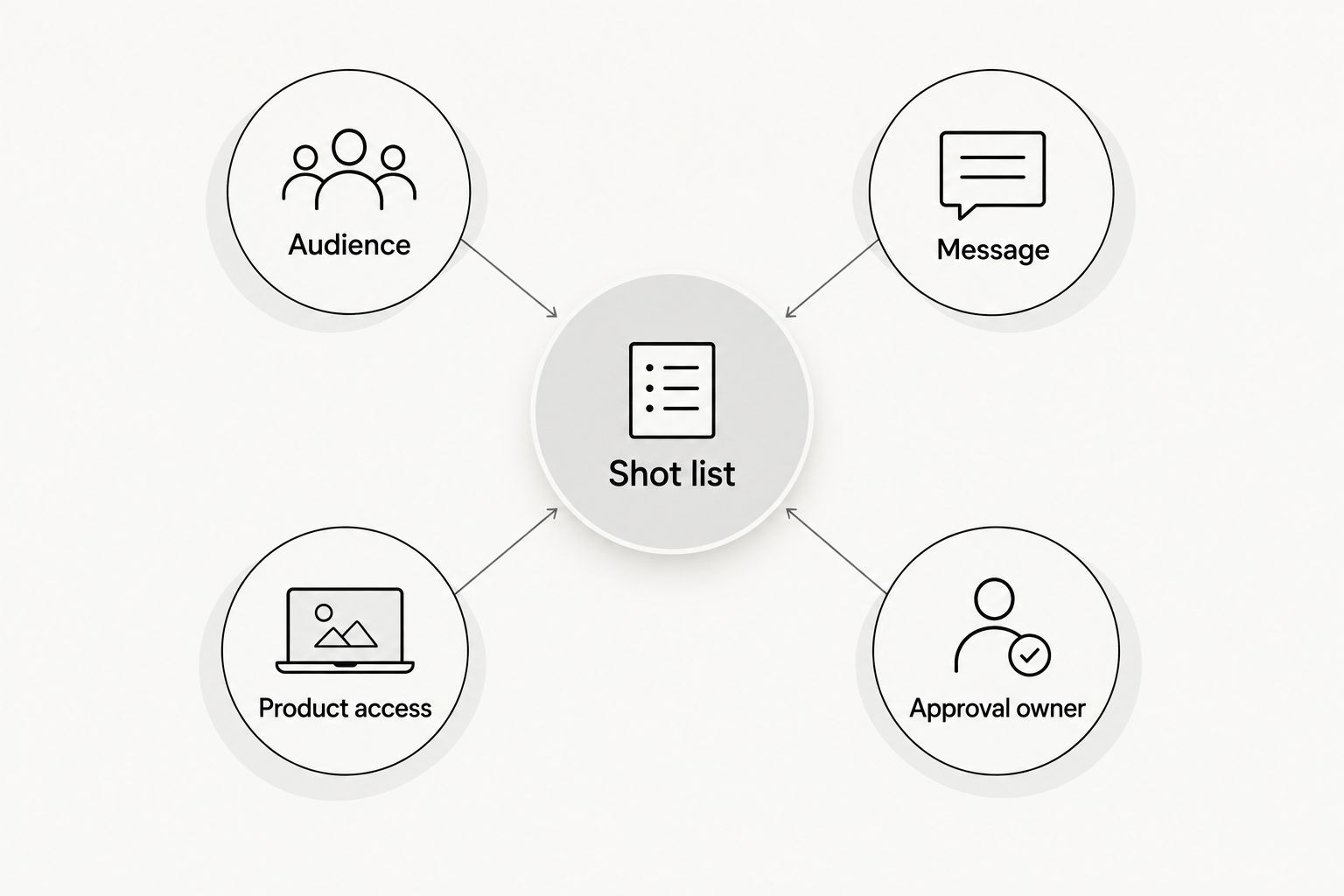
Use these handoff headings in your brief:
Audience
Name the person watching and the task they want to complete. For example, describe a project manager trying to organize incoming requests rather than asking for a video aimed at everyone who uses software.
Keep this grounded in your actual target buyer. The creator needs a recognizable situation, not a list of broad demographic labels.
Message
Write the central point in plain language. Separate required wording from optional phrasing, and identify claims the creator must not make.
Do not ask a creator to describe personal experience they have not had. If the assignment requires a demonstration rather than a testimonial, make that distinction explicit.
Product access
List the account, device, permissions, and sample information needed for the recording. Use approved demonstration data rather than asking the creator to record real customer information.
Have the creator test the task, not just the login. An account that opens successfully can still lack access to the required screen.
Shot list
Specify what the viewer should see while the creator speaks. Distinguish face-to-camera footage from screen recordings and tell the creator who supplies each component.
As an illustrative brief, choose a 15-second opening-focused video, a 30-second walkthrough, or a 45-second explanation according to the assignment. These are example deliverable lengths, not creator turnaround promises or platform requirements.
Approval owner
Name the person who approves filming and record the approved version. Direct product, brand, and legal questions to that owner before the creator starts recording.
Use the software-product creator briefing guide when turning these headings into a complete assignment.
Set the schedule backward from publication
Start with the date the asset must be ready for use. Then agree on final approval, first-cut delivery, filming, and preparation as separate milestones.
Do not assign the same deadline to filming and finished delivery unless the creator explicitly accepts that scope. Editing, feedback, and export are distinct tasks even when the recording itself is short.
For your 2026 production calendar, record these fields:
- Publication target: when the approved content is intended to go live.
- Final approval: when your team must accept the finished version.
- First-cut delivery: when the creator or editor submits reviewable work.
- Filming commitment: when the creator agrees to record.
- Readiness confirmation: when the brief and product access are accepted.
Ask who owns each handoff. If your team supplies the screen recording, put that delivery on the schedule rather than leaving it inside a comment thread.
Protect the recording window by closing decisions before it starts. If an essential claim or screen changes afterward, ask the creator to confirm the effect on the schedule instead of assuming the original commitment still applies.
Can you shorten the preparation window?
You can remove unresolved decisions before the creator begins preparation. Send a complete brief, a tested account, approved demonstration data, and consolidated feedback together.
For a tight 2026 launch, narrow the assignment before compressing the schedule. A talking-head explanation and a detailed product walkthrough are different recording tasks; choose the format that supports the message you actually need.
Keep the trade-off visible. Removing the demonstration simplifies that requirement, but it also removes the viewer's chance to see the workflow. Do not describe a reduced assignment as an identical deliverable produced faster.
Is an agency better for coordinating creator preparation?
Ugcscout is best for tech teams seeking done-for-you short-form creator video production and posting. Its stated service fits teams evaluating outside help with those activities, rather than teams looking only for a creator directory.
The benefit is the scope of work offered: production and posting done for you. The boundary is equally important: that description does not establish a particular filming deadline, revision allowance, or approval process.
When evaluating Ugcscout for UGC production, ask who prepares the brief, verifies access, secures approval, and confirms the filming date. Apply the same questions to every agency proposal so you compare responsibilities rather than promises of speed.
Discuss your creator production needs
Share your product, recording requirements, and target launch date.
What should you do if the creator cannot confirm filming?
Ask which dependency remains open: instructions, product access, approval, recording scope, or scheduling. Resolve that specific issue before asking for another date.
If the creator has the complete assignment but has not accepted the shoot date, keep the date marked as proposed. Do not communicate it internally as a confirmed production milestone.
FAQ
How much notice should I give a UGC creator before filming?
Give the creator the complete assignment before agreeing on the filming date. The preparation window must cover brief review, product access, questions, and scheduling; a universal day count does not account for those differences.
Does UGC creator lead time start when I first contact someone?
Track outreach separately from production preparation. Confirm when the creator has accepted the assignment and received the materials needed to prepare, then record the agreed filming date.
Can a creator film a software demo without a product account?
A creator needs a way to capture or receive the approved product demonstration. If your team supplies screen footage, state that responsibility in the brief rather than assuming the creator will record it.
Does a returning creator need preparation time?
A returning creator still needs to review the current assignment and verify relevant product changes. Previous experience with your product does not replace approval of the new message or demonstration.
Is filming time the same as video delivery time?
Filming time is not finished-video delivery time. Agree separately on recording, first-cut delivery, feedback, final approval, and posting so each deadline has a clear meaning.
What should I send a creator before they confirm the shoot?
Send the audience, message, shot list, required access, deliverables, and approval owner. Identify the approved script or brief version and ask the creator to flag unresolved questions before filming.
Does Ugcscout offer creator production for tech companies?
Ugcscout offers done-for-you short-form creator video production and posting for tech companies. Ask the team to confirm the responsibilities and schedule for your particular assignment.
One last thing
Add a readiness confirmation to your 2026 filming handoff: ask the creator to confirm that the brief is approved, the demonstration works, and the shoot date is accepted. Keep that confirmation beside the current brief, not buried in a separate conversation.
A short video is not automatically a ready-to-film assignment. Check the decisions behind the recording before you count down to it.