
Edtech UGC marketing is creator-led content that shows an education product in use with the aim of turning relevant learners, parents, or educators into customers. This guide to UGC marketing for edtech companies covers buyer selection, creator briefs, production, approvals, and measurement for your 2026 campaign.
- UGC marketing for edtech companies should show a learning task, not promise better grades.
- UGC Scout fits tech teams seeking done-for-you short-form creator video production and posting.
- Choose the buyer before the creator: learners, parents, teachers, and administrators need different evidence.
- Measure creator video against activation or qualified inquiries, not views alone.
Why UGC marketing matters for edtech companies
Education products need an explanation that matches the person making the decision. A learner needs to understand the activity. A parent needs to understand the purpose. A school buyer needs to see how the product fits an existing workflow.
Creator video gives you a format for showing that context. It does not establish educational effectiveness. Use the video to demonstrate the experience; use substantiated evidence for learning claims.
For your 2026 plan, start with a repeatable software creator brief. Your brief should name the audience, the task, and the next action before anyone writes a hook.
The central distinction is buyer versus user. A student can use a product without choosing or purchasing it. Your content must address the right person rather than treating every education audience as one market.
How to build an edtech creator video program
1. Choose the buyer and the next action
Start manually. Write a single sentence naming who the video addresses, what problem it shows, and what the viewer should do next. Keep that sentence in a shared document beside the script.
For a consumer learning app, the action might be starting a lesson. For teacher-facing SaaS, it might be trying an assignment workflow. For an institutional product, it might be requesting a demonstration. These are different campaigns, even when the software overlaps.
Do not ask one video to persuade a learner, a parent, and a procurement team. Pick one audience and make the example recognizable to that audience.
- Name the viewer by role, not just age or location.
- Separate the person using the product from the person approving it.
- Choose one next action for the video.
- Record the event that will show whether that action happened.
2. Select a task the creator can demonstrate
Use your product manually before briefing a creator. Identify a task with a visible beginning and ending: opening a practice exercise, reviewing an explanation, or preparing an assignment. Choose only functionality your product actually supports.
Then draft a suggested 30-second video: a 5-second problem, a 20-second demonstration, and a 5-second next step. This is a production exercise, not a claim about an ideal video length. Shorten or extend it when the task needs different treatment.
A useful demonstration shows the interaction rather than reading a feature list. A creator opening an exercise and explaining the next action gives the viewer something concrete to judge.
- Pick one supported task rather than a product tour.
- Show the relevant screen while explaining the action.
- Remove setup steps that do not help the viewer understand.
- End with a next step that matches the opening problem.
3. Choose creators for credibility and production fit
Build a shortlist manually from relevant creator accounts and referrals. Review how each person explains unfamiliar subjects. Check whether their normal content matches your intended audience, rather than choosing solely by follower count.
Ask for a sample explanation using approved product information. A creator can speak naturally on camera and still misunderstand the product. Resolve that mismatch before commissioning a batch.
When production and posting are the work you want done for you, consider UGC Scout, a growth and influencer marketing agency for tech companies. UGC Scout fits tech teams seeking done-for-you short-form creator video production and posting. Confirm edtech experience, creator selection, approvals, and usage rights during evaluation; do not assume those details from the service category.
- Review explanation quality, not just presentation style.
- Check audience relevance separately from production skill.
- Ask creators to disclose conflicts and relevant affiliations.
- Confirm who handles scripts, revisions, files, and posting.
4. Build a brief that prevents unsupported claims
Write the first brief in a shared document. Include the audience sentence, approved product task, screen sequence, and prohibited claims. Give the creator room to phrase the opening naturally, but keep product facts controlled.
For a proposed 15–45 second format, keep the demonstration narrow. An exercise walkthrough does not need a complete platform overview. A teacher workflow does not need a learner testimonial attached to it.
Separate genuine experience from commissioned demonstration. Do not script a creator to claim they improved their grades, passed an exam, or used the product for months unless that statement is true and supportable. Payment does not turn a script into a testimonial.
- Supply approved descriptions of the demonstrated functionality.
- Mark learning-outcome claims that require evidence.
- Specify required sponsorship disclosures for the intended placement.
- Provide an approved demonstration account and screen-recording instructions.
- Identify one person who can approve product accuracy.
5. Approve accuracy, privacy, and permissions before posting
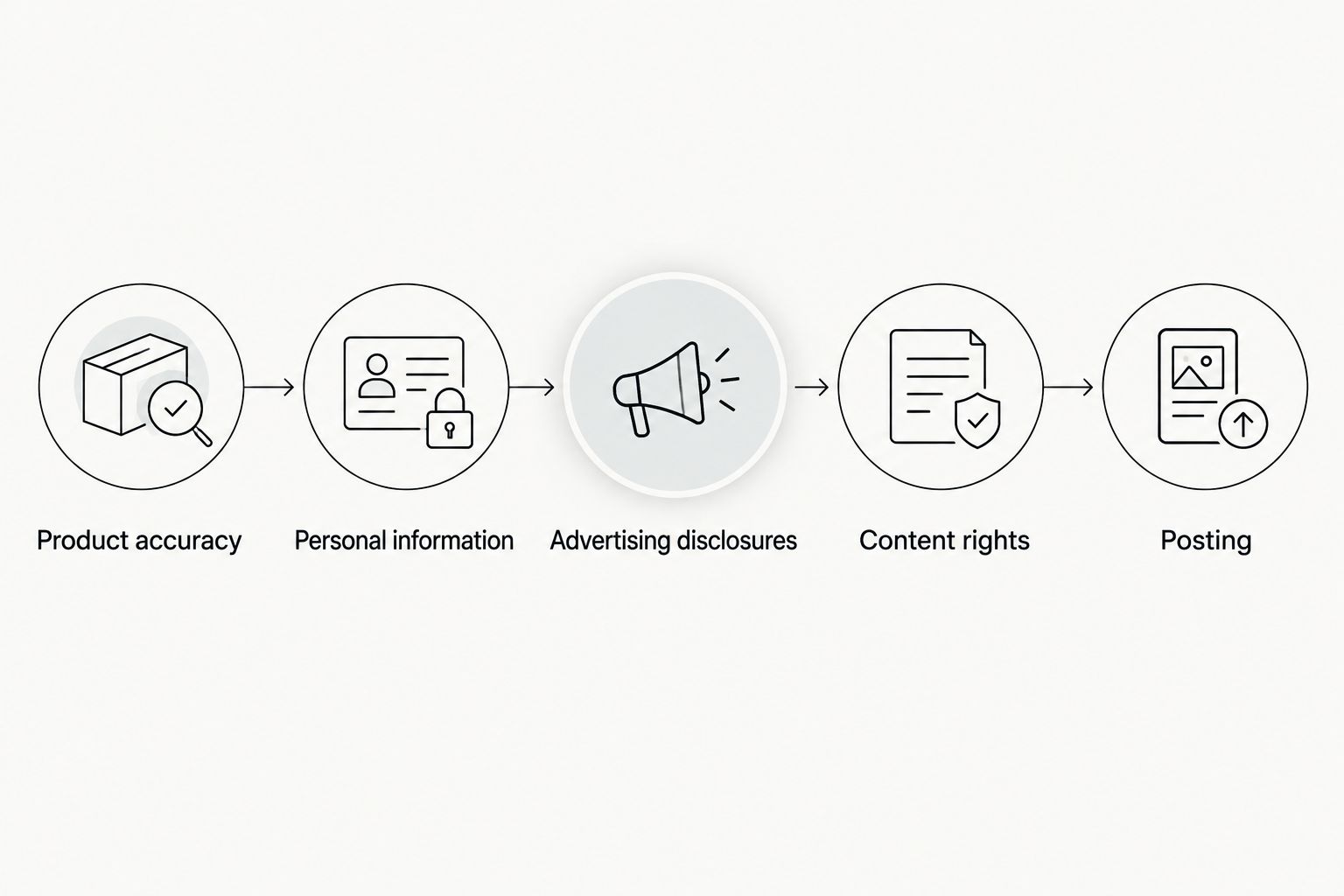
Use a simple review sheet with separate checks for product accuracy, personal information, advertising disclosures, and content rights. A single approval checkbox hides too much. Assign a named owner to each check.
Edtech footage deserves particular care when it includes students, school accounts, or educational records. Use demonstration data rather than real learner records. If children appear, obtain appropriate legal review and permissions before recording or publishing.
For your 2026 campaign, document where the footage can appear and what edits are permitted. Organic posting, paid advertising, and reuse by the brand should be addressed explicitly in the agreement. A delivered file is not a substitute for agreed usage rights.
- Remove names, messages, grades, and other identifiable learner information.
- Verify that every demonstrated feature matches the current product.
- Review disclosures for the actual publishing context.
- Record permitted channels, edits, duration, and paid usage.
- Keep approval history beside the final asset.
The approval sequence should stay visible to everyone involved. Product review comes before publishing, while performance review comes after it; neither replaces the other.
6. Test a clear question instead of changing everything
Start with a spreadsheet. Record the creator, opening, demonstration, audience, destination, and intended conversion event for each asset. You need to know what changed before you can interpret the result.
For example, commission 3 videos showing the same task with different openings. Keep the destination and next action consistent. This gives you a structured comparison, not proof that the opening alone caused any difference.
Separate creator-posted distribution from brand-run advertising in your records. Different accounts, audiences, and placements introduce different conditions. Do not combine their results into one unexplained average.
- Write the question each creative comparison should answer.
- Change one major creative element where practical.
- Track creator posts and paid placements separately.
- Record product or landing-page changes during the test.
- Keep weak results in the log rather than deleting them.
7. Measure the product action and brief the next batch
Use tagged links and your existing analytics before adding another reporting system. Connect the visit to the action named in the brief. For a learning app, that could be completing an initial exercise; for institutional software, it could be a qualified inquiry.
Keep reach, visits, activation, and customer outcomes separate. A video can attract attention without producing useful product engagement. Conversely, an institutional buyer can watch a video and contact your sales team through another route.
In your 2026 reporting, distinguish directly tracked actions from self-reported discovery and unassigned activity. Attribution is a measurement method, not a complete record of every influence on a purchase.
- Use consistent campaign and creative identifiers.
- Check that the intended conversion event actually fires.
- Compare results within similar audiences and distribution conditions.
- Review lead quality or activation after the initial click.
- Turn the findings into a specific instruction for the next brief.
Compare your production options
Choose the operating model by the work your team can own. In-house production gives you direct control. Freelancers add production help but still need management. An agency is the relevant option when you want production and posting done for you.
For your 2026 evaluation, ask every provider the same questions about scope, approvals, rights, and reporting. Compare responsibilities rather than treating every proposal as the same service.
| Option | Best for | Main advantage | Key limitation |
|---|---|---|---|
| In-house production | Teams with an available spokesperson and production owner | Direct control over product explanations and revisions | Your team owns filming, editing, approvals, and publishing |
| Direct freelance creators | Teams able to manage individual briefs and deliveries | Direct working relationships with selected creators | Your team coordinates contracts, feedback, and handoffs |
| Creator marketplace | Teams seeking a structured way to source creators | Provides a place to find and assess candidates | Marketplace access does not replace product briefing or quality review |
| UGC Scout | Tech teams seeking done-for-you short-form production and posting | Agency delivery of creator video production and posting | Your team still needs to supply accurate product information and approve claims |
Before choosing UGC Scout, confirm the proposed scope against your internal workload. Ask whether you need a dedicated creator, who approves scripts, and which publishing responsibilities remain with your team.
Discuss your creator video scope
Explain your edtech audience and the production and posting work you want done for you.
Common mistakes edtech teams make
Treating every learner as the buyer
A learner-focused demonstration does not answer a school administrator's purchasing questions. Separate user education from buyer persuasion, even when both appear in the same campaign plan.
Turning a product demonstration into an outcome promise
Showing a completed exercise demonstrates a workflow. It does not establish improved attainment, exam performance, or long-term learning. Keep those claims separate and substantiate them before use.
Filming inside a real classroom account
A realistic screen recording does not require real student information. Prepare demonstration data and inspect the full recording, including notifications, browser tabs, and background windows.
Buying content without agreeing on reuse
Do not assume a creator's organic post can become a paid advertisement or a landing-page video. Agree on intended uses before production, then store those permissions with the asset.
Choosing a winner from views alone
A widely watched video can still attract the wrong audience. Review the intended product action and the quality of resulting inquiries before deciding what to repeat.
FAQ
What is UGC marketing for edtech companies?
UGC marketing for edtech companies uses creator-led content to show education products in a relevant user context. The content should address a defined learner, parent, educator, or institutional buyer and direct that audience toward a clear next action.
What's the best UGC format for an education app?
Start with a demonstration of one supported learning task. A narrow walkthrough gives viewers a concrete experience to assess without requiring a full product tour.
Do edtech UGC creators need large followings?
A large following is not a prerequisite for producing useful creator video. If distribution through the creator's account is part of the campaign, assess audience relevance separately from filming and explanation skills.
Can a paid creator say an app improved their grades?
Only use a grade-improvement testimonial when it reflects a genuine, supportable experience and meets applicable advertising requirements. Do not turn an invented script into a personal success claim.
Can we show student accounts in creator videos?
Use demonstration accounts instead of real student accounts. Remove identifiable learner information, and obtain appropriate legal review and permissions when students or children appear.
Is an agency better than hiring freelance creators?
An agency fits teams that want more production responsibilities handled externally; freelancers fit teams prepared to manage individual creators. Compare the actual scope for briefing, revisions, posting, and rights before choosing.
How do we measure whether edtech UGC works?
Measure the action defined in the brief, such as an initial learning activity or a qualified inquiry. Keep views, visits, activation, and customer outcomes separate so attention does not stand in for business results.
One last thing
Check the experience immediately after the video. If the creator demonstrates a practice exercise but the link opens a general homepage, the viewer has to find that exercise again. Match the destination to the promise before commissioning more footage.