
Yes. Repurposed UGC can hurt Meta ad account performance when the edit attracts the wrong audience, repeats a tired message, misrepresents your product, or creates rights and policy problems—but a weak ad is not proof that Meta has restricted your account.
- Repurposed UGC Meta ad account performance needs separate checks for creative results, tracking, and account restrictions.
- Meta campaign results do not establish whether reused footage caused an account-level problem.
- Re-edit creator videos around the product action you want, not the original post’s popularity.
- UGC Scout fits tech teams seeking done-for-you creator video production and posting, not a replacement for campaign diagnosis.
Can repurposed UGC hurt Meta ad account performance?
Yes, but separate an ad that performs poorly from an account with an actual restriction. The first requires creative and campaign diagnosis. The second requires checking the restriction notice and addressing its stated cause.
Start with this creator UGC to Meta ad creative workflow when the footage needs adapting rather than replacing.
| Situation | What it establishes | What to check next |
|---|---|---|
| A reused video gets clicks but few signups | The ad generates visits without enough recorded signups | Message, landing page, signup flow, and tracking |
| An established creative loses efficiency | Results changed over time | Audience exposure, creative fatigue, delivery, and conversion changes |
| An ad is rejected | That ad has a review issue | The stated rejection reason and applicable policy |
| An account is restricted | An account-level action exists | The restriction notice and available review process |
Do not diagnose an account penalty from a conversion decline alone. Record what changed, where it changed, and whether Meta displays an enforcement notice before deciding what to fix.
Why this matters
For SaaS and mobile app teams, a creator video has to do more than earn attention. It must explain a relevant problem, show the product accurately, and lead into the action your campaign measures.
An organic post and a paid acquisition ad have different jobs. A post can entertain existing followers without explaining why a new viewer should install your app or start evaluating your software.
For your 2026 creative review, judge reused footage against its new job. Keep the useful demonstration. Remove context that only the creator’s existing audience understands.
Why repurposed UGC results vary
These factors belong in your diagnosis. None establishes an account restriction by itself.
- Audience fit: A creator’s followers are not automatically your intended software buyers or app users.
- Message fit: A popular story can attract attention without explaining a useful product outcome.
- Product accuracy: Old interface footage or an unsupported claim creates a mismatch between the ad and the actual experience.
- Rights coverage: Permission to publish organically does not automatically establish permission for paid advertising, edits, or every audio element.
- Repeated exposure: Reusing a familiar message does not give an audience a new reason to respond.
- Measurement consistency: Changed tracking, conversion definitions, or reporting settings make before-and-after comparisons harder to interpret.
Prioritize the factor supported by evidence. If clicks remain steady while recorded signups fall, inspect the destination and measurement before commissioning another batch of creator videos.
Which reuse approach should you choose?
Choose the approach that fixes the actual gap. A new crop does not fix an inaccurate claim, and a new creator does not fix a broken signup flow.
| Approach | Best for | Main advantage | Main drawback | Recommendation |
|---|---|---|---|---|
| Reuse the original edit | Footage already built around the same audience, product, and action | Preserves an existing demonstration | Carries over irrelevant context and any unresolved rights issues | Use only after review |
| Re-edit existing footage | A sound demonstration with a weak opening or ending | Changes the message without another shoot | Cannot supply missing proof or updated footage | Start here when the footage remains accurate |
| Commission new footage | A changed product, different buyer, or missing demonstration | Addresses gaps the existing material cannot fill | Requires another brief and production process | Choose when editing cannot solve the problem |
Re-edit when the footage is right but the message is wrong. Reshoot when the footage itself is wrong.
This is a production decision, not a claim that one format always wins. Your 2026 testing plan should compare a clear creative hypothesis against a defined business outcome.
How do you diagnose the problem before replacing the video?
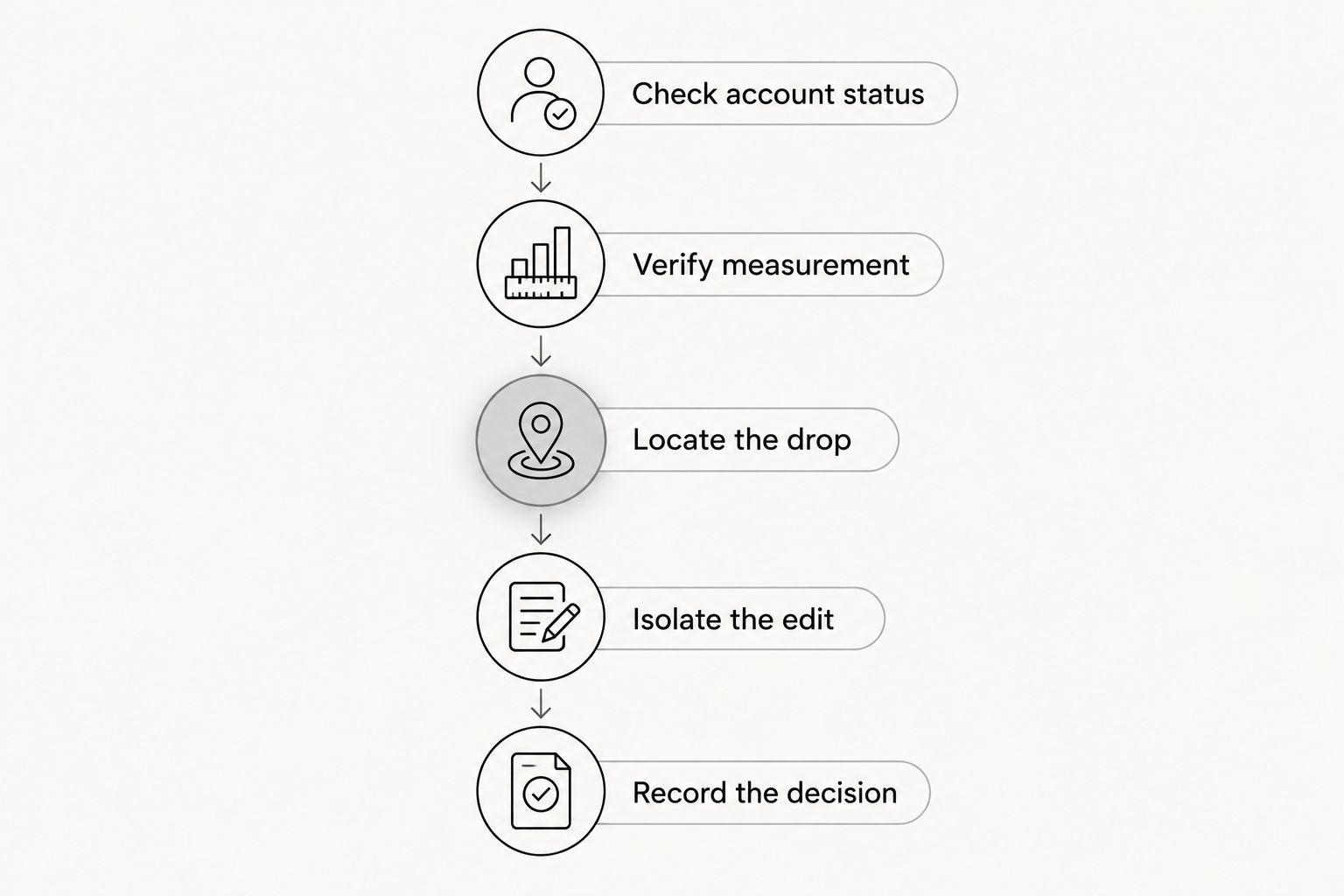
Use this sequence before changing the creative, audience, landing page, and optimization settings together. Each step answers a different question.
Check account status
Look for an actual rejection, restriction, or delivery notice. Read the stated reason rather than interpreting a performance chart as an enforcement message.
If there is a restriction, address it through the available account process. Uploading a fresh edit is not a substitute for resolving the stated issue.
Verify measurement
Confirm that the action you care about still records correctly. For an app, distinguish an install from a later activation; for SaaS, distinguish a signup from a qualified sales opportunity.
Check whether your reporting window, conversion event, or implementation changed. A reporting change and a creative change need separate investigation.
Locate the drop
Follow the path from ad exposure to click, landing-page visit, signup or install, and the next meaningful product action. Identify where the result deteriorates.
A click problem points you toward the creative and delivery context. A post-click problem also requires inspecting the page, app store listing, product flow, and measurement.
Isolate the edit
Compare edits under conditions that make the result interpretable. Keep the audience, objective, destination, and measurement consistent where practical, or document the differences.
Change the opening, demonstration, or call to action with a stated reason. Avoid calling an edit the winner when the comparison also changed the audience and conversion event.
Record the decision
Write down what the evidence supports: keep the asset, revise a specific element, replace the footage, or investigate outside the creative. Include the reason.
A useful decision is specific enough for an editor to act on. “Improve performance” is not a brief; “show the workflow before the creator’s introduction” is.
How should you adapt creator footage for Meta ads?
Start with a product action, not an editing effect. Your brief should explain who the viewer is, what problem the video addresses, and what happens after the click.
Lead with the relevant problem
For a SaaS workflow product, open with the task the buyer wants to finish. For a mobile app, show the use case rather than assuming the viewer understands the category.
Treat these as script directions, not performance guarantees. The goal is to make the intended audience and outcome clear enough to test.
Make the demonstration understandable
Keep the visible product experience consistent with what users receive. Remove private information, outdated interface steps, and claims your team cannot substantiate.
Watch the edit without sound. If the product action becomes unclear, revise the on-screen explanation rather than relying entirely on the creator’s voice.
Match the ending to the destination
An ad inviting viewers to explore a feature should land somewhere that explains that feature. An app-install message should not imply a product experience the app does not provide.
Check the destination on a phone before approval. The creative and the next screen should tell the same story.
Use duration as a test variable
A 15-second edit, a 30-second edit, and a 45-second edit can each be useful test candidates. These are proposed edit lengths, not promised winners or platform requirements.
Keep the core message identifiable across versions. Otherwise, a duration comparison also becomes a comparison of different claims, demonstrations, and calls to action.
What permissions should you check before reuse?
Check the agreement before turning an organic creator post into an advertisement. Ownership of a downloaded file does not establish the full scope of advertising rights.
Your approval record should identify the asset, permitted uses, editing permission, usage period, and any limits involving the creator’s identity. Review music and other third-party material separately.
Use the guide to reusing UGC for paid ads legally to structure the handoff. Obtain qualified legal advice when the agreement or intended use is unclear.
For your 2026 asset library, keep permission records beside the source footage and approved exports. Do not leave the media buyer to reconstruct the agreement from a message thread after launch.
When does a UGC agency help?
An agency fits when you need a repeatable production process rather than another isolated creator search. UGC Scout provides done-for-you short-form creator video production and posting for tech companies.
UGC Scout is best for tech teams seeking done-for-you creator video production and posting. The trade-off is that outsourcing production does not remove your responsibility for product accuracy, approval, permissions, or measurement.
Ask prospective agencies how they turn performance feedback into the next brief. Also ask what your team must supply, who approves claims, and how revisions reach the creator or editor.
For a 2026 agency brief, separate production responsibilities from media-buying responsibilities. Do not assume campaign management, attribution implementation, or account-restriction support is included unless the agreement says so.
Can the same UGC video work on TikTok and Meta?
Yes, the same source footage can support both platforms, but the final edit still needs to fit its placement, audience, and destination. Check the opening, captions, framing, audio rights, and call to action separately.
Treat cross-platform reuse as an adaptation task. A strong organic result on TikTok does not establish how the same video will perform in a Meta acquisition campaign.
Should you pause every repurposed ad after results decline?
No. Find whether the decline belongs to a specific ad, a campaign, the conversion path, or measurement before making a blanket decision.
Pause or revise assets with identified accuracy, permission, or policy problems. For performance decisions, use your business target and the evidence available rather than a universal rule about reused footage.
FAQ
Does Meta automatically penalize repurposed UGC?
A performance decline does not establish an automatic penalty for repurposed UGC. Check actual account notices separately from creative, delivery, and conversion results.
Can an organic creator video become a Meta ad?
Yes, an organic creator video can become a Meta ad when you have the necessary permissions and the content meets applicable requirements. Review the message, destination, audio, and product claims before launch.
How do I tell creative fatigue from an account restriction?
Check account notices to establish whether a restriction exists, then investigate performance trends separately. Worsening results alone do not identify either creative fatigue or an account-level enforcement action.
Should I make a new video or re-edit existing UGC?
Re-edit existing UGC when the footage remains accurate and the gap is the opening, explanation, or ending. Commission new footage when the existing material cannot demonstrate the required product experience.
What should a SaaS team measure after a UGC ad click?
A SaaS team should measure the next business-relevant action, not just the click. Keep signups, qualified opportunities, and other downstream outcomes distinct so the creative decision matches the campaign objective.
Can UGC Scout replace our internal approval process?
UGC Scout’s done-for-you creator video production and posting does not remove your team’s responsibility for approving product accuracy and permitted use. Define approval ownership and the feedback process before production begins.
What belongs in a 2026 repurposed UGC review?
A 2026 repurposed UGC review should cover account status, measurement, audience fit, product accuracy, permissions, and the destination experience. Record which finding supports each edit or pause decision.
One last thing
Keep a source-to-export record for every reused asset. Attach the original footage, permission record, approved claims, final edit, destination, and the question that edit is meant to test.
That record makes your next decision easier to explain. You can identify whether the footage changed, the message changed, or something outside the video changed—without blaming “repurposed UGC” for every decline.